Last updated on 27 July 2026
Calculatice is a Mental Computing Training Platform for teachers and their students from the CP to the 3rd. A realization of the CTBT and mathematics teams of the Departmental Directorate of National Education Nord. I love it.
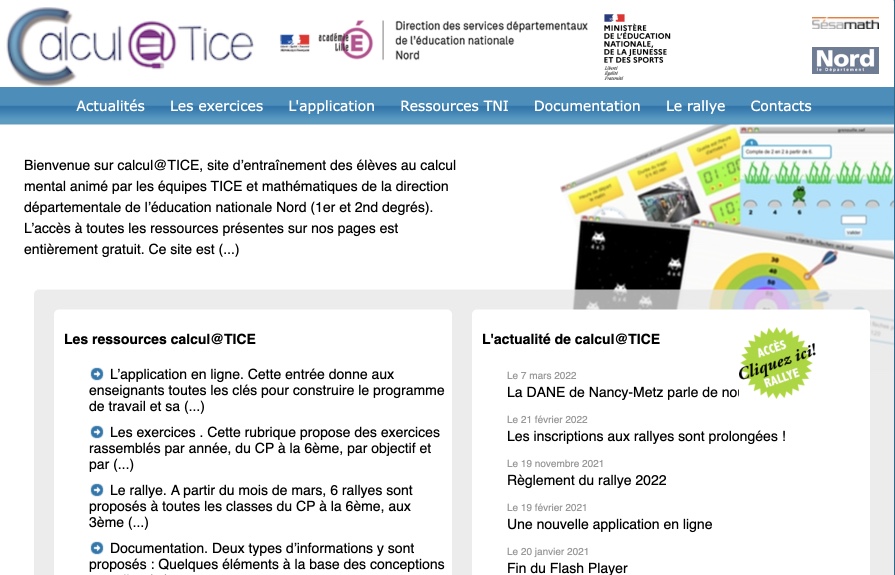
Calculatice has been around for many years. It has not gotten a wrinkle and has nothing to envy to the new platforms and some classics Mathematical Games Online. A website and a stand-alone application, Calculatice offers a complete solution, perfectly adapted for the school completely free of charge. This is a remarkable achievement.
The two dimensions that guide the logic of Calcul@TICE are as follows:
- The regularity of the daily work, which is organized in sections such as "Exercise", "Applications" and "Downloads".
- An annual event, the "Mental Computing Rally", held in the last quarter. Entire classes compete online, from CP to 3rd grade. Accessible via the ‘Rallyes’ tab on the website.
Table of Contents
An online Calculatice site and a beautiful application for tablets to play mental calculus
Calculatice offers an online application to be used freely on any computer from a simple browser and an application for iPad or Android tablet. Both media may be used indiscriminately from each other.
An online application for teachers to build their curriculum and progressions
The online version of Calculatice had a big update a year ago. You will be able to create a free teacher account and then create accounts per class and per student. The latter will be able to connect on their side with a simple code.
You will then be able to prepare content for students by tapping into a large exercise library. The latter are particularly successful and offer immediate control. Varied, pretty, playful, it is really a pleasure for your students to approach the tool. All exercises are organised by class level and each of them is offered with three difficulty scales.

Student results are directly available in the teacher’s interface. They can be exported in PDF or CSV format.
Among the interesting features of this online version is the possibility to add videos in the sessions for students. Or the possibility of introducing a specific success percentage for a game exercise to move on to the next exercise.
Go through the ENT: Calculatice is available in the GAR
This information is often missing from the tool’s presentations. If your school or institution has a ENT connected to the GAR, you can open Calcul@TICE directly from the Media Centre. The team announces this on its website: the resource has been ‘hung’ there since January 2022.
The interest is immediate. More account to create, neither yours nor those of your students: Accounts are generated on their own at the first connection, and each student automatically arrives in their teacher's classroom. Only one authentication, that of the ENT. For those who already distributed 30 activation codes on small papers at the beginning of the year, the difference is felt.
A point of vigilance nevertheless: it is also necessary that the person in charge of the assignment of the school or establishment (often the digital referent or the documentalist teacher) has allocated the resource. Several academies have deployed it, such as Paris Classe Numérique. Check on your side before planning a session, it is the kind of administrative detail that makes you miss a slot in the computer room.
Calculatice tablets to have math games and exercises at your fingertips
The tablet application gives access to almost all calculations@TICE exercises with or without the Internet. The student can also, if they have an account on the online application, log in to get the personalised content prepared by their teacher. A great success. The Mathematical games are particularly suitable for tablet use.
The application has evolved considerably since my first article. The "Rallyes" module is now integrated, with identification by QR code for each pair, which greatly simplifies the passage of the tests on tablet. We can also replay the rallies of previous years. It is free and in French. Two practical reservations: have about 158 MB to install, and iOS 16.6 minimum Apple side, which leaves on the tile the oldest iPads of some school parks. On its App Store page, the Académie de Lille states that it does not collect any data via the app. Links: calculus@TICE on Google Play and calculus@TICE on the App Store.

How do I share a session or journey with other users?
To share a session or journey with other users on Calcul@TICE, follow these steps:
- Create a session or course in your session editor.
- To share a session with a colleague, click on "Sessions" and then "Send to", and enter the email address of the person concerned …
- To retrieve a session sent, click on the button to the right of "Files". You will then be able to accept or refuse the sessions received.
- Use the session sharing tool in the corresponding tab to access a session or route inbox and send it.
- You will need the sharing ID of the person with whom you want to share content.
For visual and more detailed help, you can consult the video tutorial available on the site Calcul@TICE 's
Where can I find additional resources on Calculatice?
Three functions of the online application deserve attention, because they are the ones that save time in preparation. First, you can drag a video into a session, taken on PeerTube or in Les Fondamentaux de Canopé, to ask an explanation before the exercises.
Then, a session can become a ‘course’: the pupil only moves on to the next exercise after reaching the percentage of success you have set, or a sufficient number of tests. Finally, the results are exported in PDF and CSV, which makes it possible to keep a clean record for a period report or for the team.
It doesn't look like anything. In practice, this is what makes it possible to differentiate three groups in the class without spending a Sunday evening there.
In addition, procedure sheets and assessment grids are available in the documentation for levels CP, CE1, CE2, CM1, CM2, sixth, thus providing full support to teachers in their use of the tool.
Rallyes Calculatice. Math tests and games to play with other classes
Little icing on the cake, the teams of Calculatice organize each year their Rallyes. A kind of mental calculus championship, open to all classes who want it. They are now eight in number and cover all levels, from CP to 3rd. One rally per level, which was not the case a few years ago: the operative part stopped at the sixth.
The principle has not changed. Students respond without paper or pencil to mental calculation situations, in groups of two, during a 30-minute test. Each pair knows its result at the end, and you recover on your side a table of the scores of the class compared to the general average. On the official website, there are nearly 150,000 participating students each year, and a "deserving classes" ceremony closes the season. Suffice to say that your students are not alone in the race.
Organisational side: registrations open in January from the ‘My rallies’ tab in your teaching area, and the events take place between March and June depending on the level. You can also replay the rallies of previous years to show your students what it looks like before enrolling them. I advise it, it avoids the stress of the first day.
How do I access Calculatice?
Calcul@TICE offers a user-friendly online application that can be accessed on any computer using a standard web browser, as well as a tablet application for iPad or Android devices. Both options can be used interchangeably for the convenience of students.
Your students can access almost all Calcul@TICE exercises via the tablet app, whether they are connected to the internet or not. In addition, if students have an account on the online application, they can log in to access the personalised content prepared by their teachers.
A word to situate Calculatice in the landscape. If your workstations are already installed and you are looking for a collective local network challenge, Calculation Mental Challenge does this job very well, from grade 1 to high school. For a five-minute ritual projected on the board at the beginning of the hour, I can’t have math remains faster to launch. Calculatice retains an advantage that I find decisive when you share a computer room or work with aging machines: everything runs in a browser, without installing anything.
By way of conclusion : A great tool to work math while playing. Mental calculus is an important skill to develop. The mathematical games offered by Calculatice are an excellent lever. The various learning situations make it possible to work on both the operating techniques and the meaning of the operations. By exercising regularly, your students will improve their skills and become mental aces.
Calculatice? Your students will love it.
Tablet versions are here (iOS) and There (Android).

 English
1 Response
[…] Calculatice. Mathematical games for mental calculus training August 24, 2022 […]