Last updated on 12 May 2026
How can I find a specific part of a video? Bookmark It is an extension for the Chrome browser that allows create shortcuts to YouTube videos. That's quite a good idea.
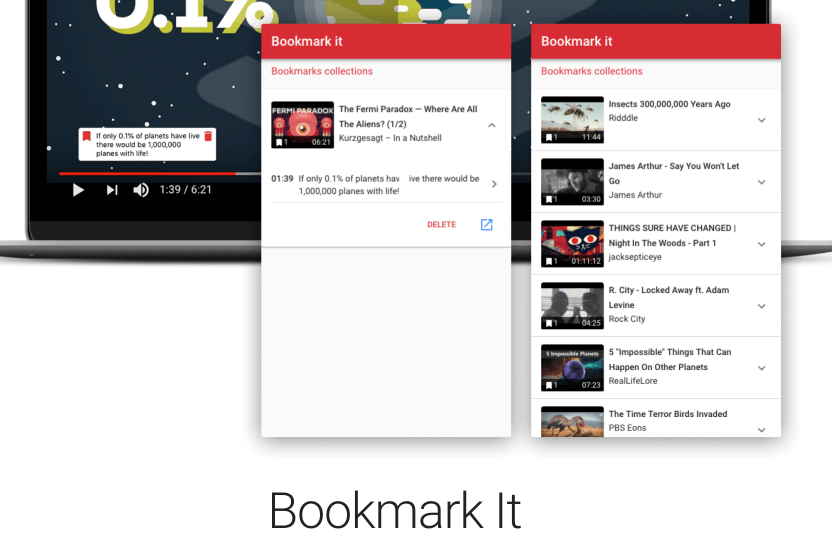
If one day you have wasted time searching for a specific passage of a video on YouTube, Bookmark It is for you. This small extension will make your life easier if you are used to working with videos. It makes it possible to create and save bookmarks to your favorite videos on YouTube. To be even more precise, Bookmark it allows you to create shortcuts to one or more passages in the videos. Ultra practical.
Bookmark, annotate, preserve, find excerpts in a video.
Once the extension is installed on your browser, you will be able to remember a precise passage of any YouTube video. To do so, simply press the ‘g’ button when viewing a video. Write a small associated note and save. The trick is done. The shortcut is automatically saved so you can return to that exact location of the video whenever you want.
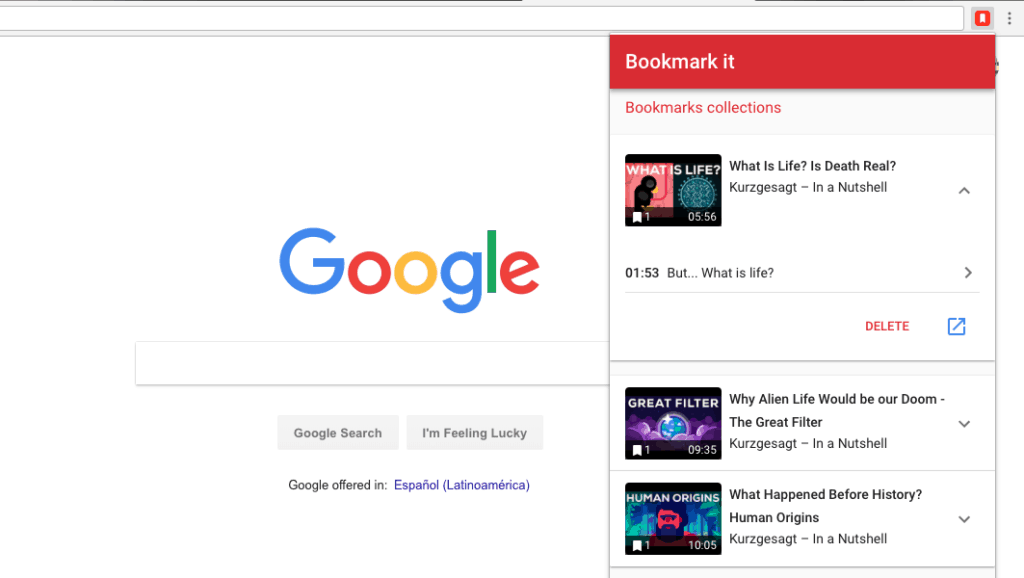
This will keep the important moments of the YouTube videos you use with one click and allow you to return to them with just one click when you need them. Bookmark It keeps a list of all your shortcuts in the menu bar of your browser.
Bookmark It makes it possible to mark the best moments of each video.
This extension is still under development. The developer announces on his website that he will continue to improve it and already has in his boxes for the coming months a mobile application to allow you to find and watch your video shortcuts directly from your smartphone or tablet. In his projects also the possibility of sharing the extracts saved by all users on the most popular videos and thus propose another way to watch a video through the most interesting moments a priori.
Bookmark It is currently free of charge and does not burden you with any advertising. A paid option allows you to create a backup directly on Bookmark It and thus be able to find all your shortcuts from any computer.
Link: Bookmark It
 English