Last updated on 12 May 2026
How can you effectively enrich your students’ vocabulary while making learning fun?
Crosswords is a free educational resource designed by the CCDMD (College centre for the development of teaching materials) in Quebec. This tool allows teachers to create custom crossword puzzles, adapted to the needs and level of their students. Whether solo, in a duet or in a group, Crosswords makes every activity a captivating and rewarding game.
With this tool, your students will be able to develop their vocabulary while having fun.
I invite you to discover this great online resource that allows you to easily create custom word grids for free.
At your word, ready, go. A Word Grid Generator for Education
Crosswords is a practical digital tool that transforms vocabulary learning into an educational game. Thanks to its intuitive functions, it offers you, asother crossword generators presented on the site, a simple but powerful solution to design exercises adapted to the level of your students.
The main functionalities include:
- Creating interactive or printable grids.
- Customizing grids from specific dictionaries.
- A user-friendly interface suitable for all levels of digital skills.
How to use Crosswords in class? (Practical guide)
There is no difficulty in using the platform. Here is a practical guide in four simple steps:
Step 1: Create an account on the platform
- See you on the Official Website of Crosswords .
- Register for free by following the instructions.
Step 2: Build a custom dictionary
- Create a dictionary based on the vocabulary you want to teach (general or specialized).
- You can test an example dictionary before designing your own.
Step 3: Generate and distribute grids
- Customize your grids by adjusting their size, clues, and difficulty level.
- Choose to print them out or share a link for online use.
Step 4: Exploiting the grids in class
Some ideas for using these grids:
- Individual work : Each student completes a grid to enrich his vocabulary at his own pace.
- Activity in pairs : Students work together to solve the grid, promoting mutual aid and discussion.
- Timed challenges : You can also organize a friendly competition to motivate students to work faster.
Create grids from custom dictionaries
On Crosswords you will first create one or more dictionaries before asking the tool to make your grids. These dictionaries, which consist of a series of words that you will define, make it possible to create personalised exercises. These dictionaries may include:
- Vocabulary specific to your discipline (science, literature, history, etc.).
- Words adapted to various levels, from beginner to advanced.
Students can repeat a grid as many times as they wish and can also save their work and come back to it later.
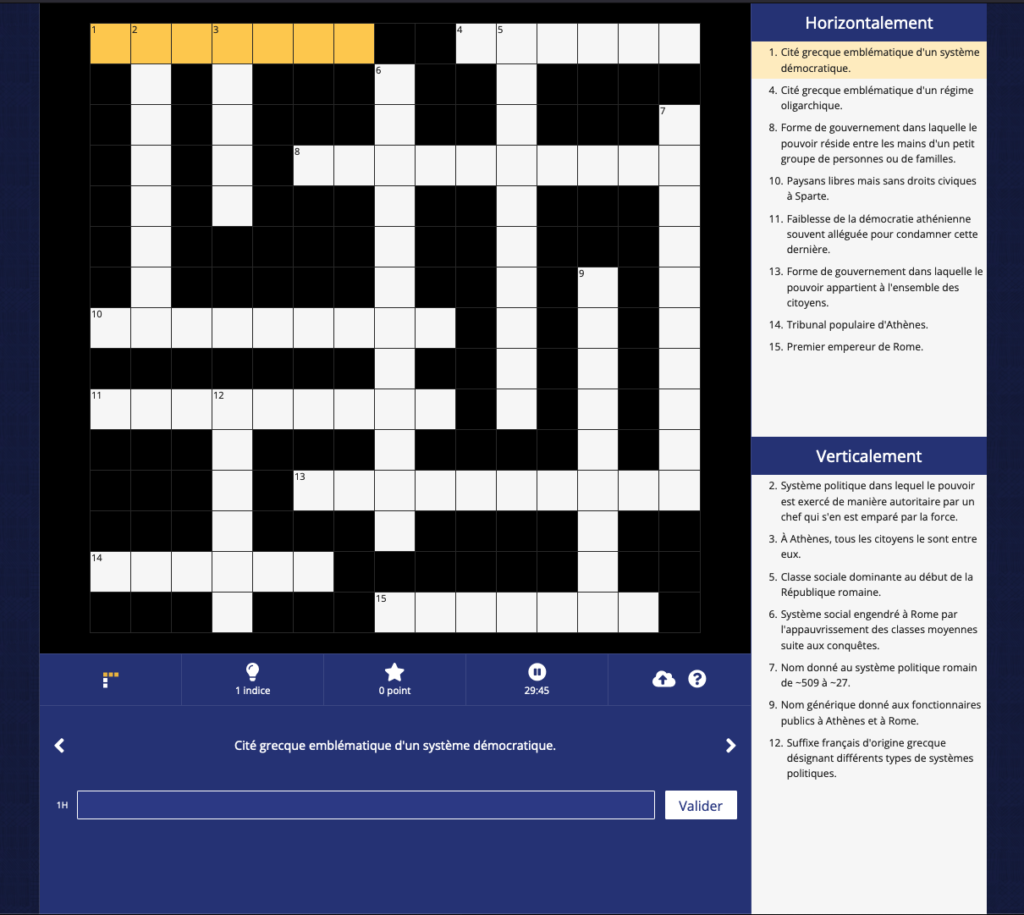
Crossword grids adapted to the level of students
The strength of the tool is its flexibility to create grids adapted to the level of your students.
To adapt the difficulty of a grid of intersecting words to students of different levels, you can use several means offered by the platform:
- Choice of words : You can choose words according to the level of vocabulary of the students. For more advanced students, use more complex or field-specific words. For less advanced students, use more common and simpler words.
- Grid size : The grid size can also be adjusted to change the difficulty. A larger grid with more words may be more difficult to complete than a smaller grid. The ‘Crosswords’ tool makes it possible to choose dimensions ranging from 11×11 to 35×35 boxes.
- Indices : You can choose to add clues to help students find the words. For more advanced students, you can choose not to provide clues, or to provide more difficult clues. For less advanced students, you can provide more direct clues.
- Resolution time : To increase the difficulty, you can limit the grid resolution time. This can encourage students to work faster and focus more.
- Level of difficulty of definitions : You can adjust the difficulty level of the definitions according to the level of the students. For more advanced students, use more complex or ambiguous definitions. For less advanced students, use simpler and more direct definitions.
Once satisfied, you can either print your grid or share a link that allows you to play online with a very successful player interface.
A tool available in French and English
Another asset of Crosswords, c’is available in several languages: French and English. This versatility makes it an ideal tool for foreign language teachers. Use the English version, Crisscross Words, to teach vocabulary to students learning English.
How to switch from one version to another?
Simply select the language of your choice on the platform. You can thus create adapted grids, either in French or in English, according to your pedagogical objectives.

A flexible, simple and accessible tool that offers a fun and effective way to work vocabulary.
Crosswords was initially designed for teachers and students in the Québec college network, but anyone wishing to use it for non-commercial educational purposes can apply for an account. We say thank you to CCDMD !
To play with your words and create grids for ‘challenge’ your students is here.
—
Receive a selection of Digital Tools in Education every week directly in your mailbox.
Join a community of 40,000 subscribers for free.
The Tice Tools Letter
Once a week in your box, most of the digital education
No pub – No spam

 English
Thank you for this great monitoring work done on digital tools.
Very useful to involve our learners in their learning.