Last updated on 26 July 2026
How to create crossword puzzles? This is much simpler than it seems thanks to one of the many crossword generators found on the net. A good way to create a fun activity to play with words.
You can design crossword puzzles for your students. You can also ask them to imagine one and then propose it to the class. Depending on the context, we will mainly look for two things: a printable grid (often in PDF, ideally with a solution) and / or a simple link to share for an online resolution.
Here is an updated selection of tools to generate a grid quickly, print it cleanly, or have it resolved directly in a browser.
Table of Contents
Educol. Create a crossword puzzle with or without AI

You prepare a sequence on the vocabulary of the forest, irregular verbs or the great notions of the French Revolution. You have the theme, but not necessarily the fifteen words and definitions needed to build a grid.
Educol can now win you this first step. Specify a theme, choose between 5 and 15 words, and select a difficulty level. The AI then offers a list of answers and clues that you can correct before creating the grid. This is important: nothing forces you to accept the result as it is.
On paper, the principle is quite classic. But in use, this generation mostly avoids spending twenty minutes looking for definitions that are short enough to fit into a record.
You can also continue to enter your own words. The grid is then printable, downloadable in PDF or JPG, accompanied by its correction. A link also allows you to share it for online resolution. The service is free, available in French and does not request an account.
What I like: AI remains an optional aid and proposals can be reviewed before creation.
What I like less: the site uses advertising services and audience measurement tools. So avoid entering student names or personal information in the topic sent to AI.
Teachers Corner. The most beautiful card to print, including AI

At Teachers Corner, fill in a form: the word on the left, the index on the right. A ‘Get Definition’ button will look for a definition on its own, and a quick input box now allows AI to build the entire grid from a simple subject. It is free of charge and without registration.
The form generated remains the most worked of this selection: fonts, colors, images, optional word bank to help the most fragile students. Export in PDF or PNG, corrected available.
Two things to know before you start. The number of lines available depends on the advertising scheme: about ten lines if you block ads, about thirty if you let them pass, about fifty with a premium subscription (billed without automatic renewal, over 90, 180 or 365 days). And the site has very little support for ad blockers, so much so that the options menu simply disappears. If your grid refuses to display, this is almost always the case.
Last point: the words "Created on TheTeachersCorner.net" are printed on each sheet and cannot be removed, even with payment. Not important for a class photocopy, more inconvenient if you put up a school booklet.
The French-language interface is also very approximate, with buttons left in English in the middle of the form. We do it, but with students at the helm, it stings a bit.
Crossword Labs. The best choice for solving the grid online
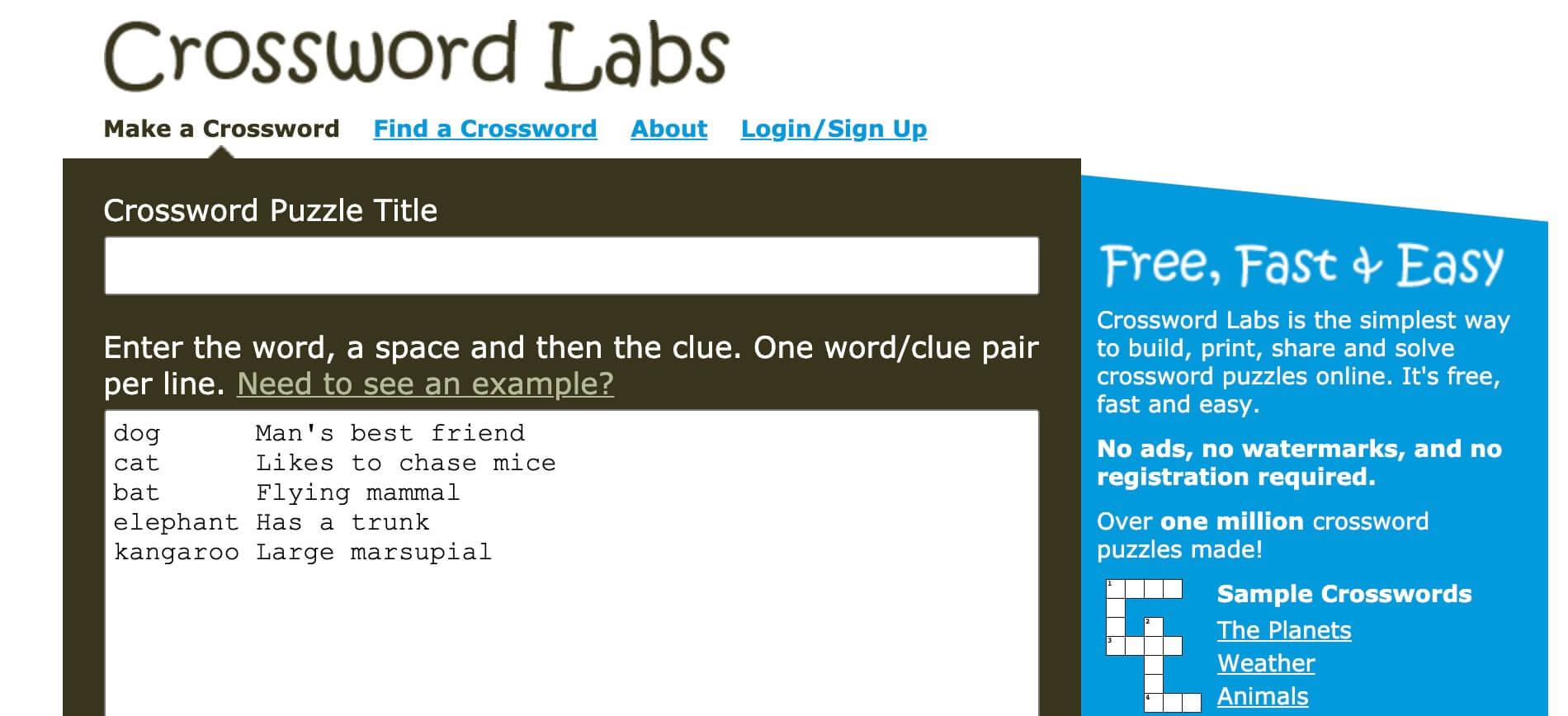
Crossword Labs is the most direct of the lot. One title, then one line per word/definition couple. The grid is built before your eyes. No advertising, no watermark, no registration, and printing is free for good, which is not so common in this niche.
It’s on the sharing side that the tool got ahead, and that’s what made me raise it in my esteem. Each grid has its own web address. Students click, type in the boxes, the progress is kept in their own browser. It's running on iPad, on the phone, on the old stations in the newsroom. There is even a ‘Focus Mode’ which displays the grid on its own, with no logo or parasitic buttons: this is the address to be sent to the pupils. You can also integrate the grid into the ENT or a class blog, or export to PDF, Word, PNG and SVG.
The designer states that the site works well with screen readers, which is worth noting about this very visual type of activity.
Two limits, honestly. Without account, your grid is public and indexable by search engines: this is the 9.95 subscription $ which unlocks hidden or private grids. And there is no way to retrieve the grids filled in by the students. The website assumes it in black and white and offers screenshots by email. For self-training, no worries. For work to pick up, it will take something else. On the other hand, rest assured on one point: students never see the fix and can't change your grid.
Small reserve of use: the interface is in English, even if you do it with four buttons.
Xwords. One of the pioneers but still effective
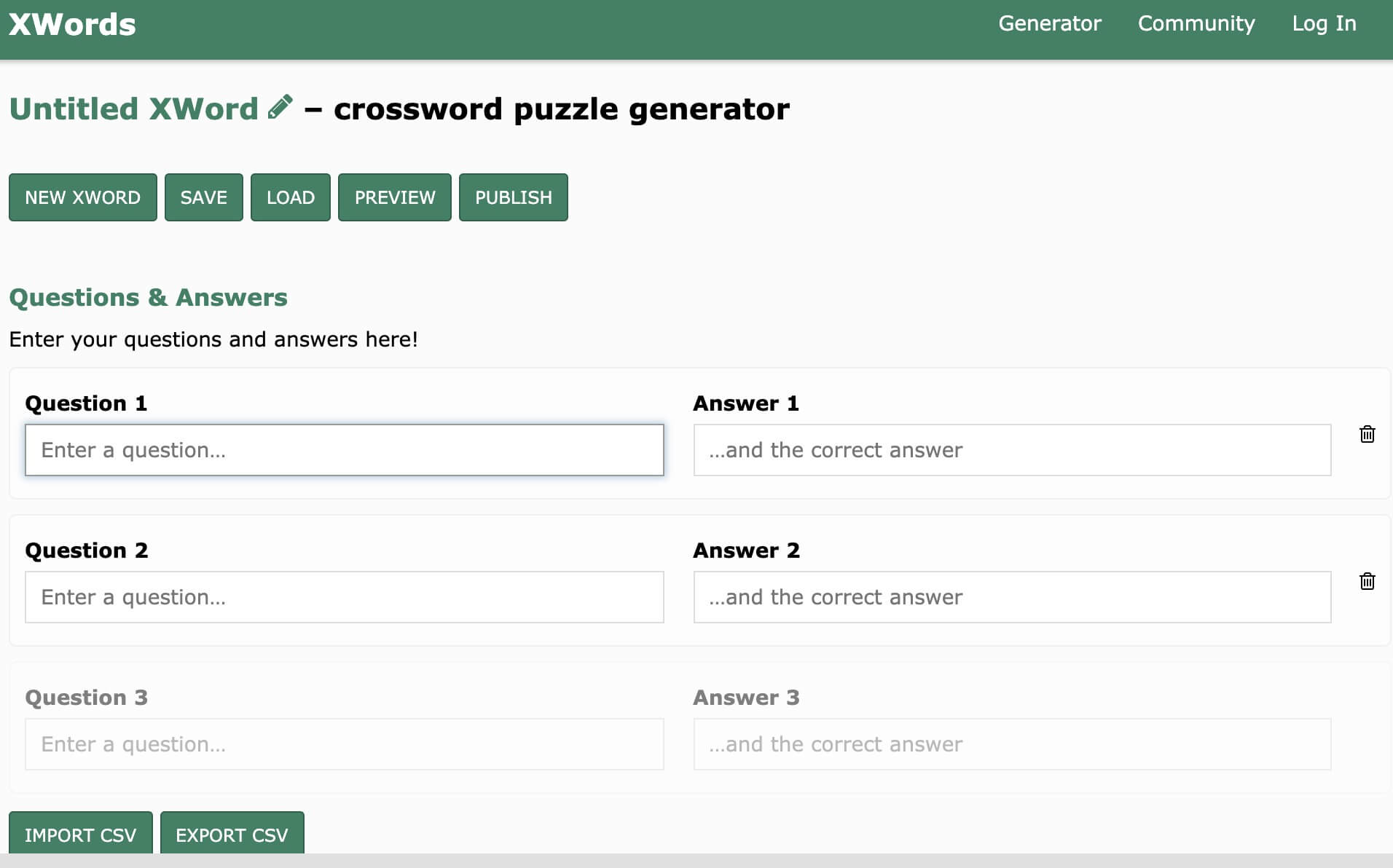
Xwords is arguably the oldest service in this small crossword software list. This can be seen in its interface but don’t get me wrong the essential is there in this venerable Arrow Words Factory. Xwords is a pretty classic crossword generator. Enter the questions in the "Question" field and the answers in the corresponding "Answer" field.
You can also download the questions and answers from a CSV file or export them in the same format. Xwords provides you with your grid and, if you wish, the solutions in image format.
Crosswords. A generator of Quebec word grids

Crosswords I was told by a reader (Thank you! Julie). It deserves a good place in this list of free tools. This Word Grid Generator was designed by the Centre collégial de développement de material didactique (CCDMD) in Quebec to facilitate rapid vocabulary learning.
It allows the design and creation of custom dictionaries from which it is then possible to generate crossword grids very easily. The tool is complete and very comprehensive with many options to vary the difficulty of the grids.
PuzzleGenio. Create a grid, share it and print it as PDF

PuzzleGenio remains the most comfortable tool for a French-speaking audience: fully translated interface, entering words and clues, automatic generation, three levels of difficulty. The grid is played in the browser with stopwatch and verification of answers, and two sharing links are proposed, one to play, the other to edit. On the printing side, you download two PDFs in A4 format, the empty grid and the corrected one. Students do not need an account.
However, it is necessary to update what I wrote in January in my article about PuzzleGenio. The service now has a paid offer, and the free version has been tightened: advertising in the workspace, small watermark on uploaded files, low print quality, limited number of grids saved. The Pro subscription is displayed at 9.90 $ per month or 69 $ per year, with a one-time pass from 30 days to 5.99 $ and an education rate of 49 $ per year, the latter conditioned to an address in .edu. In other words, French teachers with an academic address are unlikely to be entitled to it, but I did not check with the publisher.
Useful clarification: grids created with the free plan are reserved for personal or school use, resale requiring the commercial license. For the class, it doesn't change anything.
That said, this changeover in six months illustrates why it is better not to build an entire annual progress on a brand new free tool. The watermark on a photocopy, frankly, is not dramatic. But this is the kind of detail you discover when you print, the night before.
Do we need an account, and what happens to the students' data?
This is often the real question when considering having the tool manipulated by a class. Good news: Five of these six generators work without any registration, neither for you nor for the students. Only Crosswords, from the CCDMD, requires the creation of a teaching account before accessing the publisher.
Two reflexes are enough to cover the essentials. First, check the visibility setting before validating: Educol explicitly offers the choice between public and private, while Crossword Labs publishes by default your grids in free access, indexable by Google. Next, avoid including personal information in the title or definitions, such as the first and last name of a student or the precise name of a need group.
In terms of tariffs, two families must be distinguished. Crossword Labs and Educol remain truly free for classroom use, with the former’s subscription only serving to hide its grids. Teachers Corner and PuzzleGenio operate in freemium with advertising and restrictions on the free version. Nothing prohibitive in all four cases, but it is better to know before building a session on it.
In practice for the class: 3 ideas for simple activities
Here are examples of simple activities with crossword puzzles. It’s up to you to invent your own.
1) Primary. “Topic words” (discovery/reinvestment)
Choose a theme (sea, forest, emotions, … seasons). Give 8-12 words with simple clues (or phrases with holes). Students solve in pairs, then reuse 3 words in a sentence or mini-text.
Depending on the level, you can offer two versions: one with very guided clues and one with more open clues.
2) College. Sequence vocabulary (French, science, languages)
From a lesson, build a grid with key concepts (sequence words) and short definitions. To be used at the beginning of the session to “reactivate” or at the end to revise.
Tip terrain: avoid too long definitions, otherwise students spend more time decoding the index than mobilising the notion.
3) High school. “Reasonable definitions” (revision and precision)
Have students produce the grid: each group chooses 10 notions, writes clues, and then exchanges with another group that solves and comments on the clarity of the definitions. This is a very good way to identify misunderstood notions, without going through a classic check.
At your crosswords, ready? Play it.
I find that crossword generators are a simple solution to make vocabulary and revision activities, in print or online.
Practical advice: to get a denser and more pleasant grid, mix short words and longer words, and avoid lists with too many very similar terms (plural/variant), which sometimes complicate generation.
If you're looking to vary the revision formats, take a look at these too. tools to create an online quiz, which meet a neighbouring need with an automatic bonus correction.
Do you use crossword generators? Share your favorites in the comments.
Summary table of solutions (a small quick comparison)
| Educol | Create a grid very quickly, without frills (simple activity, quick record) | • Very simple interface, quick to handle • Limited customization (according to available options) |
| Teachers Corner | Obtain a “type plug” grid ready to print, very class-oriented use | • Many formatting/printing options • May become less practical if annoying advertising/menus (depending on context) |
| Crossword Labs | Go straight to the point: you enter words + definitions, the grid is generated quickly | • Minimalist, efficient, fast • Less pedagogical sheet / less layout than some tools |
| Xwords | Reuse lists (import/export), produce multiple grids from existing content | • Import/export (practice if you reuse lists) • Older interface, less “modern” in use |
| Crosswords (CCDMD) | Working the vocabulary “over time” (resources/dictionaries + grid generation) | • Very complete for building vocabulary activities • May require a little more handling than a 1-click generator |
| PuzzleGenio | Have the same activity in playable version online and in printable version | • Highlight link sharing, online gaming and PDF export (grid + solution) • Use with caution if you want a very strict GDPR/school framework: check the privacy policy |

 English
Crossword Labs is a simple but effective crossword generator that allows users to create a free and public word grid by naming and defining them on a white sheet of paper. https://scratchgames.io