Last updated on 12 May 2026
In order to prepare your courses, you increasingly need to print from the web. Advertisements, images, background colours, many ingredients pollute the extract of the page you want to keep. Elements that also exhaust the expensive ink cartridges of your printer. How to avoid it? How can you print from a web page only what you want to keep? Here are 5 free tools and extensions that will save you money.
PrintWhatYouLike.
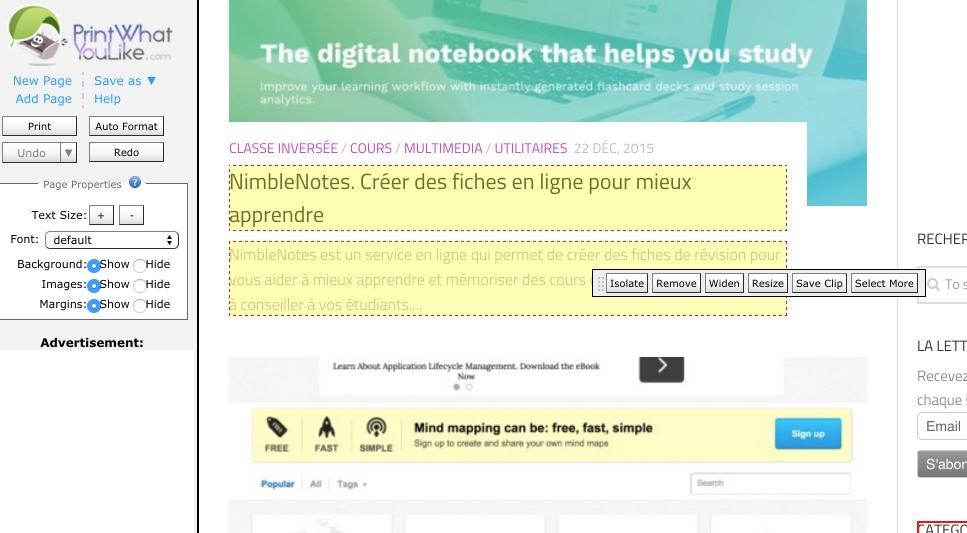
As the name suggests, PrintWhatYouLike will allow you to print only what you like in a webpage and not the rest. It is used very simply by indicating on the service’s homepage the URL of the page you want to print. PrintWhatYouLike will display it to you by partitioning its elements. All you have to do is delete what you do not want to keep in your print or choose the item(s) you want to print. It works very well. PrintWhatYouLike had the good idea to also create a bookmarklet to install on your browser. This will allow you to open the PrintWhatYoulike editor with one click on any web page. Practical.
Link: PrintWhatYouLike
PrintLiminator
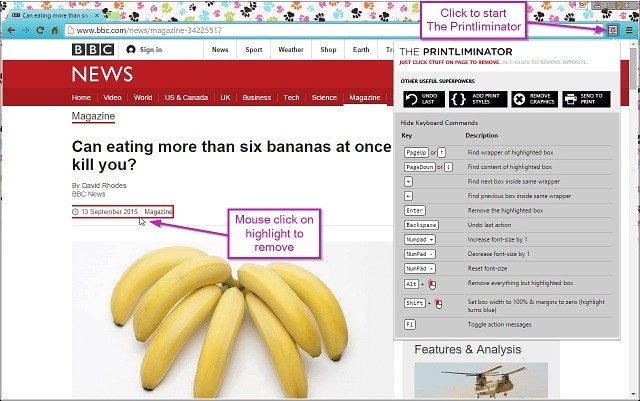
It is a bit like the spirit we find here. Printiminator is an extension for your Chrome browser that will allow you to optimise your impressions. Once installed, you will only need one click to open the editor from any web page. The extension offers many options. You can of course remove certain elements from the page, but you can also intervene on the formatting of what you will print by keeping only the text if you wish. You can even change the font and its size. Pedagogical, when you print PrintLiminator will tell you how many paper pages you will consume.
Link: PrintLiminator
CleanPrint, PrintFriendly and Clearly are the other three tools in this list of cost-effective tools and extensions. I presented them some time ago in a previous article: 3 tools to save paper and ink in class

 English