Last updated on 12 May 2026
TheArtificial Intelligence (AI) There is no end to revolutionising the field of education. Well used, it can offer teachers and trainers innovative tools to improve their pedagogical practice with young people and adults alike.
Table of Contents
Why use artificial intelligence to generate lesson plans?
Course planning can be a tedious task, especially when it comes to creating course plans for multiple subjects and levels. Fortunately, artificial intelligence (AI) can be a valuable tool here to help generate efficient and personalised lesson plans.
Needless to say, you will need to check, complete and adapt the plans provided by these different tools. But overall the results are excellent and we are only at the beginning of the AI revolution. These different AI tools allow you to provide a framework and progressions that you can then adapt but that will save you a lot of time.

Find out how these six AI tools can help you create more effective and engaging lesson plans.
AI Tool 1: Khanmigo

Characteristics
Khanmigo is an AI-based tool of the Khan Academy. It offers a unique approach to creating personalized lesson plans based on the academic level and the specific needs of students.
Operation
Khanmigo uses machine learning to analyse students’ performance, identify gaps and propose appropriate learning sequences. Teachers can easily integrate this tool into their planning.
Benefits
- Personalized lesson plans
- Real-time monitoring of progress
- Save time for teachers
Disadvantages
- Requires a stable internet connection
- Can be expensive for schools with large numbers of students
Example of use
A math teacher can use Khanmigo to analyze their students' performance on different topics and then create a lesson plan tailored to their specific needs.
AI Tool 2: Profy

Characteristics
Profy.ai is a platform that allows teachers and trainers to create interactive lesson plans using artificial intelligence.
Operation
Users can choose from a variety of lesson plan templates and customize them according to their educational goals. Profy.ai then generates interactive activities, quizzes and digital resources tailored to the needs of learners.
Benefits
- Quick and easy creation of interactive lesson plans
- Wide selection of templates and customisation options
- Easy integration with other digital tools
Disadvantages
- Requires a paid subscription to access all features
- May be less suitable for certain disciplines or school levels
Example of use
A language trainer can use Profy.ai to create a lesson plan that integrates interactive activities, videos and translation exercises, to engage students in learning a new language.
AI Tool #3: Copilot Class
Characteristics
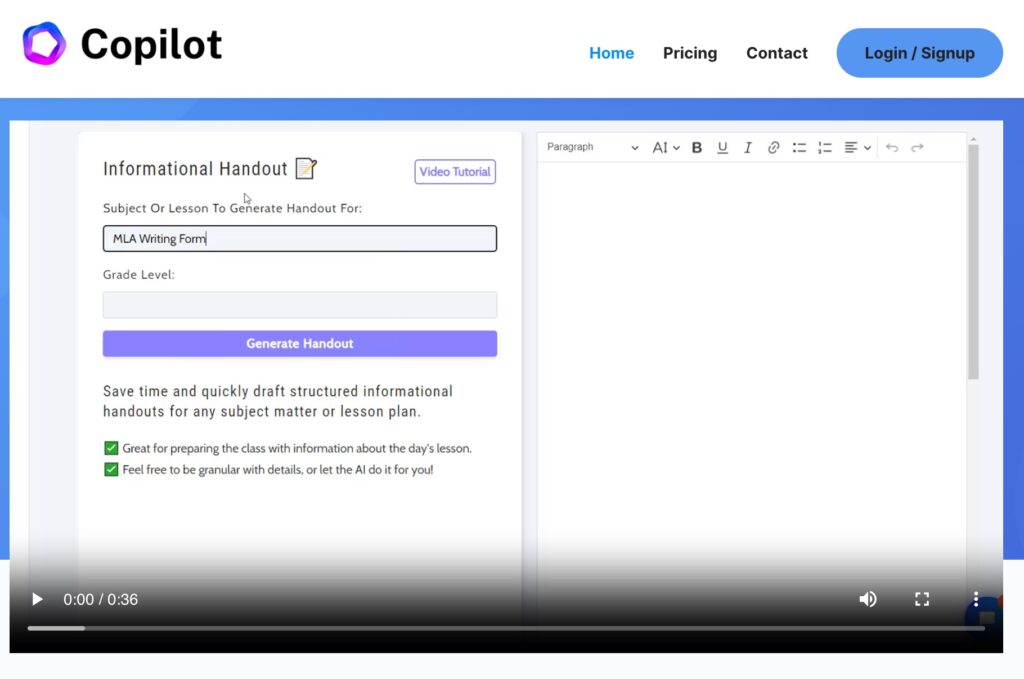
Copilot Class is an AI-based software that helps teachers create smart and adaptive lesson plans based on each student’s level and skills.
Operation
Based on existing data, artificial intelligence analyses the level of students and offers personalised learning pathways. Teachers can then adjust these pathways based on their own pedagogical expertise.
Benefits
- Adaptability to different levels and learning styles
- Saving time for course preparation
- Continuous improvement through data analysis and feedback
Disadvantages
- Only available in English at the moment
- Requires prior training for optimal use
Example of use
A science teacher can use Copilot Class to create a lesson plan that takes into account the level of each student, offering differentiated activities and adapted resources.
AI Tool #4: Magic School

Characteristics
MagicSchool.ai is an AI platform for educators, offering a variety of tools to facilitate course planning, pedagogical differentiation, assessment writing, PPI (Personalised Intervention Plans) writing, and more. I have dedicated an article to this AI tool for education right here. It allows you to create original educational content, aligned with standards and personalized for students.
Operation
MagicSchool.ai uses artificial intelligence to help teachers generate ideas, write educational content, give meaningful feedback to students, and overcome language barriers. It is able to rewrite existing content to make it accessible to different levels of reading and works in more than 25 languages.
Benefits
- Significantly time-saving, the tool can help teachers save up to 10 hours per week.
- Allows you to create content adapted to the specific needs of students.
- Facilitates the adaptation of content for students at different levels of reading.
Disadvantages
- Some pedagogical nuances or specificities might not be fully captured by AI.
- Although compliant with privacy standards, the use of online data can still raise concerns.
Example of use
You can use MagicSchool.ai to generate multiple explanations of a complex concept in just a few clicks, adapting teaching to different learning styles.
AI Tool #5: LessonPlan

Characteristics
Another AI-powered lesson plan generator, designed to help teachers quickly create high-quality lesson plans. This tool makes it possible to generate complete course plans with engaging activities and resources to help students learn and retain the material. It is suitable for all levels, from kindergarten to high school, and allows detailed customization of course plans.
Operation
LessonPlans uses artificial intelligence to generate lesson plans in minutes. Teachers must provide a detailed description of what they want, customize the plan according to their needs, and save it for future use. The process is designed to be simple, offering a step-by-step guide for each lesson, thus facilitating its follow-up and then its implementation in the classroom.
Benefits
- Simple and intuitive interface.
- Ability to adapt lesson plans to the teacher’s teaching style and students’ needs.
- Suitable for a wide range of subjects and school levels.
Disadvantages
- The generated plans may require quite a few adjustments to meet the specificities of each class.
- Although offering a trial period, full access is subject to a fee.
Example of use
You can develop in a few clicks a lesson plan on a complex subject such as photosynthesis. The tool can suggest interactive activities, laboratory experiments, and multimedia resources to make the topic more accessible and engaging for students.
Which tool to choose?
Khanmigo, Profy, Copilot Class, LessonPlans and Magic School all offer the possibility to create personalised lesson plans with the help of artificial intelligence. They have been developed for this purpose and are therefore better suited than ChatGPT. Choosing the right tool will depend on the specific needs of each teacher or trainer.
Some are multilingual but others like COpilot for example speak only English and you will have to go through a translation again. All offer a free version to be able to test them. Do as I do and compare results from the same lesson.
For my part, I have a small preference for Magic School, which offers a real AI toolkit for teachers. Its course plan generator is particularly effective and relevant if it is specified in public terms, objectives and pedagogical expectations.
Impact of AI on education
Artificial intelligence has the potential to significantly improve education by helping teachers better understand their students’ individual needs and adapt their teaching accordingly. However, there is no bliss, it is essential to ensure that these tools are used ethically and responsibly, preserving the human relationship with students.
To reap the full benefits of AI in education, I remain convinced that these tools need to be integrated and tested gradually and while continuing to learn about new technologies in order to stay at the forefront of teaching practices.
To create your next lesson plan, try one of these five artificial intelligence tools to create lesson plans tailored to your students’ needs and assess the outcome.
 English
Very interesting. Thank you very much for sharing.