Last updated on 12 May 2026
At school, discussions around social networks come back regularly: private accounts that are not really private, photos that circulate without authorisation, cyberbullying, identity theft, emotional or sexual blackmail …
The problem is that most of the time these situations remain invisible. Young people do not talk about it spontaneously to adults. They try to manage alone, among themselves, sometimes by aggravating things. And when a teacher ends up being made aware – often by another student, a parent or a report – it is already too late: screenshots have circulated, the account has been hacked for days, cyberbullying has been going on for weeks.
How to support students without being an expert on each platform? How can we give them concrete benchmarks, not just general prevention discourses?
It is precisely these issues that are being addressed. FantomApp, a new application proposed by the CNIL for 10-15 year olds. It's a really good idea. It offers very concrete tools to regain control of its accounts and better manage risk situations online.
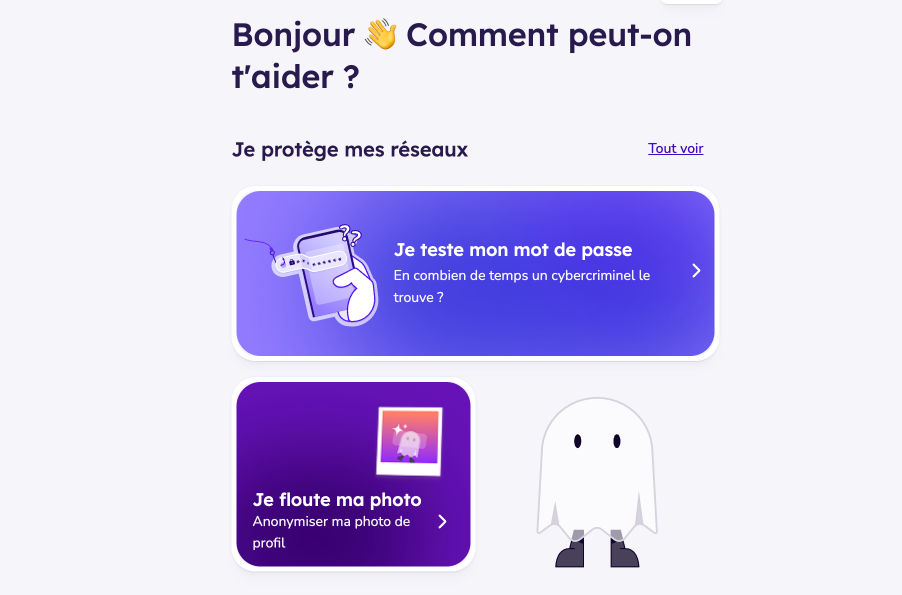
Table of Contents
What is FantomApp?
FantomApp is available free of charge on theApp Store, on Google Play or on the web. She wants to help young people increase the security of their accounts, adjust their privacy settings and find help in case of cyberbullying, hacking or impersonation.
Unlike many commercial applications, FantomApp is exemplary in terms of data protection : no personal data is collected, with the exception of the IP address (necessary for technical operation) and the type of device used. No profiling, no targeted advertising, no data resale.
A digital survival kit for young people (and for the less young too)
One of the strengths of FantomApp is to start from the concrete situations that teenagers encounter on a daily basis. The application thus offers several entries of the type:
- ‘ I want to delete content »
- ‘ I got hacked »
- ‘ I'm experiencing cyberbullying »
- ‘ We're pretending to be me. »
- ‘ I'm being sexually blackmailed »
- ‘ I was scammed »

Behind each of these situations, young people find clear explanations on what is happening and on their rights, concrete actions to be taken (capture evidence, block an account, report content, change a password, etc.), as well as Contacts with trusted actors (associations, institutions, support services) that can accompany them.
In the classroom, the platform can become a good support for a Session Media and Information Literacy (MIL)) or a time of exchange in class life: rather than staying in the theoretical, we show a tool that gives real steps to follow, step by step. Useful.
Tools to concretely strengthen your accounts
Beyond emergency situations, FantomApp offers practical tools for improve daily safety student profiles.
Testing the robustness of your passwords
Students can ‘ test the strength of a password’ and understand in seconds why certain passwords are easy to guess, how long a cybercriminal would take to find them, and how to create a much stronger password.
This is an excellent basis for a Classroom activity on the right reflexes to adopt: create long passwords, diversify accounts, avoid too personal information, etc.
Preserving your image
Another interesting tool: I blur my picture. FantomApp allows blur or pixelate a portrait before publishing it online. A good way to discuss with students the notion of digital identity, the difference between a highly exposed account and a more discreet account, as well as the possibility of staying active on networks while showing less about yourself.
Understanding data shared online
The tool I'm testing my visibility invites young people to ask themselves the right questions: what does your bio say about you? Does your nickname make it easy to find you? What can an unknown person already guess from these elements alone?
Even in a private account, not everything is invisible. FantomApp helps to become aware of these ‘small leaks’ of information which, put together, tell a lot about a person.
Tutorials to adjust the right settings on each network
FantomApp doesn't just offer general advice. The application proposes Dedicated tutorials the main networks used by teenagers: Instagram, TikTok, Snapchat, X, WhatsApp, etc.

For each platform, young people will find very specific guides to:
- removing geolocation;
- spend your account in private;
- enable dual authentication;
- limit who can contact them or add them to a group;
- hide sensitive content;
- disable personalised ads;
- prevent them from being found by their telephone number or ‑mail address;
- disable contact sharing;
- prevent consultation of their status ‘online’;
- or limit the exploitation of their data by the AI that owns the platform.
As mentioned above, I believe that some of these guides will be useful to many adults.
Some limitations inherent to this type of tool
The application mainly targets 10-15 year olds, which may seem a bit light for older high school students, although the advice remains relevant. As social media interfaces evolve regularly, tutorials will require frequent updates. Let's hope that the CNIL has planned this watch and these necessary updates.
Finally, it goes without saying that FantomApp does not replace broader educational support: it is a valuable tool, but not a miracle solution to all digital challenges.
A useful ally for responsible digital education
With FantomApp, the CNIL offers a real good tool: an application designed for young people, focused on their concrete needs and respectful of their privacy. For teachers, it is an interesting resource to integrate into media literacy sessions, cyberbullying prevention projects or digital citizen journeys.
(It is also a good resource for yourself if you need to update yourself on these issues related to security and privacy on social networks!)
Whether for secure accounts, better understand what you are showing about yourself online or know who to turn to in case of problems, FantomApp is a good way to help students navigate social media more serenely. In short, a tool of free trust and public utility.
Ready to Test FantomApp and advise it to your students? Download the app for free from the App Store, Google Play or use the web version. You can also discover it for yourself to better accompany your classes in their first steps towards a safer use of social networks.

 English