Last updated on 12 May 2026
Back to Adobe Spark at the end of the year on the occasion of the publication of my ebook Les 30 CTBT Tools of 2018. Spark figured prominently. A deserved place. This free and complete tool, very easy to take in hand, meets all your needs of creation and multimedia storytelling in class.

adobe had the good idea to offer practical workshops at the last Educatec show in Paris. Workshops that have replenished and in particular the one dedicated to Spark. It is true that it is an ideal tool to create with your students video capsules, multimedia presentations, online courses, blog posts, posters, photomontages, etc.
Stories, videos, illustrations, adobe Spark allows you to give free rein to your inspiration and that of your students.
Create a multimedia story very simply
This is one of the Spark adobe functions I prefer. Without any knowledge of computer code, without the need for complicated integration software, Spark allows you to design, create and broadcast a multimedia narrative mixing texts, images, sounds, videos. The result is amazing. You will not have to blush.

Ideal for a school trip report or a multimedia lesson or a presentation.
Make videos like a pro
With adobe Spark you will be able to easily combine video clips, photos and icons to create cool videos or slideshows. You will be able to punctuate your film by adding texts and captions in an intuitive interface. Spark’s video module also makes it possible toRecord your own voice or that of your students in just a few clicks. This is enough to develop the speaking and to value the work even for the most timid. With a whole series of ready-to-serve models, Spark Video will allow you to create videos explanations, animated and commented slideshows, small class films.
Produce attractive illustrations
Whether creating an image for your classroom blog or creating a poster, the Spark tool is very easy to use. Select a template, add your photo(s) and text, and then position your items wherever you want. Everything is done by dragging and dropping from the end of the mouse. Save, download, print and you're done.
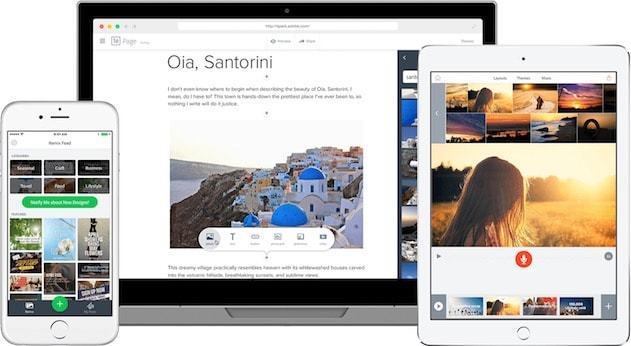
You can download and use adobe Spark for free. The software also offers a mobile version for smartphone or tablet.
If you subscribe* to the Creative Cloud you will benefit from the Premium version of Spark which gives you access to hundreds of adobe Fonts and the ability to synchronize your work between your different devices and other applications in the suite.
Link: adobe Spark
*Through its Education programme, adobe offers its Creative Cloud creative applications free of charge (Adobe Spark) or at a preferential rate (from €5 per pupil per year – see conditions) to all primary, secondary and higher education institutions. Creative Cloud adobe creation applications allow students to acquire a mastery of digital tools that has become essential. To learn more, you can write to educ@adobe.com or consult the following pages: For primary and secondary school subscriptions – For teacher and student subscriptions
 English
1 Response
[…] wealth for all those who use or want to better use free tools like Spark or the brand new Rush for capturing and editing […]