Last updated on 12 May 2026
How to correct scanned copies sent by your students? How can you avoid printing everything, correcting it by hand and then re-scanning it before sending it back to your students? PDF for teachers It will make your task a lot easier with a whole series of well-thought-out functions that will save you precious time.
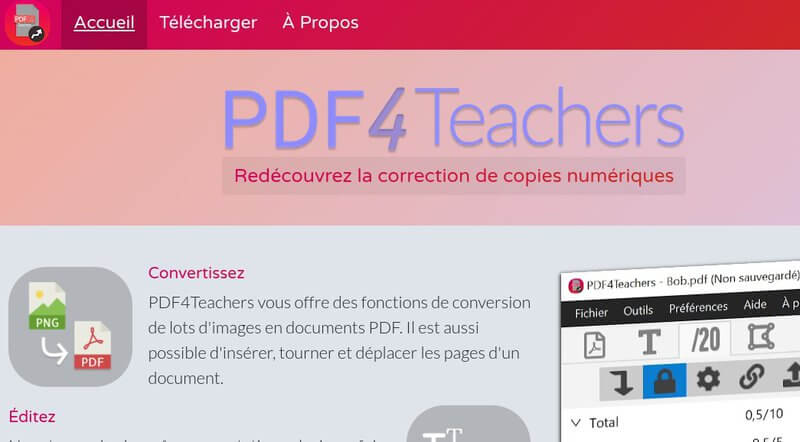
Free and free software that could have been created by a teacher. This is not the case, PDF for teachers is the work of a 16-year-old …lycéen: Clement Grennerat. If in recent months you have had to juggle scanned copies, you have not finished thanking him.
Table of Contents
PDF for teachers is an application dedicated to the correction of scanned copies
Taking charge of the application requires a little time and careful follow-up of the video instructions produced by the young author. This initial investment will soon be profitable thereafter. The functions supported by the application working with PDF files are as follows:
Conversion to PDF
The application first collects all the copies received in a dedicated file. To be able to work, PDF for teachers, as its name suggests, needs files in PDF format. It will do this by transforming image files into PDF files. Batch conversions are possible. You will then be able to insert, rotate, move the pages to get perfect scanned copies.
Edit and Correct Copies in PDF
It is in this function that PDF for teachers takes its full interest. You will be able to annotate your copies with textual elements that you can customize as you like (color, size, etc). If some annotations come back often, you can add them to a list of favorites. This will allow you to quickly reuse them on the same or another copy with a single click. You can also classify them as you see fit and to find them easily, the developer has integrated a suggested typing system. As soon as you type the first characters you will see saved comment suggestions. Ultra practical.
Create a scale and rate copies
PDF for teachers also does wonders for putting notes and calculating averages. The first step is to indicate the notes per question. The tool will then self-number the questions and automatically calculate the totals. Once the notation of the first witness copy is complete, you will be able to export the system and the position of the notes to all other copies.
Once all your copies have been corrected, you can export all the notes to a spreadsheet. Great. All you have to do is retrieve your new corrected PDF files and send them directly to your students by email.
An open source application to correct PDF copies
PDF for teachers is an excellent, very practical tool that continues to evolve based on user feedback. It complies with the GDPR of the European Union: all exported editions and files are stored locally, the only network accesses of the application concern the verification of updates.
A free, open source and free application available for windows and mac. If you use it, don’t forget to donate via Paypal to its young author. He deserves it.
 English
Hello, PDf for teachers looks like a great tool for … teachers using Linux or Mac OS.
To date, there is no version for Windows. Too bad!
great!! thank you very much!
Great! Congratulations for this student!
@Christophe:
Yes, yes, it does have a version for Windows!
Congratulations for this great tool! And free!
For the correction of copies, it is missing the possibility to block, surround, indicate, by a brace, a group of lines etc … Perhaps soon?