Last updated on 28 November 2022
At the end of the school year, which is disrupted by the health context, it is not always easy to find the right tools to best support students at a distance. This is the challenge of the new CASIO Education solutions that I propose you to discover below.
Table of Contents
A new tool to accompany lDistance learning: Classpad.net
ClassPad.net is a free solution offered by Casio Education to easily create and share mathematical content with students. Available online, the platform can be used on any type of medium: smartphone, tablet or computer.

It makes it possible to build a sequence of tailor-made courses or exercises by very simply adding blocks of text, formulas, graphic representations or images on the same page.
You can also draw inspiration from content already produced by other teachers in the community, modifying and adapting it according to the problems of your … students.
You can then share with the class the URL link of the homework or course you just created. In the case of homework, the student will be able to complete the exercise and send it back, without the need to create an account.
And with the Premium version of ClassPad.net, you can easily handle formal calculation lines, and even write them by hand directly to your tablet thanks to handwriting recognition.

—
Please also read: 3 free tools to extract text contained in an image
—
A better understanding of probabilities with Casio graphing calculators
The current graphical calculators are scalable and enriched with updates. A clear advantage to meet teachers’ demands for improvement, to adapt to changes in curricula, without asking for a new investment for families.
At the start of 2021, the CASIO Graph 35+E II and Graph 90+E graphing calculators will benefit from a free update to install a new probability menu.
Much simpler to use and all in French, it will allow students to better understand this essential theme of scientific programs.
It will cover the probability laws of the high school mathematics and physics-chemistry programmes:
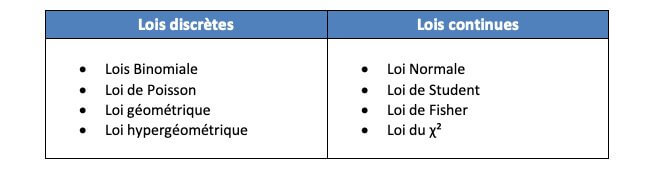
When entering the Probability menu, it will be possible to choose the law to be studied, to define the different parameters (n, p, … terminals), and to display its graphical representation very simply.

As the menu works in the same way on Graph 35+E II and Graph 90+E, the teacher will be able to easily deal with the same example with the class, even if the pupils are equipped with different calculators.
To discover the ClassPad.net platform, take part in the online workshop of the Rencontres CASIO on Wednesday 26 May at 3.30 p.m..
Casio Education offers free services to accompany teachers
↔ Do you want to discover new solutions in real-life situations, or are you training in the use of Casio calculators in the classroom?
Participate in the free online courses available all year round, and ask all your questions to the Casio team’s science teachers. Registration on the site here
↔ Do you want to facilitate access to equipment for your classes?
Whether you recommend CASIO exclusively, or with other brands, participate in our equipment support offer and receive free copies of calculators and USB emulators to equip your classes. Registration and terms of the equipment support offer on the Casio website here
This article is the result of a partnership with Casio
 English