Last updated on 1 October 2026
At the end of August, empty room, a list of 29 names on a piece of paper. You already know that Theo and Maxence cannot be neighbours, that two students need the first row, and that everything will have to be redesigned in November. So we open a spreadsheet, we line up rectangles, we erase, we start over.
In short, there are tools made for this. I have taken up this list published some time ago from top to bottom: eight Class Plan Generators, from the free software to be installed to the web application running without account, via two paid services. For everyone I looked at what it really costs, if you need to register, and also where your students’ first names land. This is the question that almost nobody deals with, and yet it is the only one that should make you hesitate before you paste a class list into a form.
We had seen some time ago how to save time for create a school structure. Here is what to organize your room from the start of the school year. If you know of others that are not listed here, add them as a comment.
Table of Contents
Before you paste your list of students somewhere
A class plan is not an innocuous drawing. It is a nominative list of minors, sometimes with photos, sometimes with an implicit comment about who is chatty and who needs to be in front. Three reflexes before you start:
- Check whether the tool is running in your browser or on a server. Some do not take anything out of your machine, others store everything in an online account. This is not the same commitment.
- First names are almost always enough. There is no need to enter surnames, let alone import class photos, unless you know exactly where they will be hosted.
- Check the language of the interface. Two of the tools on this list are in English only. It’s not discouraging for you, it’s discouraging if an uncomfortable colleague has to take over.
A word also on accessibility, which is often forgotten: a visually impaired pupil, a dys pupil who needs the teacher’s speech without background noise, a paired pupil, all this is played out at the time of placement and not afterwards. Tools that manage rules ("that first-ranked student," "these two separate ones") save you time on that. The others let you do everything at the mano.
Classroom: Free software that keeps everything on your computer
Classroom remains the most reassuring option on the data side, for a simple reason: it is a software you install, on Windows, Linux or macOS, and nothing else. I had already mentioned it in a dedicated article. Class plans, groups for island work, mixing students, excluding those you have already positioned: the functions were well thought out by the three authors, a family of computer scientists and math teachers.
You have to be honest about one thing. The latest published version is 1.1.1, and it dates from September 2020. The deposit still has a few open tickets. The software works, but the project has not moved for five years, and on macOS the installation remains manual. If you're looking for a tool that evolves, look elsewhere. If you're looking for a tool that doesn't hold anyone to account and you accept a somewhat rough installation, it still does the job.
Class plan: photos of students to retain faces
Class plan is a Quebec web application designed by Sylvain Payeur, a computer science teacher near Quebec City. It is mainly aimed at high school teachers who see six or seven groups a week and row to put a name on each face in September. You create your layout, copy and paste your lists, place students alphabetically or randomly, and print in color or black and white, with or without photos.
Personal registration is free of charge, with no group limits, and you enter your data yourself. A "school" formula exists at 200 $ per year and per school (the site is Quebec, we can assume Canadian dollars), with automatic import of lists and photos from GPI, Quebec's school management system. Suffice to say that this part will be of no use to you in France.
Important reservation: the tool is designed to integrate students’ photos on a server located outside the European Union.

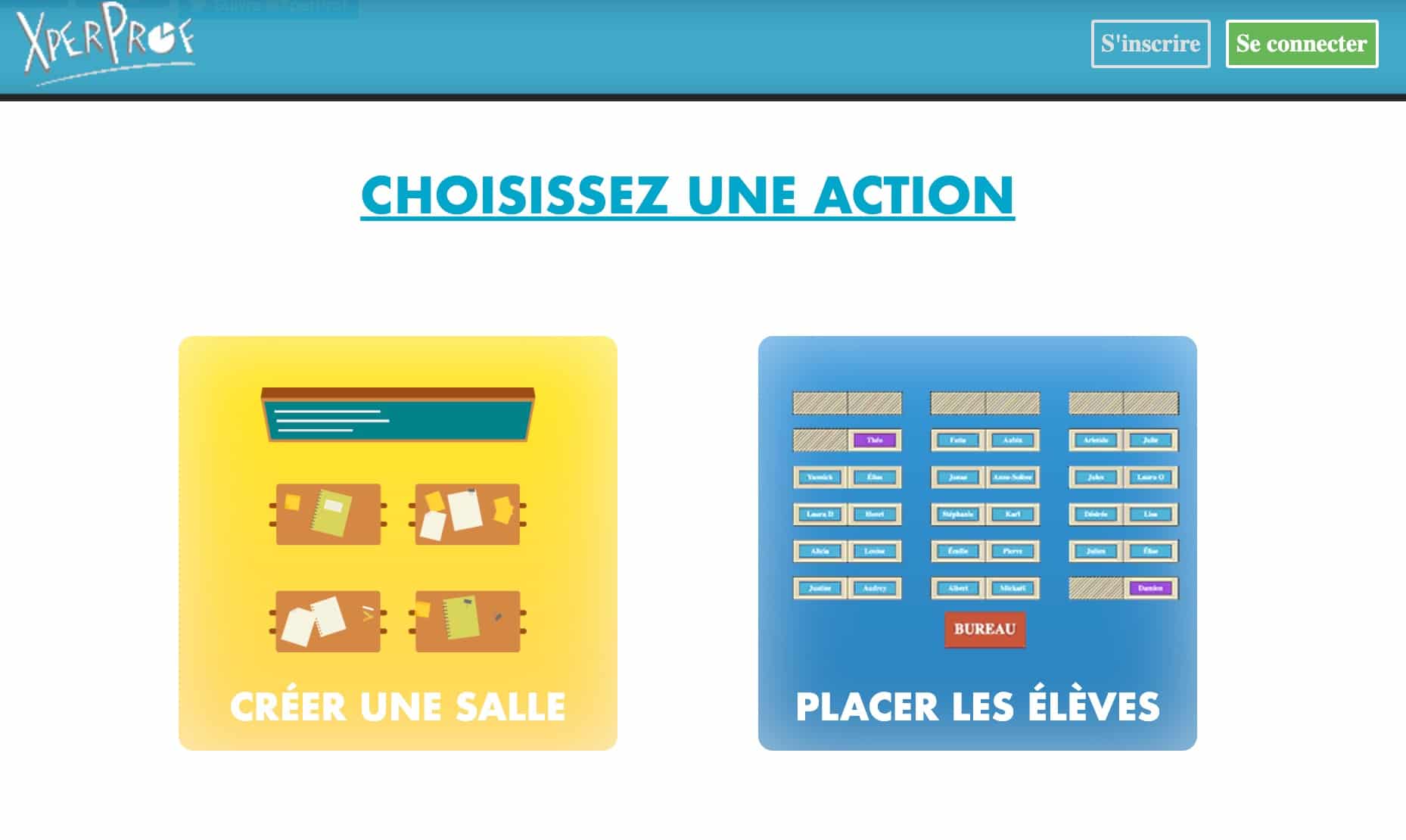
XperProf: the teacher view and the student view on the same PDF
XperProf offers a frankly dated interface, but a function that I have not seen anywhere else as well done: the PDF export comes out with two shots, a teacher’s view (you are facing the students) and a student’s view (you are looking in the same direction as them). Concretely, you project the student view to the table at 8 am and everyone finds their place without you having to mentally decode the symmetry. Sounds anecdotal. Back-to-school day is not.
For the rest, the algorithm places students randomly on the remaining tables, leaving the ones you locked intact. So you can isolate a student to a specific place and let the draw do the rest.
Point to be corrected in relation to what was said in the old version of this article: XperProf is not entirely free. You need an account, the full trial lasts one month, then you switch to a basic version. The full version is available at €12 incl. tax for one year, with up to ten groups stored online. At this price we are not going to cry scandal, but as much to know before seizing six classes.
Gynzy: the Class Plan Integrated into a Suite for TBI
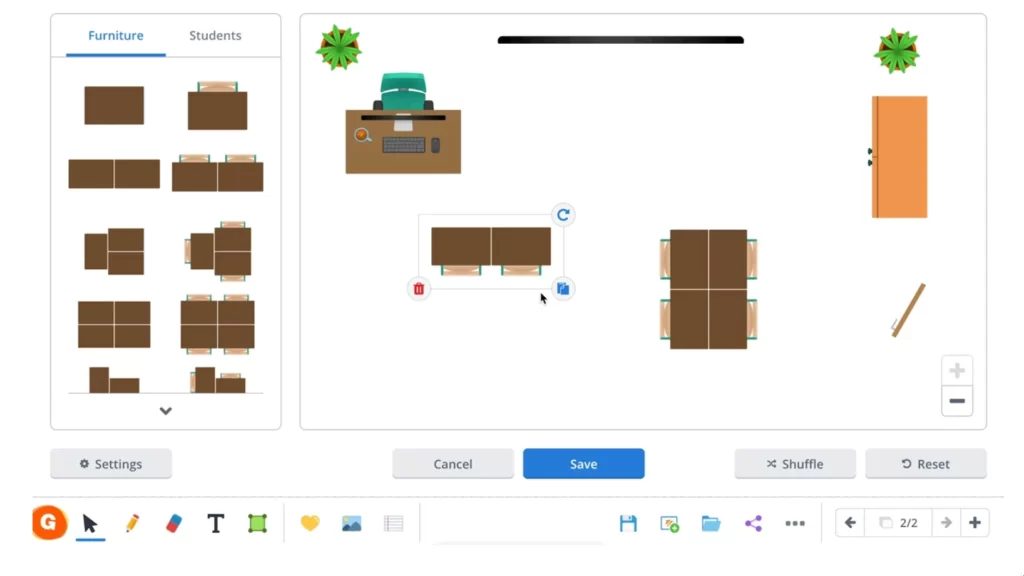
Gynzy is not a class plan generator, it is a suite of interactive whiteboard tools in which the room plan is one of about 30 modules (timer, pupil selector, traffic light, group generator). You move the furniture, you rotate it, you adjust the sizes until you get the actual layout of your room. The rendering is the most neat of this selection.
It pays off, and it has to be made clear. One teaching licence per year, one school licence per classroom … The amounts do not appear on the rates page: you have to start the procedure or ask for a quote, which is always a little (a lot) annoying. There is a free trial, identical to the paid version. The publisher is Dutch and highlights its GDPR compliance, which remains a serious argument for a European school.
Well, if you don’t have a BIT or touch screen in class, paying Gynzy for the room plan alone has no interest. It is the rest of the kit that justifies the expense, or nothing.
UbiSit: hosted by the Forge of Educational Digital Commons
UbiSit was designed by a teacher and hosted on the Forge of Educational Digital Commons, the infrastructure of the Ministry. I opened it to see: it starts instantly, without an account, without a home screen, without a cookie banner. We switch between a "Offices" mode and a "Students" mode, we import a list from a text file (one first name per line), we place by hand or we let the button distribute. Already positioned students stay in place when you restart the draw, which is exactly what is expected.
The plan is exported and re-imported in JSON, so you re-use the same room for your other classes. A little detail I like: you can remove all students before exporting, to keep a blank layout.

Educatarea: the most complete without creating an account
Of the whole selection, Educatarea is the one I would recommend to a hurried colleague. Interface in French, no registration, no advertising, no watermark. I pasted a list of first names and got a plan in less than a minute.
What really sets it apart is the system of rules. You ask that some pupils be placed in the first row, others in the last row, that two pupils be separated by at least two places, or on the contrary side by side. The application shall apply those rules in order of priority, starting with the investments imposed before.
There is also a ‘mix lists’ mode, which equitably distributes pupils from different groups: practical for tutoring pairs or for not concentrating the same profiles in the same place. Each row can have a different number of seats, which finally makes it possible to reproduce the biscornue rooms.
Export PDF, export Excel, print. Your settings are stored in the browser, so you find your work when you return, and you erase them with the reset button.
The downside: We don't know who's behind the site. The privacy policy does not name any company, mentions Google Analytics and refers to COPPA, a US regulation, without a word about the GDPR. The first names of students remain in your browser, which greatly limits the risk. But the absence of an identifiable publisher on a tool intended for school, frankly, is a lack.

Seating Chart Maker: most successful, but paying and in English
Seating Chart Maker is developed by a Finnish studio, which places accommodation in the European Union. It is by far the most successful room editor on the list: various table shapes, rotation, automatic alignment, copy and paste groups of tables, decorative objects, student portraits. You import the list from a CSV or spreadsheet, you define who to keep together and who to separate, and you switch between a teacher view and a student view for both printing and projection. He also manages amphis and training rooms, so the superior will find his account.
Beware of real conditions. The free trial lasts 7 days and is limited to a room, a list and a plan, with a watermark on the printouts. Then the personal subscription is around 4 $ per month, charged 47.88 $ year-round. A team formula exists around 25 $ per month for ten users.
The interface is in English only. For you, it may pass, but if the idea is to equip a disciplinary team, it is a real obstacle.

My Class Plan: the only one that clearly documents the GDPR
My Class Plan is a recent French service, and it is the only one of this selection whose privacy policy has reassured me. It indicates hosting in France on a private server, the collection of students’ first names only (never last names), an audience measurement via Plausible without a tracking cookie, and the deletion of data within 30 days if the account is closed. For a tool that manipulates lists of minors, this level of accuracy should be the norm. He is not.
The operation is classic and efficient: you grab or import your students, you put your constraints (separate chat rooms, group pairs, put some students in front), you draw the room, the tool generates a plan that respects the rules and you then adjust by dragging and dropping.
You need an account, and free is really limited: two classes, one room, three generations of plan per month, export PDF. Beyond that, it is €19.99 for the year unlimited, with a formula based on quotes. For a school teacher with only one class, the free version is more than enough. For a college teacher with six groups, you will have to go through the payment box.

A blank class plan to print
Sometimes you don’t need a generator. We just want a sheet with tables, to be filled in with pencil on the day of the start of the school year and to be corrected in November. Here are two blank PDF templates, in A4 format: one in rows and one in islets. No account, no list of students to entrust to anyone.
If your room does not look like either, UbiSit and Educatarea allow you to draw your layout and then print it without students.
Which class plan generator to choose according to your need
| Your need | Recommended tool | Why |
|---|---|---|
| A plan in five minutes, without counting | Educatarea | No registration, placement rules, export PDF and Excel |
| Student data that remain in France | My Class Plan | Accommodation France, first names only, GDPR documented |
| A free tool hosted by the institution | UbiSit | Forging educational digital commons, nothing to install |
| Don't put anything online at all | Classroom | Installed software, data on your machine, island management |
| Keeping Faces in September | Class plan (Quebec) | Student photos and colour printing (carefulness of accommodation) |
| Project the plan so that students are placed alone | XperProf | PDF export for teacher and student view |
| A module integrated into your TBI | Gynzy | Room plan in the middle of around 30 classroom tools |
| Complex rooms, amphis, made very neat | Seating Chart Maker | Most successful room editor (paying, in English) |
—
A class plan is not a drawing, it is a series of decisions: who in front, who separates from whom, who next to the student you want to help. These tools do not make any of these decisions. They only save you the forty minutes of scrubbing and copying that comes after, and that is already not nothing on a Sunday evening in late August.
If you only need to test one, take Educatarea for speed, or My Class Plan if hosting the data is important to you. The right tool, anyway, is the one you will reopen without sighing in November, when the dynamics of the class will have changed and everything will have to be reviewed.
In the same register, you can look at the tools to create a school schedule or these tools for making an online diagram.
Frequently asked questions about class plan generators
Do I need to create an account to make a class plan?
Not always. Educatarea and UbiSit operate immediately, without registration. XperProf, My Class Plan, Class Plan, Gynzy and Seating Chart Maker request a teacher account. None of these tools require an account for students, which simplifies things a lot.
Can we really put the photos of the students?
Technically yes, on Class Plan and Seating Chart Maker. Legally, this is another case: student portraits are personal data of minors, and their deposit on a third-party service is the responsibility of your school head, not your initiative. Check with him beforehand, or settle for first names.
Do these tools work on a tablet?
Web applications (Educatarea, UbiSit, My Class Plan, XperProf, Class Plan, Gynzy, Seating Chart Maker) open in a tablet browser. Drag-and-drop at the finger on a 30-seat plane remains painful, though. Classroom, on the other hand, is software to be installed on a computer only.
Which generator for a primary class?
My Class Plan or Educatarea. A single class, a single plan to be retouched from time to time: The free version of My Class Plan covers exactly this case, and Educatarea even avoids account creation.
Are student data protected?
This depends heavily on the tool, and is the main criterion of choice. Classroom doesn't get anything out of your computer. Educatarea and UbiSit keep everything in your browser. My Class Plan hosts it in France and documents it. The others deserve a careful reading of their conditions before entrusting them with a nominative list.

 English
Hello ,, I recently coded a tool that complements these , tools called classOptimize and can be found in opensource here: https://github.com/jeromefavrou/ClassOptimize