Last updated on 4 November 2026
End of May, at the gym, with a second class. The bands have found their gestures and chosen their music, but each change of place turns to carambola. Two students meet in the middle, a third no longer knows whether they are passing in front or behind. You end up drawing felt crosses in a corner of the whiteboard, and nobody looks at them.
In short, it would be necessary to see the displacement before making it dance. This is exactly the terrain of Stancz, an online choreography app that places dancers on a stage at scale and animates their journeys from one formation to another. It is primarily aimed at dance teachers and troupes, but it has its place in EPS, as a theatre option or for the end-of-year show.

Table of Contents
What exactly is Stancz?
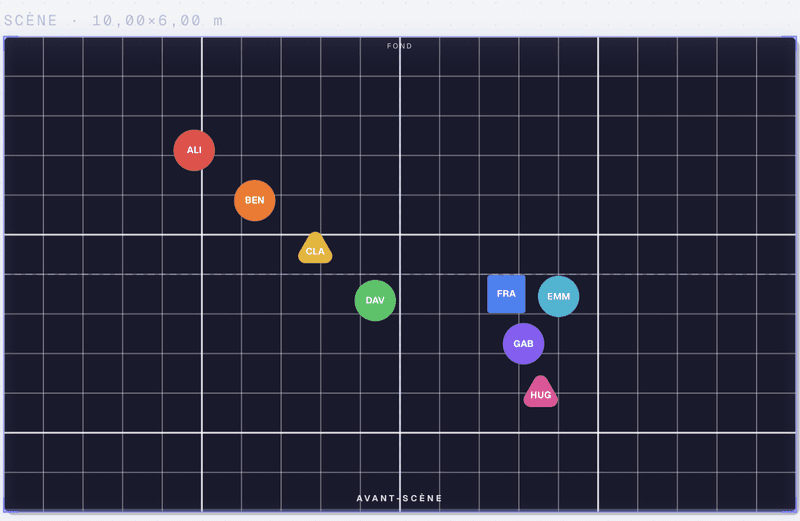
The principle consists of three gestures. You put points on a stage (your dancers, or your students) and draw a first training, then a second one. The app calculates the path of each one between the two and replays the passage, based on the music you imported. Circle, lines, diagonal, V: we chain, then press on reading.
If you have already used a tool to generate a class plan, you know the original idea: to place people in a space. Stancz adds time and movement.
The tool only takes care of the tray. He ignores gestures and does not manage any school enrolment. The publisher writes it in black and white on its ‘about’ page, with a frankness rare enough to be flagged. We are therefore somewhere between the sketch on the board, too fixed, and the show management software, much too heavy for a class. Stancz opens in the browser, without installation, on Windows, Mac, Linux or Chromebook. It also exists in iPhone, iPad and Android applications.
What Makes Stancz Really Original
Other dance training apps exist, especially in English and especially on iPhone. What distinguishes it is a handful of choices that I had not yet seen gathered in the same place.
The viewer’s view: sitting in the third row
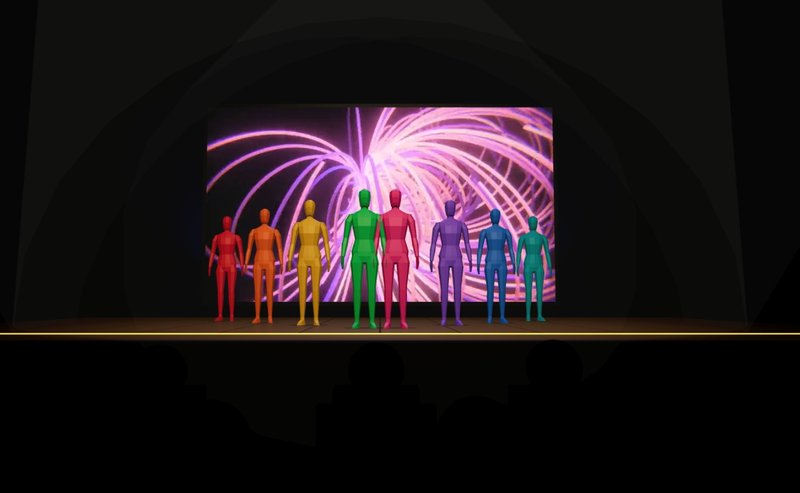
Stancz offers the plan seen from above and a 3D view that is rotated. He especially adds a view "from the audience chair". This is what struck me the most by running the homepage demonstration. Impeccable training can become unreadable from the front: three students lined up in the axis, and the public sees only one. To make a class understand that you dance to be seen, it is a real click to provoke.
Transitions, where everything is played out
Most tools, such as paper sketches, show positions. Stancz mostly shows what happens between two positions. You pull a handful in the middle of a path to bend it and you immediately see if two students will hit each other in the centre. It is precisely the part of the session that eats the most time.
The Tracking mode, to learn its place
Each dancer can follow ‘his’ point, surrounded by a halo. For a student who is not well located in space, or for an allophone student who has not grasped all of the oral instructions, seeing his or her own point move is better than three explanations. Show mode displays the scene in full screen. This is convenient with a projector, or with a tablet placed against the wall of the gymnasium.
A handmade tool, in twenty-five languages
Last detail, which matters to me. Stancz is developed by one person, Martin Bernard, an independent developer based in France. It has no sales team or investors. However, the interface exists in 25 languages. (Small parenthesis: the app covers you from one end to the other, ‘place your dancers’, ‘your troupe’, which gives it a false air of a somewhat familiar dance teacher, and I admit that it made me smile.)
In EPS, optional theatre or school party
- In EPS in high school. Learning field 3 requires composing a collective choreography. Groups can prepare their training on a tablet before moving to the gym, and then compare their plan to the viewer's view. I would use it from the teacher’s account, on a classroom tablet, for the account reasons detailed below.
- In college, AS dances or for the end-of-year musical. The tool is used to dock inputs and outputs on the soundtrack and to add accessories (chair, table, passable). A dedicated track even manages the background screen, if the room has one.
- In primary school, for the June show or a dance meeting. Children will not touch the tool. On the other hand, the teacher arrives at the first rehearsal with a standing plan projected onto the painting.
- Optional theater. Stancz helps adjust the placements of a group scene on a scaled board, with background and foreground markers.
I even see it as an unexpected use: geometry. A V, a grid or a circle of twelve students, it is also discussed in math. I would not make it a math tool, but for an interdisciplinary project, the idea stands.
Is Stancz free, and does it need an account for students?
The model is freemium. The free plan, with no credit card or time limit, includes 2D, 3D and viewer views, animated transitions and music synchronization. It is limited to three choreographies.
For the number of trainings, the site contradicts itself. He announces four by choreography on the homepage and the ‘about’ page, and six on the ‘prices’ page. In both cases, it is short. In my opinion, a three-minute group choreography quickly exceeds this figure. The site talks about enough room to put on an entire show. I doubt that.
The Pro subscription costs €3.99 per month or €29.99 per year, with a trial month, which is still very reasonable. Schools and associations have a dedicated formula.
The account is mandatory (email address, Google or Apple). The conditions of use require to be of the required legal age in one’s country, without further specification, and there is no provision for school use with minors. With middle school students, let alone schoolchildren, I would therefore keep the tool on the teaching side: you prepare, then you project in Present mode.
On the data side, the privacy policy is rather reassuring. The hosting is provided by Cloudflare in the European Union, no advertising cookies are placed, and the account deletes itself from the app. Mobile apps still go through Google (Firebase) for notifications and crash reports, which can be disabled. What I love, what bothers me
What I like
- The spectator view, a real good pedagogical idea.
- Animated transitions, showing collisions before arriving at the gym.
- Operation without installation, with choreographies synchronised between the computer and the tablet.
- Data hosted in Europe, without advertising.
What bothers me
- No PDF export or image: it is impossible to print the map to display it in the gymnasium. And that, frankly, is a lack in school, where not all students have a phone.
- A tight free plan for a real show.
- Contradictory pricing information from page to page.
- A mandatory account, without a framework for underage students.
- A young project, carried by one person. The privacy policy even indicates a SIRET ‘in the process of registration’. Sustainability must be monitored.
See the dance from the room before the first try
I did not put on a full show with Stancz, and the free plan does not lend itself to this. For a dance sequence in EPS or a school party, however, I would keep it under my elbow from the composition phase, on the teacher’s side, projected on the wall. His most original idea is also the simplest: to have students sit in the room before they go on stage. To try: Stancz.

 English