Last updated on 12 May 2026
Vialogues is a tool that allows you to converse around a video. A particularly interesting tool, provided by Columbia University, which facilitates exchanges with learners during the broadcast of a video.
Vialogues are the contraction of video + dialogues. It is as simple as that.

Vialogues allows users to interact with videos by inserting comments at specific times in the video. A kind of collaborative tool that I had presented on my blog dedicated to collaborative tools some time ago. The use for a teacher or trainer is very simple. First of all, you have to choose a video. You can upload it from your computer or provide a YouTube or Vimeo link.
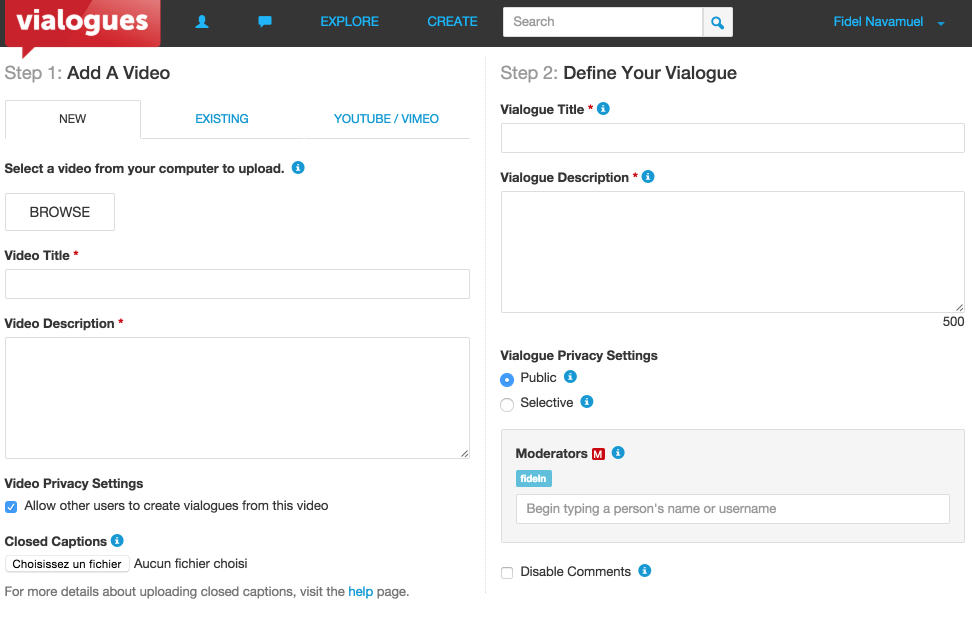
It is then necessary to give a title, a description and the turn is played. You can choose to make your video public and viewable by all users of the site or give it a private character that can only be viewed by the people you are going to invite. Once your video is online you can encourage the conversation by asking questions, inserting a survey and of course then responding to comments. Note that Vialogues provides an option to give one or more people a role as moderator. The latter will then be in charge of approving or not the comments.
Your Vialogues created, a number on the thumbnail of the video indicates the number of comments generated by the movie. The video player divides the screen in two: on the left the video window, on the right the comment thread in the form of a timeline that allows you to jump from one comment to another and from one sequence of the video to another as well. Simple and effective.
[clickToTweet tweet=”Vialogues is a video player enriched with a discussion or comment forum. #tice’ quote=’Vialogues is a video player enriched with a forum for discussion or comments. “ ]You can invite the people you want to show the video to by email, but you can alsoinsert into a class site or blog.
Vialogues is free, the only limit is the size of the video if you upload it directly to the site without going through YouTube or Vimeo, it may not exceed 1Gb.
Link: Vialogues

 English