Last updated on 12 May 2026
Spiral is a website that offers a series of four tools to create interactive activities for the class. A kind of digital kit in which you will draw according to the needs of the activity models ready to serve for your students.
Only the teacher needs to register on the platform. He will then create a class group and provide a simple code for students to register and participate in the different activities.
Spiral currently offers four types of interactive activity modules.
Table of Contents
1 — Quickfire
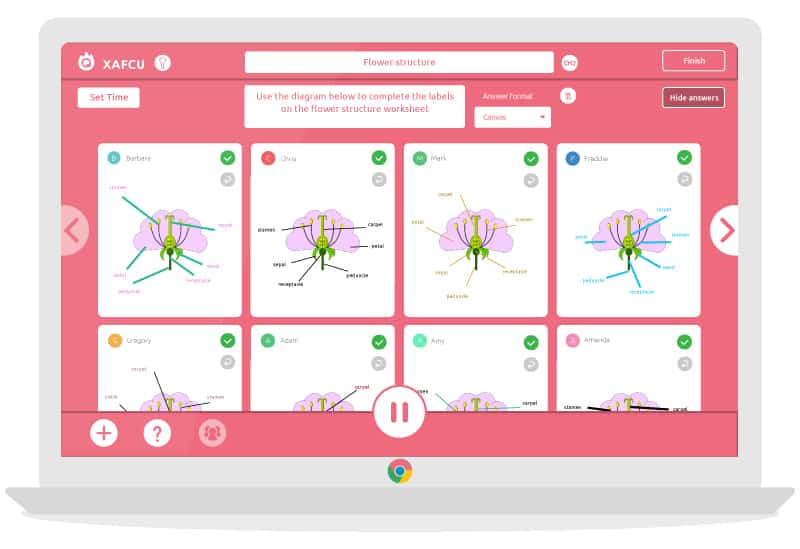
Quickfire makes it possible to measure the understanding of a concept or to launch a pedagogical sequence by interviewing your learners via a text question or a drawing to caption. The teacher who can limit the time left to reply will receive proposals from each student in real time. It will even be able to display them on the screen without revealing the names of the authors and then make a collective correction.
2 — Discuss

Discuss allows dIntegrate interactivity with your students in your presentations. You will upload your slides to PowerPoint or create a quick presentation with text, images and videos directly from the tool. You will then be able to insert questions and invite your students to answer them live. They will be able to do this directly from their computer or tablet. They will also be able to comment on other people's responses and engage in live dialogue. Both the teacher and all the activities offered in Spiral will be able to save all the results and exchanges for each student.
3 — Team Up

This third module in spiral will allow you to Create groups in your class. You will give them a guideline or a mission and each group will respond to it in collaborative mode by making a simple presentation combining text, images and drawings. You make up the groups and you can give different tasks to each of them. When the groups have finished, you can project the response of each group to the whole class.
4 — Clip
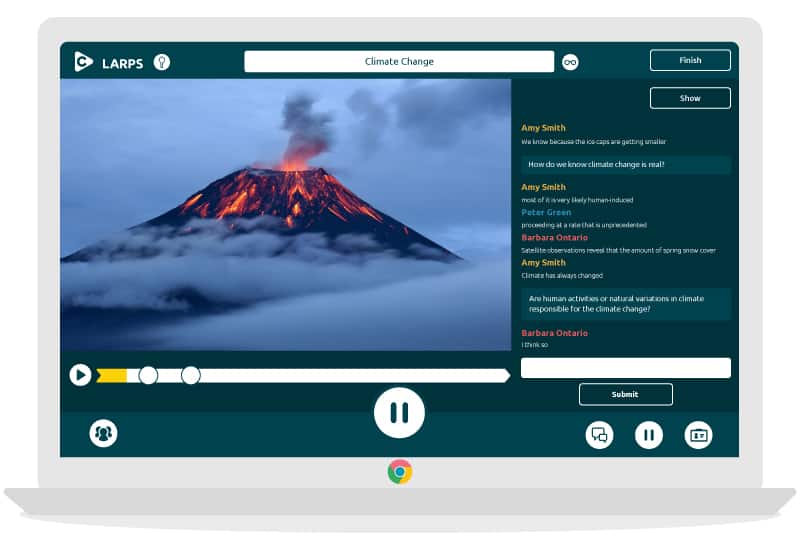
Last small activity module, Clip will create quizzes and discussions around a video. Clip allows you to view a video from YouTube from its public URL. You can associate questions and comments by inserting markers. When your students arrive at them during their viewing, the question or quiz you have prepared will appear. Spiral will collect all the results for you.
That's great. I was won over by this service. Spiral can allow you to run a training session or sequence very easily. The interface is in English (snif!), but the handling is not an insurmountable problem. Best for last, Spiral is completely free and ad-free.
Link: Spiral
 English
1 Response
[…] language trainer can use Profy.ai to create a lesson plan that integrates interactive activities, videos and translation exercises, in order to engage his students in […]