Last updated on 12 May 2026
Mathcha is an impressive Online Math Editor. It is a visual editor WYSIWYG (What you see is what you get) that successfully mixes text mode and mathematical mode. The platform is used to write formulas and problems. It incorporates remarkable graphical representation functions and facilitates the sharing of the whole. Perhaps one of the best visual editors of mathematical formulas in its class.
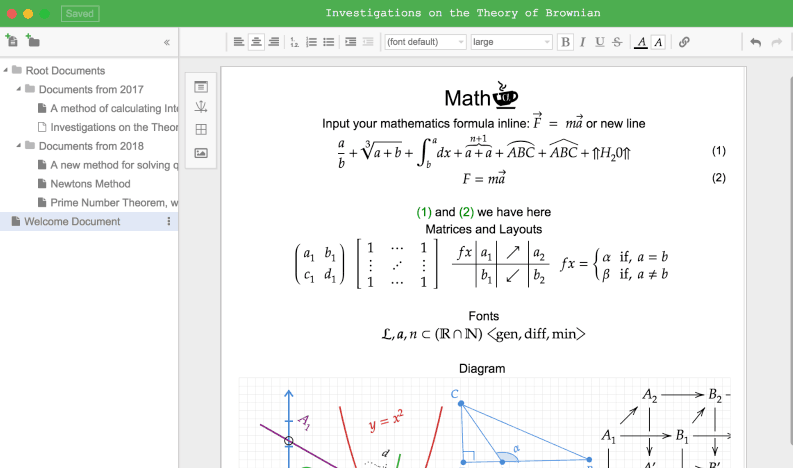
Matcha offers a free online editor open to all. It has the advantage of being accessible from anywhere from any connected device and offers an application to install on your machine, which is paid for, for private or even confidential work.
Matcha therefore makes it possible to edit mathematics from a computer. It is not as simple as it seems. This tool offers everything you need to simplify the input. After a time of grip finally quite fast thanks to very clear instructions for use, Matcha will allow you to edit maths and edit them quickly and well.
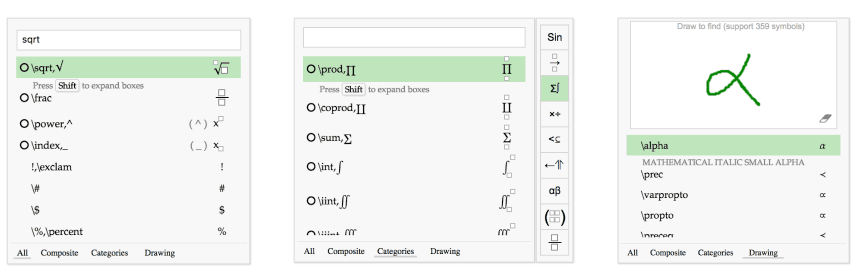
Your mathematical editing is facilitated by a variety of adaptable templates and shortcuts to built-in suggestion lists. The publisher offers multiple sets of symbols to meet all needs. You will be able to use most mathematical symbols without any knowledge of the LaTex language.
Formatting your document is very intuitive. Matcha is a kind of mix of word processing and layout tool. You will thus be able, for example, to integrate into your pages real millimetre drawing sheets on which you will draw very easily graphs and diagrams.

Once your document is complete, you can share it via a single URL or export it in LaTex format. You can easily print it also after saving it in PDF or image format.
Mathcha wants to help people quickly write any mathematical formula or equation. Other tools allow you to insert some basic mathematical symbols, but they are slow when you want to add something more complex. Mathcha offers all the necessary functions grouped in one tool to create your own mathematical document (normal text, text in mathematical mode, diagram / graph).
An editor of Mathematics to try. The online version is open and free. You will be able to download to your Mac or Windows computer an application that adds some additional functions. However, to be able to use it, you will need to pay a yearly subscription of around 25 Euros.
Link: Matcha
 English