Last updated on 12 May 2026
Readermode is a great extension for your browser that will allow you to adapt and customize the on-screen reading of any web article. Everything is customizable to give you a bespoke reading experience without any unnecessary distractions. This extension offers many particularly interesting features in an educational context. It is particularly useful for students with dyslexia or difficulty concentrating.
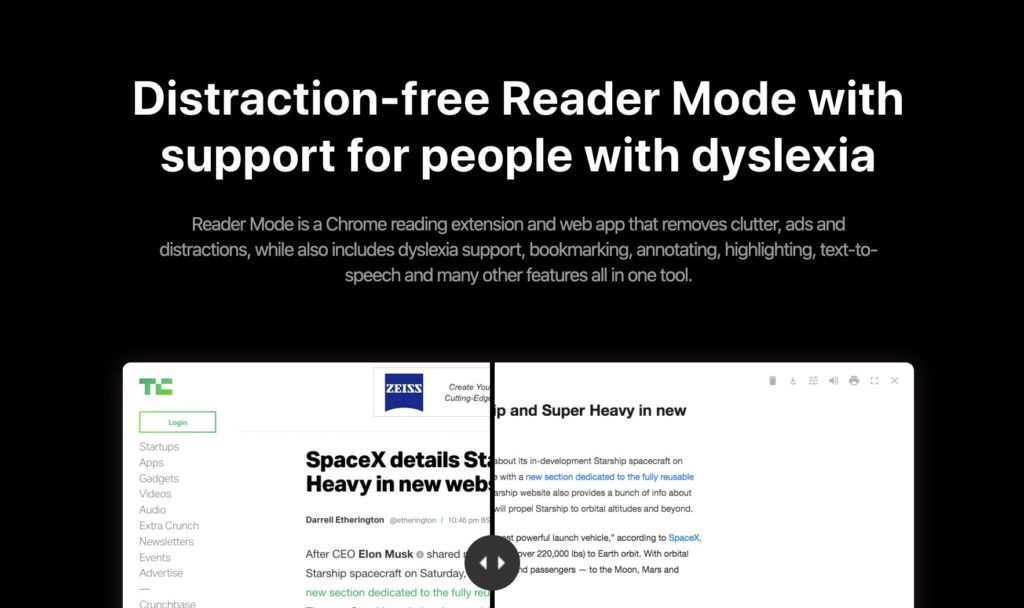
It is sometimes difficult to focus on reading an article on the web. Everything is done to distract your attention. Taking notes on what you're reading can also be complicated. So much so that many people print to free themselves from any distraction harmful to concentration.
Readermode is an extension that will help you solve this kind of problem very easily. Once enabled, the extension allows you to customize how you see an article on the web and highlight and annotate it directly so you can go back to the important parts later. In use it is very convenient. The tool also offers a Premium version that adds super powers to your browsers to read, annotate, save, classify, search, archive all your readings. Detailed review.
Table of Contents
Customize the reading of your favorite articles on the web
The Readermode extension will therefore allow you to create a personalised environment for reading an article on the web. The operation is simple. Once installed on your browser, simply click to adapt the presentation of the article you are reading.
You can choose the font, text size, text color, and background color in which you prefer to read an article. You can also remove elements such as a footer, photos and of course possible advertisements. Remove unwanted text, images, and other items by simply clicking on them. ReaderMode allows you to choose whether to display or hide page elements by simply turning them on or off.
Highlight, annotate, translate a web page with one click
You can also save the link of the page to be able to return to it. This is very convenient because you will also be able to highlight a passage of the text so that you can then find it easily. The extension also provides a direct link to Google translate to get the translation in or from any language with a click. You can also take notes directly on the page and they too can be accessed at any time. All your notes are grouped together to facilitate their consultation, printing and sharing.

Embedded note-taking is one of the functions I like a lot in Readermode. The notes include the highlights that you highlighted during the reading of the article and possibly your personal comments on the highlighted excerpts. Everything you highlight can be found at the end of the article in the notes section. For long articles it is super convenient.
The Readermode extension has been designed to make reading easier when thinking about dyslexics
One of the main strengths of Readermode lies in its features designed for dyslexic students. The extension offers several specific fonts designed to make reading easier and reduce visual confusion, such as OpenDyslexic and its variants (Mono, Bold, Italic).
Other functionalities for accessibility:
- Use of a dyslexia rule : Students can read at their own pace using a ruler that highlights the line being read. This rule is fully customizable (size, color, position).
- Audio playback with synthetic voice : For students with reading disabilities, the extension offers the possibility to read the text aloud, with word-by-word underlining to facilitate visual follow-up. Several voices are proposed and you can vary the speed of playback.
These features make Readermode a particularly suitable tool if you work with students with specific needs, allowing them to access digital texts more efficiently.
Readermode is a dyslexia extension that was designed by its developer with DYS readers in mind.

Why can Readermode be useful for teachers?
In the world of education, Readermode can be a valuable tool for teachers and students. It not only makes it easier to read articles online, but also helps to better organise information and focus on essential content. Here are some key benefits for teachers:
- Improving accessibility for dyslexic students : Readermode offers fonts specifically designed for students with dyslexia, allowing them to read more easily and at their own pace.
- Facilitate text analysis : Highlighting and annotation functions allow teachers and students to highlight important parts of a text, making it easier to understand and study.
- Optimize course preparation : Teachers can save articles, annotate them, and archive them for later use, simplifying the preparation of teaching materials.
You can use Readermode for free and benefit from the main options offered.
Readermode Premium adds super powers to your custom reader
The creator of Readermode has just introduced a Premium version that makes this extension a complete tool for your readings on the web but also to carry out your monitoring and curation as well as your backups.

A series of premium functions that make it an even more practical tool on a daily basis, including:
- Unlimited cloud storage.
Premium playback mode becomes your permanent library with unlimited storage of all your articles set aside. This will allow you to easily access your saved articles, wherever you are, thanks to your personal library. - The "Read Later" function.
The ‘Read it later’ or ‘Read later’ function allows you to save pages and read them at your convenience. You'll still be able to archive them afterwards when you're done. - Folders to classify all your content
Readermode Premium allows you to organise all your content in specific folders. Create as many folders or subfolders as you want. You can also use a tag system. - A full-text search engine and a citation generator
This premium function alone deserves the price of the subscription. Quick, the built-in full-text search engine lets you quickly find what you're looking for. View pages saved by keyword, title, author, description, notes, etc. And when you need citations for your articles, just open the automatic citation generator to see and copy the citation that was generated for you. The latter function is very useful for your research work. You will thus be able to generate a perfectly formatted bibliography or sitography very easily.

Count a little more than 4 € per month for this version of Readermode Premium.
The tool also offers a full licence for schools. For around EUR 50 per month, the school will be able to offer the pro version of Readermode to all its pupils or students and to all teachers. The number of individual licenses managed by a single subscription is unlimited.
Read without distractions. Annotate and highlight passages. Set aside important items. Offer an interface suitable for DYS readers. Print cleanly an article found on the web. Readermode combines ultra-convenient functions.
Link: Readermode

 English
1 Response
[…] optimal when you are, for example, on a newspaper article. We're pretty close to ReaderMode, another tool that makes it easy to read on the […]