Last updated on 12 May 2026
Classroom is free and free software that will allow you to create and manage a plan of your class very easily. It is a free application running on Windows, Linux and OsX to help teachers manage their classrooms.
Classroom is a ‘family’ project that is owed to three members of the same family. Respectively computer engineers and mathematics teacher, the three larrons have built a simple and practical tool to help you juggle different classes and configurations.
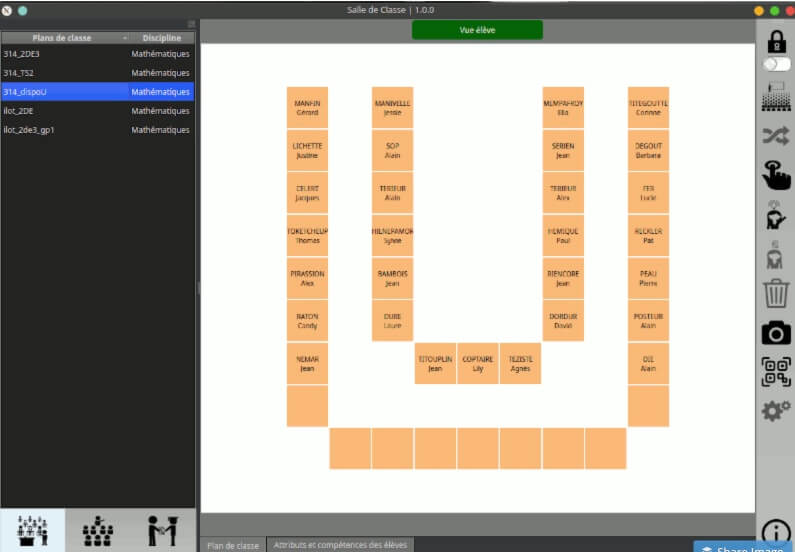
Classroom allows you to have a visual map of your classroom like this other application for create class plans for your courses presented here some time ago. But the Classroom app does much more than that. Quick presentation.
Comprehensive functions to manage your classes and student groups
The app offers many functions that go far beyond the classroom plan. You can:
- Create and simply manage class plans
- Create and manage groups students for work on islands, for example
- Assign students skills and attributes of different types
The plan of your class is built with the end of the mouse with squares to place on a virtual class. Then create your classes and read them from your different students. The software will distribute them randomly. You can also of course keep your hand and place them as you wish.
As a second step, you can also set up groups of students to work in islands. In use it is very convenient.
A tab system at the bottom of the screen allows you to switch from the classroom plan to the management of students’ skills and attributes. It is up to you to use it as needed. You will be able to play with colors, insert counters, notes, free text …
A short video of one of the authors of the software gives a quick tour of the application:
Note that Plan de classe offers a complete manual very well done with several other videos to help you take charge of the software.
Your class plan on your mobile
Class plan can also be used on mobile or tablet. You will not find it on the various "blinds". the authors decided to stay away from the merchants. To get it, all you need to do is flash the ‘QR code’ that you will find in the application itself.
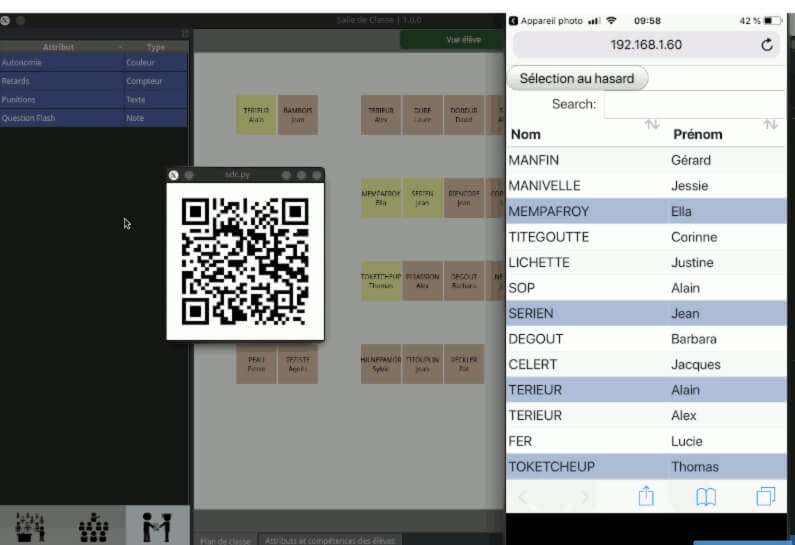
I was telling you when starting Classroom is available on Windows, Linux and Mac. On Windows and Linux the installation is simplified. If you are on Mac, it is a bit trickier, you will have to go through a manual installation. I advise you to follow the ps step by step now in the application manual.
A beautiful realization made available to all. Thanks to the authors. If you too have developed tools that can be useful to the educational community, give me a signal so I can help you spread them widely.

 English
Hello,
Unable to access the .msi download link on the page: https://github.com/wawachief/SalleDeClasse/releases/tag/v1.1.0, only source codes.
Normal?
Hello Régis, perhaps the easiest way is to contact the author of the software directly: olivier.lecluse1 (a) ac(tiret)caen (point) fr
It's all here
https://github.com/wawachief/SalleDeClasse/releases/tag/v1.1.1