Last updated on 12 May 2026
I'm sure you've been through this scene in class before. A student stares at his white sheet. He has ideas, it is obvious, but between what he would like to write and what he happens to put on the page, there is a wall made of spelling, fear of fault and tiredness of writing. You know he understands. You also know that he will win if he is left alone in this ordeal.
For these students, and especially for children dyslexic, dysorthographic or with a language disorder,technological aid does not do the work for them: it gives them back access to the written word. Among the best tools in this category is Lexibar, a DYS software free of charge; serious, designed with speech therapists, including Three key functions remain free for life.
I tested it, here is my opinion.
Table of Contents
What exactly is Lexibar?
Lexibar is a reading and writing aid software for dyslexic pupils Designed by the Quebec publisher Haylem, in collaboration with speech therapists. It is installed on the student’s computer or tablet, and it is added to the software he already uses: word processing, browser, PDF reader.
Lexibar works on Windows, Mac and iPad. The interface is available in French and English, with a rich dictionary, some 20 synthesis voices and a bank of more than 12000 illustrations designed to help the student clear up certain meaning ambiguities.
The application can be downloaded from the official website, with a 30-day free trial to test all functions.
Lexibar is not the most visually modern tool. But that is not really what he is being asked to do. Its interest is elsewhere: in the discreet help it provides at the precise moment when the pupil needs it most.
Five functions designed for DYS students
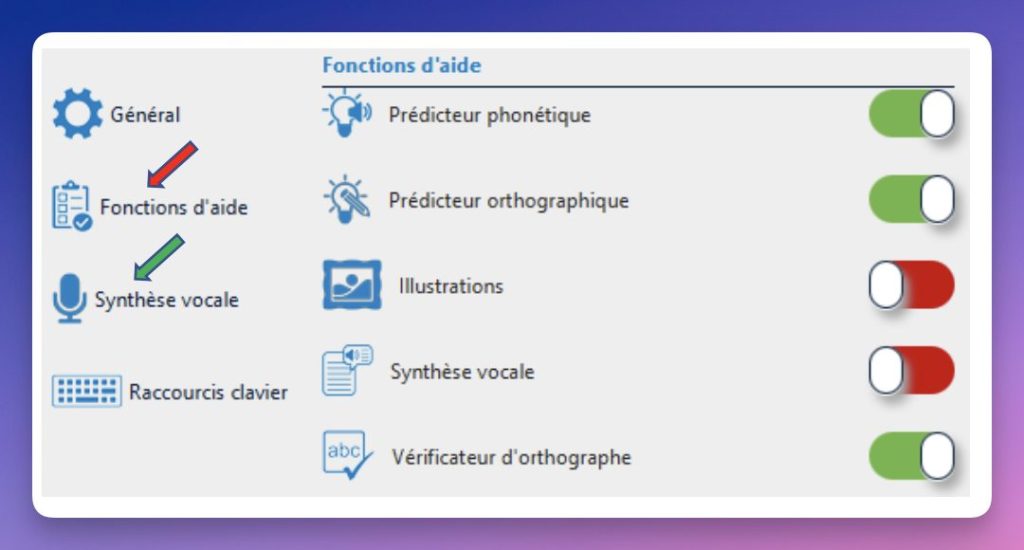
One of Lexibar’s biases is the modularity. Each function can be activated or deactivated separately. The teacher or orthopedagogue keeps a hand on what is offered to the student. This is valuable when working on remediation and wanting to avoid cognitive overload.
What I found interesting was not so much the list of functions as how they respond to very concrete blockages. It is not only in the addition of technical options, but in a logic of accompaniment of the student in front of the writing.
1. The spelling predictor
The student starts typing a word. Lexibar offers him a list of correctly spelled words, based on the letters already entered. He chooses. This is the classic principle of Word prediction, but well integrated into the text that the student is writing.
2. The Phonetic Predictor
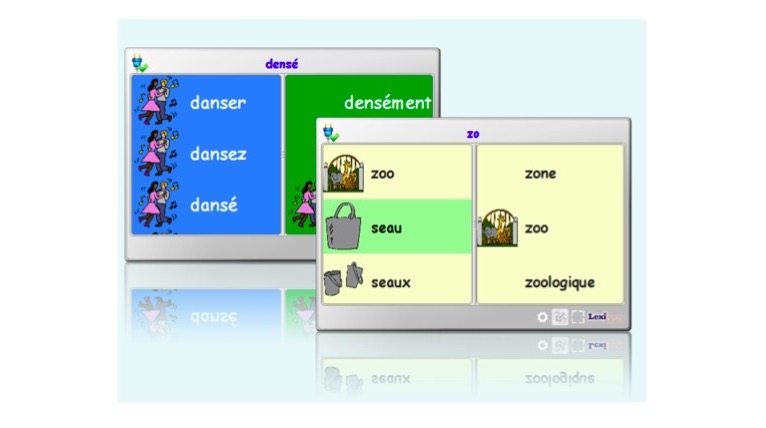
This is probably one of the functions that really sets Lexibar apart from other free tools. Does the student write ‘orizon’? Lexibar includes the suite of sounds and offers "horizon". For a child dyslexic which passes through the phonological route, This predictor is a real buoy. It makes it possible to produce a word correctly spelled without having to guess the mute letters or traps of the French language.
3. Voice synthesis
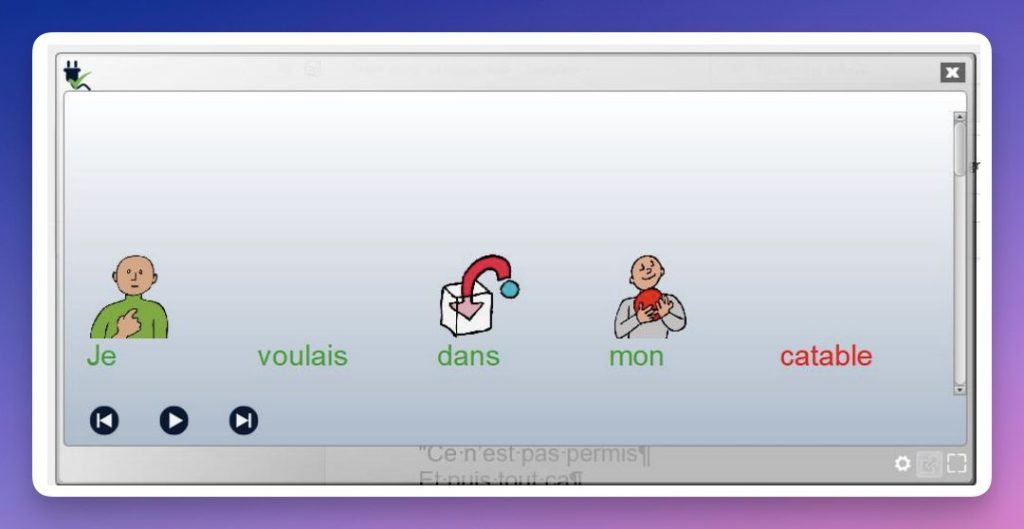
Lexibar reads out loud what the student writes, as well as any text displayed on the screen: web page, PDF document, Word file. The benefit is twofold, in reading for students who decode slowly, and in writing to allow them to hear what they have produced and spot their mistakes themselves.
4. Illustrations
Each word proposed may be accompanied by a small illustration. For a young student who hesitates between ‘sea’, ‘mother’ and ‘mayor’, the image immediately casts doubt. The same function can be added in the reading window, to support the comprehension of a text.
5. The colour-coded spelling checker
In place of the eternal red underlining, Lexibar uses a Color System to report the type of error : grammatical, spelling, lexical. The student sees not only where he or she was wrong, but also what he or she needs to correct. This is clearer and more useful than a simple “it is wrong”.
A real good plan: three free functions for life
This is probably the point that will speak most to French teachers at the moment, in a context where the digital budgets of schools and colleges are tight. Of the five functions of Lexibar, three remain entirely free of charge, with no time limit, as soon as the software is downloaded:
- Voice synthesis
- The spelling predictor
- The colour-coded spelling checker
In other words, you can equip the computer station with a DYS Student, or a whole class background, without paying a penny and already have a serious technological help to offer. For many students, these three bricks are enough to transform the relationship to writing. And it is arguably one of the few market tools to offer such a strong free base in the area of DYS support, where most serious solutions are around EUR 100-300 per licence.
The two remaining functions, the Phonetic Predictor and Illustrations, are available for free trial during 30 days, then switch by paying. (count about 10 Euros per month) These are the most useful for severe profiles, but the free base remains largely usable to get started.
It is not magical. No software is. But when a student blocks on the spelling even before they have been able to formulate their idea, this type of help can change a lot.
What does it look like in class?
On paper, we have a fairly complete free DYS software. In use, here are examples of situations in which it makes sense.
- A written production in CM2 or 6th. The dys student can finally focus on his ideas rather than fear of fault. The speech synthesis allows him to re-read his text ‘by ear’ before returning it.
- A documentary reading in history-geo. A student with reading difficulties can follow the text displayed on the screen with Lexibar’s voice and access the content of the session at the same time as the others.
- Learning English. The bilingual interface allows a dys student to have the same type of support in LV1, which is rare in French-speaking tools.
- Working with an AESH or an orthopedagogue. Enabling and disabling the functions one by one makes it the perfect tool for progressive remediation sessions, where crutches are removed as the student gains autonomy.
A friend who teaches French in middle school recently told me about one of her 5th grade students. severe dyslexia. At the beginning of the year, he almost systematically made blank copies in writing. After a few weeks with Lexibar installed on the class post, his argumentation text was two pages long. Not perfect, and that is so much the better, but legible, and above all to him. The detail which it noted: it was the pupil himself who refused to have the phonetic predictor removed from him, because he was beginning to memorise certain spellings by seeing them displayed correctly.
What really works
Several elements deserve to be highlighted, in a landscape where manyso-called "DYS" tools They are sometimes simple, disguised proofreaders.
The Phonetic Predictor first. Very few free or semi-free tools offer this function, and it is precisely the one that changes the life of a dyslexic child. Next comes modularity : each function is set independently, allowing Lexibar to be adapted to a specific educational project.
The free base for life is also a real editorial gesture, rare in this segment of the market. For many students, these three bricks are already sufficient to transform the written report, without the need for a licence. Finally, the pedagogical seriousness is felt: the software has been designed with speech therapists, and the accuracy of the functions confirms this. We are not in front of a nice empty interface.
Assisted handling. Lexibar offers many videos and tutorials well done enough to allow you to take charge of all aspects and functions of the software.
What I like a little less
You also have to be honest about the limits. Lexibar is not an online application: it needs to be installed on each station, which can complicate deployment in establishments where IT services lock machines.
The main obstacle, in my view, is not pedagogical but practical: Installing software on an institution’s workstations often remains a small obstacle course.
Two key functions are paid for beyond 30 days, the phonetic predictor and illustrations, and these are arguably the most useful for DYS students young or with a severe disorder.
Tastes and runners are always special, but I think that the graphic atmosphere would benefit from being revisited and updated a little.
My opinion: to test without hesitation, especially in primary and middle school
The Lexibar Software does not invent anything spectacular. Word prediction, speech synthesis, spell checker: These bricks exist elsewhere, sometimes for free. What makes the value of this tool, this is the assembly quality and attention to the profile of DYS students. The phonetic predictor, the colour code of the checker and the possibility to combine illustrations put Lexibar one notch above most of the free tools found online.
For a French teacher looking for a Free DYS Software to equip one or more pupils without a dedicated budget, theequation is frankly interesting : a download, 30 days full test to test the five functions, then three functions that remain free for life. If your students hang on to the phonetic predictor during the trial, you will then have a strong case for applying for a license from your school or community. Otherwise, the free base is already enough for many classes.
 English
Hello,
‘Two key functions are paid for beyond 30 days, the phonetic predictor and the illustrations, and these are arguably the most useful for young DYS students or students with a severe disorder’: I, too, find this to be a significant limitation.