Last updated on 12 May 2026
How to offer each of his students a personalized feedback on a homework or on his work? Qwiqr is a great tool that will make it easier for you by giving you the opportunity to give or send a personalised feedback to each of your students.

The idea came to Mark Waller, a former IT developer who became a physics professor in the southwest of the UK. How to remotely offer the most personalized and complete feedback possible. Mark did not do things halfway. Qwiqr allows you to easily send your feedback in voice, video, text and even add resources such as links or files. That's great.
Make a personalized return to a student with a simple smartphone
Qwiqr has only one defect, …son's name is unpronounceable. For the rest, everything is very simple and well thought out to save you a maximum of time in your corrections. The application works from your smartphone or computer.

For each student you will be able to record your voice, as if you had the student in front of you. You can also record a video or write a text. That is not all. You will also be able to attach a photo, a link or one or more files at the same time. To use it is simple, fast and effective, it is enough to do a small test to convince yourself of it.
QRCodes or a link to personalize returns
Qwiqr was originally designed using a system of QRCodes. The idea is as follows. When you log in to the app, you have the option to create with one click and then print label boards with QRCodes. Then paste a QR on each student copy.
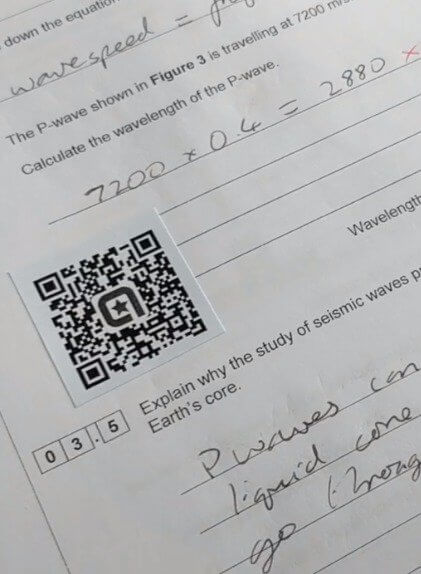
After that, you just need to flash a QR Code with your smartphone to start recording your copy correction. For example, you can take a photo of the copy and record your return by commenting it on the audio. Once your student has retrieved his copy, it will be enough for him to flash his QRCode in turn to hear your voice and see your complete return. Malin.
To further simplify the system you also have a link system with a unique code. For example, by sending it to your student by email, they will also have access to your personalized feedback.
All your feedback is archived in your teacher interface. You can also use standard corrections for multiple students very easily.
Qwiqr also offers a conversation function. With the latter your student can in turn make you a return by the same means.
A clever tool to make your corrections alive. Especially useful if you are on a distance.
Qwiqr is in English but the handling is really very simple. The service is free for most functions. The developer will ask you for around 20 euros for a whole year if you need advanced features like sending videos. A fair price to allow it to pay, among other things, for the hosting of files.
To go further: Search sites for create QRCodes

 English
For pronunciation: Qwiqr is a transposition of ‘Quicker’ = faster; because the basic idea is to provide an audio commentary to the student. We speak on average 7 times faster than we write.
A free French solution exists thanks to the DANE of Versailles. Not only audio is available, but also video. In addition, it is GAR!
Our gummies are repositionable and apairable with a smartphone without an app!