Last updated on February 17, 2025
Clipchoose is an online service that allows very easily create a survey from videos.
There is no shortage of online tools to set up a survey and question students or learners. I have presented a few of them here. In all, more than 20 tools to create online surveys. Most of them make it possible to propose questions illustrated by texts or photos. Clipchoose allows you to vote on videos.

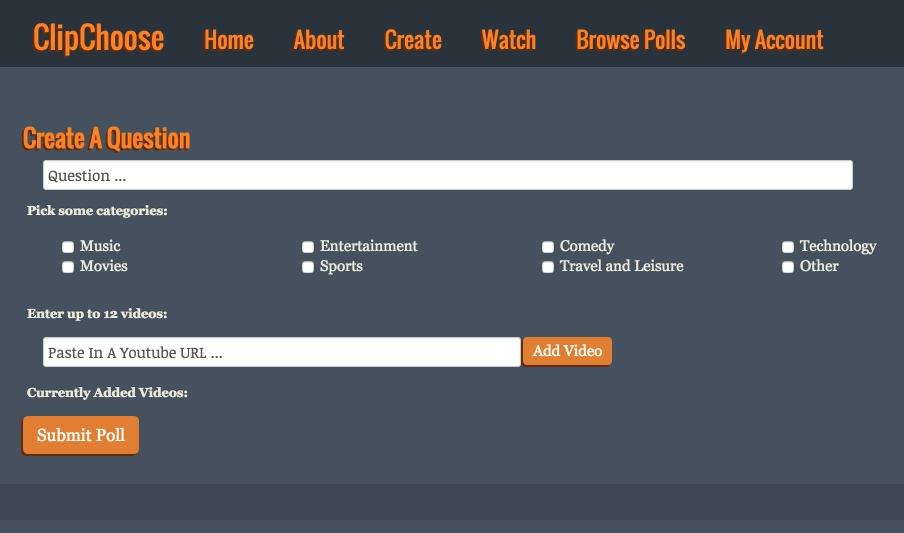
As its English name suggests, ClipChoose offers respondents choose between two, three, four and up to twelve videos. The interface is in English, but the setup is very simple. First of all, you need to register. Then you will be able to create your first survey.
You define the question you want to ask the participants, classify the survey in one of the proposed categories and finally you will add your videos. ClipChoose connects to YouTube for this. And YouTube only unfortunately. You indicate the URL of the video on YouTube and ClipChoose will immediately include it in your survey. You can submit up to 12 videos in a single survey.
The tool provides you once your survey is published a unique URL that you will be able to share. The URL is the page of the poll on which respondents will find the question asked and all the videos they will be able to watch before voting. On the same page, a comment field will allow each other to exchange and explain, for example, their choice or vote. It is worth noting and it is a good point that participants in your survey will not need to register for the service to be able to vote.
At the moment, the polls are free, but public. You can also browse a long list of surveys created by other internet users on the site. ClipChoose announces the upcoming arrival of an option to create private surveys and advanced features to manage your published ones.
ClipChoose and currently free of charge and without advertising.
Link: ClipChoose
 English