Last updated on 12 May 2026
WorkFlowy is an online application that allows to take notes intuitively and efficiently.
But WorkFlowy is much more than that. This is a great tool to organize your thoughts and projects. I have a real crush on this amazing tool, arguably the simplest, easiest to handle and most flexible in its class.
WorkFlowy is a web-based application that can be used on any browser. Its approach is ultra simple, it organizes your thinking, notes, tasks and ideas as a list. A single list.
Once registered you access a blank sheet as in a regular word processor. As soon as you start writing, you create the first item on your list. Each item can contain as many sub-items as you want and the same goes for sub-items or categories and so on.
Unlike tools like Evernote or OneNote, you do not need to create a note per idea and classify them in different folders. WorkFlowy offers a unique list. You will then be able to zoom in on a point or subpoint on your list. Each point also has a drop-down menu allowing you to edit, add a subpoint, share, delete or export, but we will come back to it.
A video to make it clearer:
Try it out, it’s almost immediate. Especially since WorkFlowy offers small accompanying videos for the start-up in the form of remarkable help with clarity. The tool also offers to train you to use keyboard shortcuts to go even faster in taking notes. You can display a permanent memo to get used to it.
WorkFlowy also advises you to use #hashtags and references @users. The powerful search engine integrated into the app will thus isolate you from all your notes all those concerning a theme or a person. All in a fraction of a second.
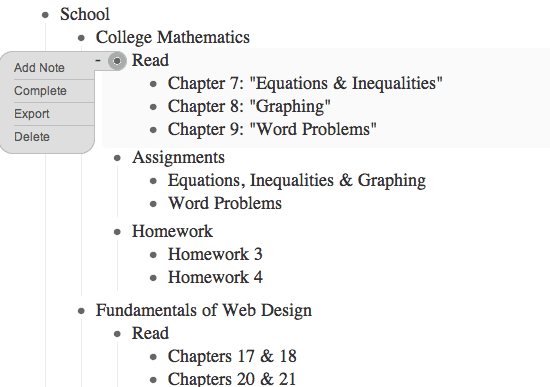
Another interesting function for use in teamwork with colleagues or between students, the possibility to share all or part of your notes. You can share one or more chapters from your list via a single URL. Shared points will appear in color in your list. You will also be able to define the related rights. The people with whom you are going to share will be able to either consult only your notes or intervene and modify them if they wish.
In the end, a very practical online application that allows you to focus on the essentials thanks to a stripped-down interface and very intuitive use.
WorkFlowy can be used online from any computer. The tool offers an extension for Chrome that allowsuse even without an internet connection. Your notes will sync as soon as you log back in. There is also a free version for iOS and Android They also allow WorkFlowy to be used without a connection.
WorkFlowy is free up to 250 notes per month (500 by following the link below Confirm the email sent to you immediately to receive 500 free notes per month). This is largely sufficient for normal use
For special needs, you can opt for a subscription of around EUR 4 per month that adds a few additional features and lifts the monthly note limit.
Link: WorkFlowy
 English
I started testing today for a reading sheet. I'm excited! Especially since I tested the .opml export and then made an import into a mindmapping software: a beautiful card generated!
The stripped appearance helps to stay focused.
Hello,
Workflowy is indeed an amazing application of efficiency. The ability to share any level of the central document and invite people to collaborate through a simple url is great. I use it with my high school students. https://profjourde.wordpress.com/2014/07/01/workflowy/
F.