Last updated on 12 May 2026
Lexiclic is a great application developed by two teachers from the Besançon Academy who will enable your students to find the spelling of a word on their digital tablet. A magic keyboard to access the lexical spelling of a word in just a few clicks. A great idea to make kids from CP to CM2 autonomous to learn spelling intuitively and autonomously.
Better yet, Lexiclic will put students in a position of success in writing productions by reducing the fear of spelling mistakes.

Lexiclic is an application for iOs and Android tablets. You can also use it on a computer from a web browser. It was designed by teachers for teachers and it shows. Very easy to handle, it has a range of options and customisation functions to adapt to any situation.
Write just to love writing
Lexiclic's keyboard is a model of ergonomics and simplicity. The idea is to allow the child to look for how a word is written in two or three clicks and in autonomy. On the sound keyboard, with the help of illustration drawings if necessary, the child will type the sequence of sounds of the word he is looking for. Most of the time, the first two or three sounds are enough for the application to display a results page with the word searched for. The child can then memorise the spelling and write it down without error.

Compared to the paper dictionary in which the child drowns in research and drowns in passing the idea he had in mind at the time he was writing, Lexiclic allows him in a playful way and at his own pace to stay focused.
Clear and colorful result pages to help memorize
The results page when the child searches for a word is very successful. The nature of each word (name, qualifier adjective, verb, invariable word or expression) is identified by a color. A click on the verb label gives access to the conjugation. Many drawings enrich the words. The application proposes two levels. Lexiclic 1 proposes 7 000 words for the levels CP – CE1, Lexiclic 2 for the following levels proposes 18 000 words.
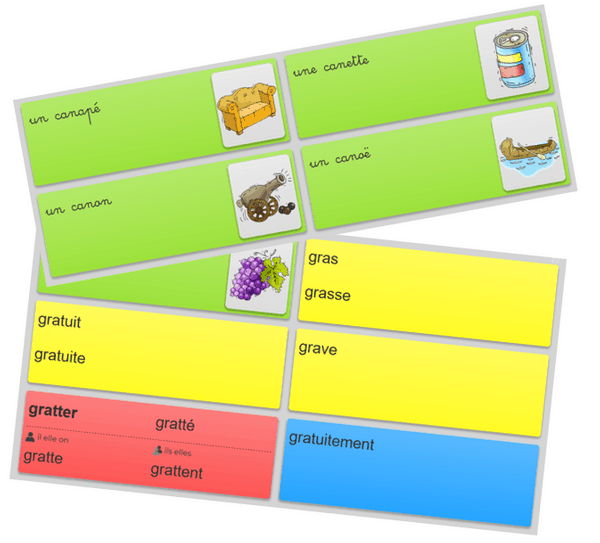
Advanced customisation features to adapt the application to your pedagogy
Lexiclic adapts to your habits and pedagogy and not the other way around. You can go through the settings of the application to change the color of the labels of the nature of the words. Change the color of the keyboard to identify for example the two levels proposed Lexiclic 1 and 2. You can still play on fonts, display illustrations or not, set the available times in the verb conjugator. Don’t be afraid to go wrong, you can always find the default basic configuration with one click.
Simple, playful, ergonomic Lexiclic is a good surprise that will (re)give your students the taste to write without fear …et without mistakes. The kids are gonna love it.
Lexiclic can be used on a tablet without the need for an internet connection. A free version allows you to use and try the application. Designed for the school, the application is also available in a full-featured, unlimited pro formula to allow you to install it on tablets or computers in the classroom. The price depends on the number of installations.
Note that the application is still under development. Two versions are available at the moment French and Swiss. The latter is based on the usages of French in Switzerland. A Belgian version should follow. In the boxes also a version for colleges.
Link: Lexiclic
 English
1 Response
[…] (February 2021): More information on this keyboard can be found in the article ‘Lexiclic. A magic keyboard to learn spelling’ by Fidel Navamuel as well as tutorials and other resources in the […] page