Last updated on 12 May 2026
We are increasingly called upon to read on screen. Sites, articles, news, difficult to escape this new way of reading in our daily lives.
Much more information can be read quickly, but our eyes are not made to read on screens. Words are skipped, paragraphs are repeated several times, and reading on the screen does not facilitate concentration.
Fready is an amazing tool that tries to solve this problem with an original solution to make it easier to read on screen.

When you read a paper book, you sometimes follow with your finger the line you are reading. Fready does exactly the same thing with a kind of color pointer that will guide your eyes and brain as you read.
An extension for Chrome to make it easier to read on screen
Fready once installed in your browser will change your on-screen playback mode. You'll read more and faster with scientifically-developed features to help you focus when you read … on what you're reading.
Extension for Chrome first of all, when you want to read an article found on a web page, you can get an online version with a click text without unnecessary distractions. Clicking on the extension icon and Fready gives you a stripped-down version of menus, advertisements and other visual animations that can distract your brain and interfere with your concentration.
Fready also shows a colour slider under the first word of the article. You can adjust the color and dimension. It is a kind of virtual pointer. Click on the space bar and immediately the cursor moves and highlights the text in the rtythm of your reading. It accompanies your eyes and brain effectively. Test it, it’s surprising. You can of course set the scrolling speed that shows you the number of words per minute that you will be able to read. Other information always useful reading time for each article.
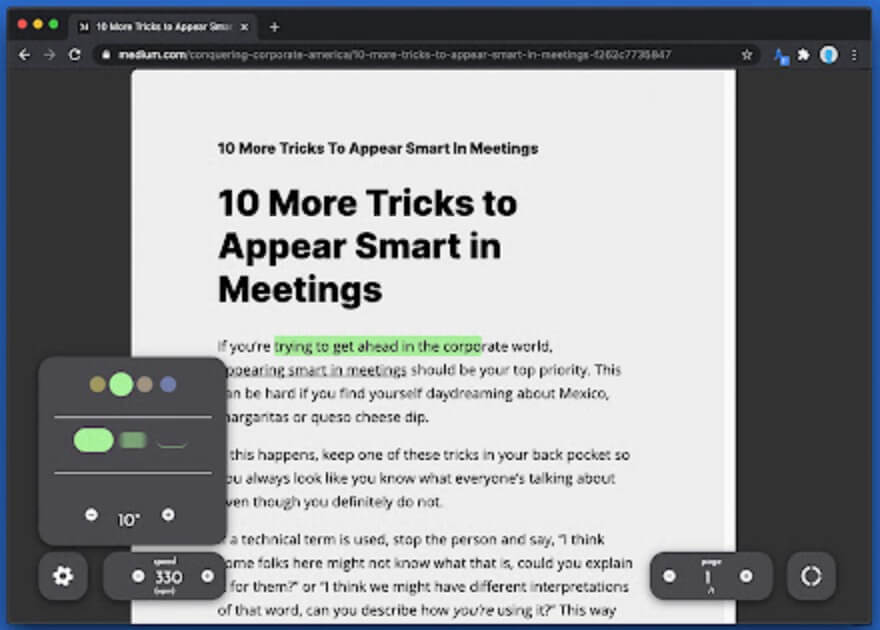
Save the articles you want to read on the screen
Fready also allows you to curate articles or texts found on the web. The extension allows you to save the articles you find while browsing for later reading. Practical.
You have two options when browsing and clicking on the extension button. You can either read the article immediately with the above-mentioned visual guide or save it for later reading. When you log in to the Fready site with your credentials you will find all the items you have set aside. The site shows you the reading time for each of them.

Fready has been designed to make it easier to read articles on the screen, but also entire books in the long term. Freadly is still under development and should give us a few more surprises. At the moment the developers have planned to offer the tool free of charge. A paid subscription of a few euros per month is announced but only for reading accompanied by online books or long PDFs that you can add to your library.

 English
Superb application, useful also for many people with visual impairments or attention difficulties. He only lacks the word, but that is what Edge does.
Thank you for sharing.
Hello,
It may be less complete, but I have been looking for an equivalent for Firefox:
https://support.mozilla.org/fr/kb/retirer-tout-le-superflu-des-pages-web-grace-au-mode-lecture
Good continuation!