Last updated on 12 May 2026
Quizalize is a great online tool that allows to easily create questionnaires in the form of games to submit to your students.
This platform offers a system based on games and challenges around questionnaires to learn while playing. A real success. Your students will try to respond in class or at home to the quizzes you will create and will receive points if they respond well and quickly.
Quizalize can be used on a computer, tablet or laptop from a single url and a class code. There is no application or plug-in to install, the service works from a simple browser.
Creating quizzes on Quizalize is simple and intuitive. After registering, all you have to do is give a title to your questionnaire and choose a theme. You then proceed to write your questions which may include images and up to four options for the answer. You will also be able to specify a time limit for the answer that can range from 5 to 120 seconds for each question.
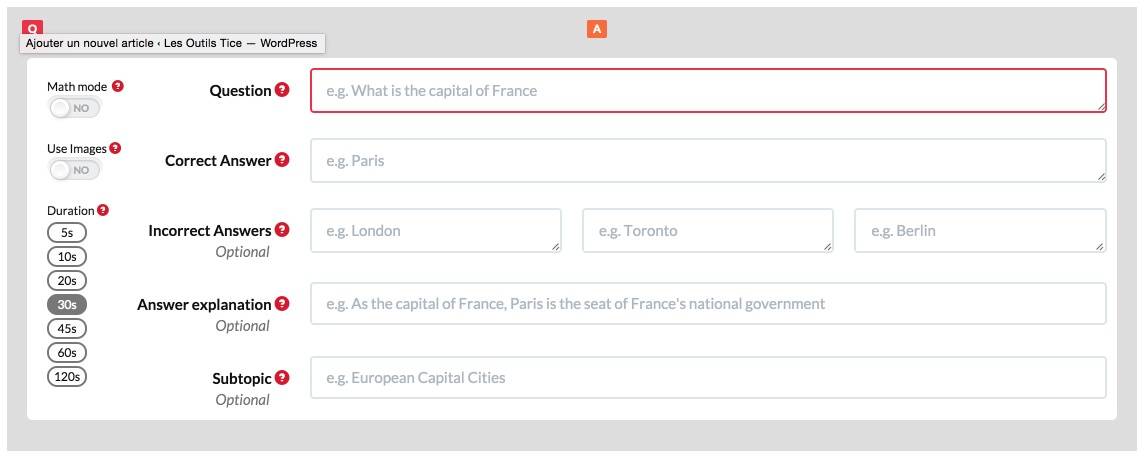
You can then save your questionnaire and offer it to a class by providing it with a unique code.
If you offer the activity in class, you can follow the results live from your teacher access. You will be able to check which questions pose the most problems to the class group, but also identify the students who need your help the most.

The platform is in English, but the handling is simple and does not pose a real language problem. The site offers a quiz bank mainly in English to test yourself some are free of charge others are not. Good news, l“Registration and use of Quizalize shall be free of charge.
A good tool to "challenge" your students to learn and revise.
Link: Quizalize

 English
a small error was reported to me for the use of the jumble code
Place this code in the answer window and not in the question window
In order not to have come to write that, here is one last tip:
it is possible to add a comment or a written explanation following a wrong answer. If the answer is correct, this comment does not appear. But it may be interesting that it is always visible (whether the answer is good or bad): To this end, a code must be added before the comment: ‘exp:1//comment written’.
A+