Last updated on 12 May 2026
Mindomo is an online tool that allows to create easily, alone or with your students, mind maps or heuristic maps. It is distinguished by a relatively simple use that puts it within everyone's reach and very practical sharing tools.
The advantages of mind mapping are now well known. A heuristic map makes it possible to organise information in a synthetic and visual way. They facilitate, among other things, the memorisation or understanding of a concept or problem.
Until recently, the software for creating mind maps was relatively complex. Mindomo is one of the new generation tools that have broken down this barrier. Once registered on the site, you will be able to create your first ‘ideas card’. Online support is very effective. Each block has its own drop-down menu that offers all the options offered. They can then be connected to each other and moved from the end of the mouse.
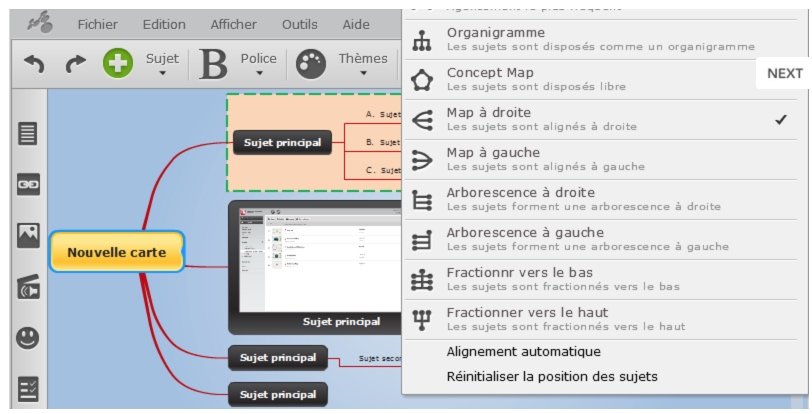
You can add explanatory notes to the blocks, you can also illustrate them by inserting images, videos or links. You can use the various functions very quickly and you will be surprised to be able to master in such a short time a tool for organising, prioritising and gathering your ideas.
Another strength of the tool is the possibility to work with several on a single heuristic card. An integrated instant messaging system even makes it possible to exchange information during the collaborative production of a mental map. Practical.
You can, once completed, print your cards or export them in PNG, GIF, JPEG or PDF format. Mindomo also provides a unique URL to share a map simply. I also liked the presentation function of Mindomo. You can prepare slides with your mind map. The first slide will show your entire card by default. You can then delimit the space you want to see in the second and then in the following ones. By clicking on the projection mode you will be able to switch the slides from one to the other with a beautiful zoom effect that is reminiscent of Prezi.

Mindomo offers an online version, but also software for your computers, smartphones and tablets. These will allow you to work even without an Internet connection. Your cards will sync as soon as you log in again.
Mindomo is in English, but the translation is underway. This gives quite amazing screens written in English and French. Mindomo allows you to create three cards for free. Then you have to switch to a paid subscription.
Link: Mindomo

 English
Good to know: with my academic address as a teacher I have never been limited in the number of mental cards and I pay nothing.