Last updated on 12 May 2026
Recordense is a utility that will help you transcribe written interviews or audio interviews. It is well known that a recorded interview can quickly turn into an arduous and time-consuming task. Recordense will make it much easier for you.

Recordense provides you, without the need to register, a notebook optimized for your transcription. First of all, you need to upload the sound file you are going to be working on to the site.
The site will then provide you with a reader suitable for working with sound.
The site accepts most audio file formats : Wav, Mp3, Ogg, etc. You can use a file on your computer or search for one directly on your Google Drive. There is no size or limited duration. Once your file is uploaded to the site, the audio player opens above the blank sheet that will allow you to take the notes. The reader is used via large buttons, but you can also use easily rememberable keyboard shortcuts that will help you be even more efficient.
The use is simple. One click and you will hear the sound. A small dimmer will then allow you to speed up or slow down the flow. A button on each side allows you to jump forward or backward for 5 seconds.
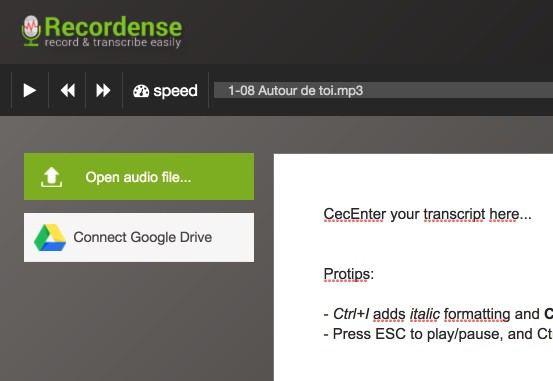
The word processing proposed to take your notes is classic. It offers the classic formatting functions. More interestingly, you will be able to insert time marks corresponding to a moment in the registration. An interactive time marker. With one click you will be able to return to the record at the marked passage. Practical.
Once your transcript is complete, all you have to do is upload your document in text or markdown format on your computer.
The tool also offers an application for Android devices that will allow you to work in mobility.
Recordense is free.
Link: Recordense

 English
hello Fidel, I have been using the Google Docs app for some time, ‘tools’ tab, ‘voice input’ choice and when the microphone appears, you can speak and what you say is automatically transcribed into excellent French or another language, without any fault. The point is that you can find your file on your smart phone and therefore, you can continue the transcription, share it, work simultaneously with someone else, …
thank you again for your finds
adeline
Hello Fidel,
I use Happy Scribe. https://www.happyscribe.co/fr
The use of voice recognition for the transcription of my interviews.
Article still useful eight years later, thank you! Recordense remains excellent for long audio interviews uploaded in .mp3 / .wav. For short social videos (TikTok, Reels, YouTube Shorts) where you often only have a URL and not the source file, I go through Voqusa — the link is glued and the transcript falls directly, without inscription. The two tools complement each other well depending on whether the source is an audio file or a video link.