Last updated on 12 May 2026
Google Tour Builder is a online storytelling tool that makes it easy to create and explore stories and places around the world based on GoogleEarth’s mapping. The tool is free and can be used from a simple web browser.

With Google Tour, you can create a guided tour of any topic of your choice, zoom in to show where the events took place, and easily embed text, links, photos or videos of the story. You will be able to create a multimedia chronological frieze based on a map with real ease.
Using Google Tour Builder is very simple.
There is no need for instructions for use, the interface is intuitive and the operation is immediate. Once connected to the site you will be able to create your first virtual tour. You can create as many towers as you want.
Create your introduction with a title and a global presentation and then start installing the steps of your journey. Simply indicate the place or address and it will appear on the Google map as soon as possible. Once you have installed your steps, you will be able to edit each of them. You can give it a title and specify a date or period. You can then add a description that may contain one or more links. Ideal for referring the reader to online add-ins.
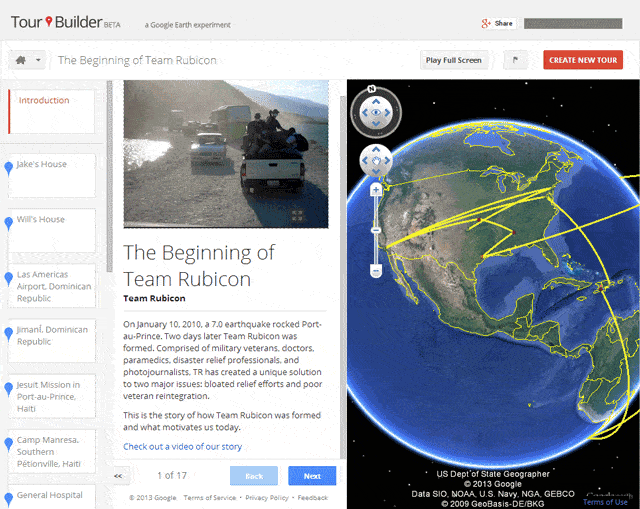
Tour Builder makes it possible to offer multimedia chronological friezes
Google Tour Builder also makes it possible toillustrate each step with one or more photos and videos. By clicking on an image, the reader launches a kind of slideshow that enriches the presentation of the stage. Your work is automatically saved on the server.
Once you have finished your storytelling, all you have to do is share it. Google Tour Builder provides you with a link that you can broadcast by email or via social networks.
Google Tour Builder can allow you to easily create educational resources and interactive tours to tell a story to your students. You can also use it in combination with a paper questionnaire to propose a game or a knowledge check.
The tool could also lend itself quite well to use by the students themselves. Work alone or in a group to present a presentation or research work. The only limit is Google itself. To use Tour Builder, you must register or log in via an email address. Too bad.
Google Tour Builder is free and ad-free. It can be used from a simple browser.
Link: Google Tour Builder
 English