Last updated on 12 May 2026
Table Capture is a little magic utility for all those who like me once wanted retrieve a table of data present on an HTML page. It is not easy at all.
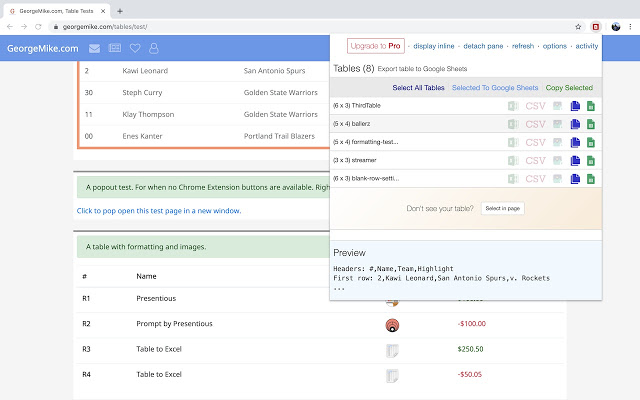
Table Capture is a small extension for Chrome that will give you the ability to easily capture HTML tables for use in a spreadsheet, whether you're using Microsoft Excel, Office 365, Open Office, or Google Sheets.
Retrieve data tables from a site without tearing hair
The web is an inexhaustible source of data to enrich or illustrate a course or academic work. While it is very simple to set aside text, images and even Recover videos from the web, things get tough when it comes to saving structured tables of data on an html page.
The Table Capture extension will make this possible with two clicks and three moves. Once the extension is installed in your browser. This will indicate you with a small icon as soon as a table is available on a web page.
The use is relatively simple. Simply highlight the text in the table you are interested in and make a check-click.
The extension launches and shows you the table that you can recover. The tool will also show you a convenient preview of the table. You can clear empty cells. You can also select multiple tables.

Capture HTML tables to recover them in Excel
Table Capture allows you to export any web table in text format or in a Google sheets spreadsheet, which can be used immediately. You can also import your extraction into Excel or retrieve all the data in .csv format. Magical.
Table Capture has convinced nearly 100,000 users. The free version allows you to recover html tables in Google Sheets but not in Excel. To debride this option and some others it will be necessary to pay about 8 € for a whole year.
Link: Table Capture

 English
For the Firefox browser, I use the ‘Download table as CSV’ extension.