Last updated on 12 May 2026
The article was updated on 29 August 2017 – View the new version of the Screencastify presentation
Screencastify is an extension for your Chrome browser that allows a simple click ofvideo-record the contents of your computer screen.
A great tool that will make it easier for you to create videos for your students to show them a website, an online resource or a user manual on the web. Ideal for the inverted class.
Screencastify has many advantages if you use the Chrome browser and do not hesitate to use Google services. Once installed, this extension will provide your browser withan additional button in the form of film film.
To create a video and start recording your screen, a simple click will suffice. You will use the microphone on your computer to record your voice and can choose to preview the content of your video live at the bottom of the screen in a small window.
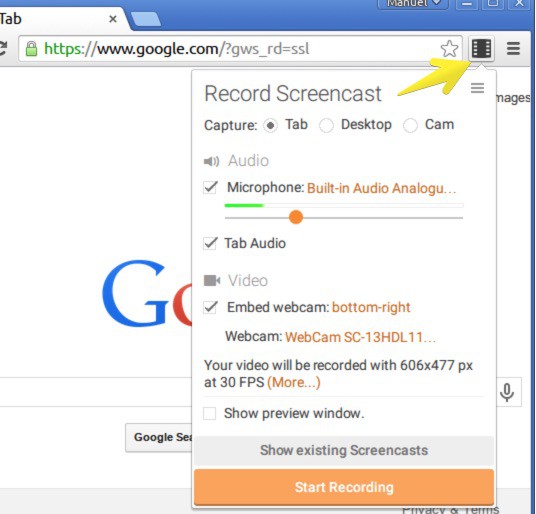
A second click and it's up to you. A countdown of three seconds starts before the start of the recording. Everything you do on the screen is recorded. Once your demo is complete, you just have to click again to stop your video. Simple.
One of the advantages of Screencastify, in addition to its ease of use, is the possibility to save your video directly to Google Cloud. Ultra practical. You can also if you want to save it only on your computer and then upload your video to your Google Drive. Sharing is also easy. You can upload directly to YouTube and get a link to share with your students.
From the extension menu, you will have access to a dashboard in which you will find all your videos recorded via Screencastify.
An excellent tool that is simple and easy to use. Best for last, Screencastify is free and allows you to record as many videos as you want. Only limit among others of the free version, the duration of the videos. Each of them may not exceed 10 minutes. Test this extension, if you find regular use, then switch to the pro version. The latter lifts all the limits and brings some additional tools, including the possibility of cropping a video for example. The cost remains reasonable 20 euros for a year.
Link: Screencastify

 English
Indeed, thank you to make known this application which works very well with the chrome book for which screencast did not work well.
Adeline, fan of your letter hebdo
hello, thank you for all the info you give about a lot of things. is there a complete tutorial to use screen and download canva … slides.. I can’t do it on my own - thank you