Dernière mise à jour le 23 June 2026
Vous connaissez ce moment. Le rituel de calcul mental du matin, l’ardoise levée, les mêmes trois élèves qui répondent vite et les autres qui décrochent. Vous variez les supports, vous projetez des séries d’opérations, mais tenir l’attention de toute la classe pendant dix minutes de calcul est souvent compliqué. Surtout quand les niveaux sont très hétérogènes.
Bref. Il existe une application qui prend ce problème par un autre bout : la motivation par le jeu et l’émulation collective. Elle s’appelle Calcul Mental Challenge, elle est éditée par Studiophel, et elle a un argument rare : gratuite, sans publicité, sans inscription obligatoire, et couvrant tout le spectre du CE1 au lycée.
J’ai regardé ça de près. J’ai apprécié.

Table of Contents
Qu’est-ce que Calcul Mental Challenge ?
C’est une application de calcul mental disponible sur quasiment tout : Windows, Mac, Linux, Android et iOS. Son ambition tient en une phrase : rendre le calcul mental moins ennuyeux pour les élèves, sans publicité ni compte obligatoire. Le résultat est étonnamment complet. On y trouve une douzaine de modes de jeu, plusieurs opérations, un mode classe pour les enseignants, et même des compétitions entre établissements. Ce qui frappe d’abord, c’est l’alignement sur le programme. Chaque niveau suit les attendus du Bulletin officiel. En CE1 on travaille additions, soustractions posées et compléments simples. En CM2 on attaque les décimaux et l’ordre de grandeur. Au collège arrivent fractions, relatifs et puissances. La progression détaillée sur le site va jusqu’à la Seconde (réels, calcul algébrique, puissances), puis bascule sur une catégorie Concours orientée calcul rapide, pièges et stratégies. Ce n’est pas un outil calibré pour le primaire qu’on essaie d’étirer vers le haut : la progression est pensée par cycle.
Les fonctionnalités qui comptent vraiment pour la classe
Inutile de lister tous les modes un par un. Concentrons-nous sur ce qui change quelque chose pour un enseignant.
Le mode enseignant : une séance en quelques clics
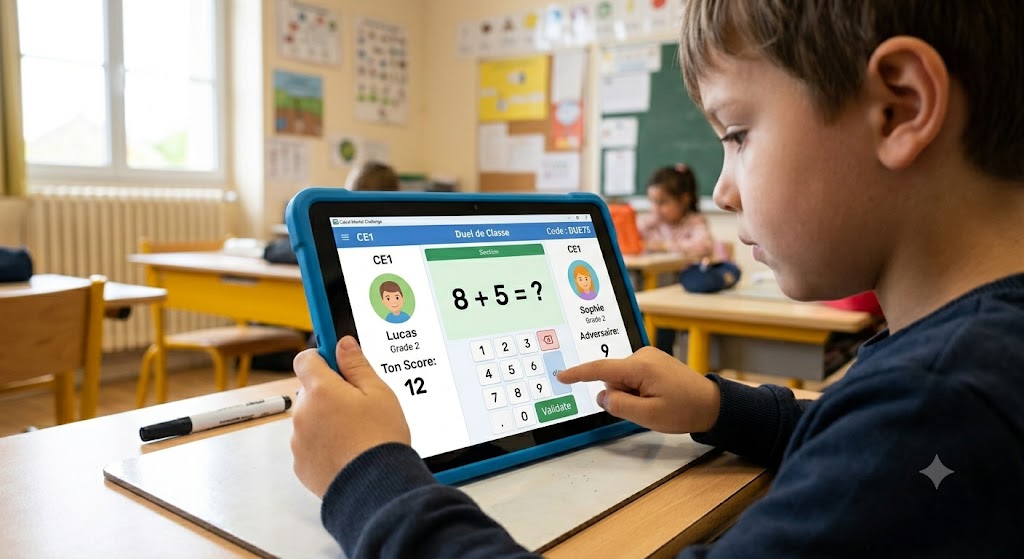
C’est le cœur du sujet. Vous choisissez une classe, un niveau, une opération, un mode de jeu, et un code s’affiche en grand à l’écran. Les élèves le saisissent sur leur poste ou leur tablette, ou cliquent sur la salle détectée automatiquement sur le réseau local. Tout le monde reçoit les mêmes questions, et vous suivez un classement en temps réel pendant l’activité. Ce principe du défi projeté au tableau rappellera quelque chose à ceux qui utilisent déjà J’peux pas j’ai maths, avec son mode prof pour les rituels de début de séance. La différence ici : les élèves répondent directement sur leur appareil, et le score remonte tout seul. À la fin, vous récupérez un bilan pédagogique exportable en CSV et en PDF. Pratique pour conserver une trace des séances et suivre la progression de vos élèves. Détail qui rassure : en mode classe, tout reste sur le réseau local de l’établissement. Aucune donnée élève ne sort de l’école. On y revient plus bas.
Des modes pensés pour différents profils d’élèves
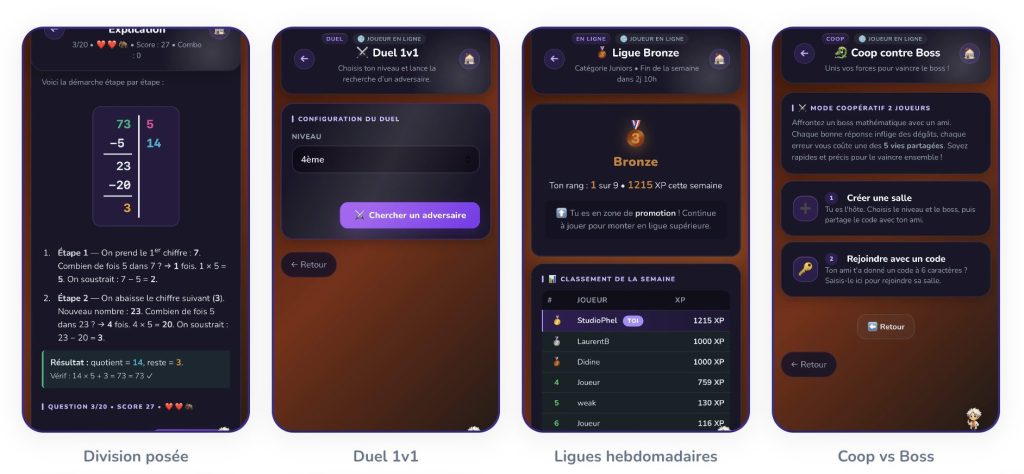
La variété des modes n’est pas que cosmétique. Le mode Problèmes propose des énoncés contextualisés. La Division posée décompose chaque étape comme sur un cahier et vérifie les réponses en temps réel, utile pour ancrer la technique opératoire. L’entraînement permet aussi de cibler une opération précise, dans l’esprit d’un exerciseur comme Défi Tables pour les tables de multiplication. Et puis il y a le Mode Calme que j’ai vraiment apprécié. Pas de chrono, pas de combo, pas de score : juste le temps de réfléchir. Il vise les plus jeunes, les élèves dys et tous ceux que la pression du timer bloque plutôt qu’elle ne stimule. C’est typiquement le genre de détail qui montre que l’éditeur écoute ses utilisateurs. Autre attention pour les élèves fragiles : la police Lexend, conçue pour faciliter la lecture des jeunes lecteurs et des élèves dys, ainsi qu’un mode daltonien avec plusieurs réglages.
L’émulation collective : Guerre des Écoles et Bataille de Classes
C’est l’angle ludique le plus original. La Bataille de Classes fait s’affronter deux classes, chaque élève voyant sa contribution au score collectif. La Guerre des Écoles élargit le principe entre établissements.
L’idée d’un défi collectif n’est pas neuve. Le concours national Mathador repose depuis des années sur le même ressort de motivation par la classe entière. Calcul Mental Challenge en propose une version permanente, à lancer quand vous voulez. Sur le papier, on pourrait craindre la course aux points stérile. À l’usage, l’idée reste plutôt un levier de motivation collective. De quoi inciter les élèves à revenir sans transformer le calcul en compétition permanente.
Mode d’emploi : démarrer une séance en classe
Concrètement, voici comment lancer votre première activité.
- Installez l’application sur le poste enseignant (Windows ou Mac).
- Installez-la sur les postes ou tablettes élèves. Tout le monde doit être sur le même réseau local.
- Créez votre séance. Un seul formulaire : classe, niveau, opération, mode de jeu.
- Affichez le code au tableau. Les élèves le saisissent ou cliquent sur la salle détectée automatiquement.
- Lancez. Tous reçoivent les mêmes questions, le classement s’affiche en direct.
- Analysez. En fin de séance, consultez le bilan et exportez-le si besoin.
Le logiciel demande une installation locale, à anticiper selon la connexion de votre établissement. L’éditeur annonce un déploiement en moins de dix minutes. Comptez ensuite quelques secondes pour préparer chaque séance suivante.
Calcul Mental Challenge face aux autres outils
Le calcul mental en ligne ne manque pas de bonnes ressources. Voici comment situer l’application par rapport à des outils déjà présentés ici.
Criterion
Calcul Mental Challenge
Calculatice
Matheros
Levels
CE1 au lycée
CP à la 6e
CP to CM2
Price
Gratuit, sans pub
Free
Subscription
Inscription
Non obligatoire
Compte enseignant gratuit
Account required
Installation
Application à télécharger
En ligne + tablette
Online
Mode classe
Oui, réseau local
Yes
Yes
Données élèves
Restent dans l’établissement
Compte en ligne
Compte en ligne
What I like
La gratuité réelle, sans publicité ni achat intégré, mérite d’être saluée : c’est devenu rare pour une application aussi fournie. L’approche des données est rassurante, avec un mode classe en réseau local strict. La couverture du CE1 au lycée est inhabituelle. Et les attentions pour les élèves dys ou en difficulté (Mode Calme, police Lexend, mode daltonien) montrent un vrai souci pédagogique.
What I like less
Il faut télécharger et installer l’application : pas de version navigateur pour tester en deux clics, contrairement à Calculatice. L’installation locale et la nécessité d’un réseau commun peuvent compliquer la mise en place dans les établissements mal équipés. Enfin, l’abondance de modes et d’éléments ludiques risque parfois de détourner les plus jeunes de l’objectif.
Faut-il l’adopter ?
Si vous cherchez un outil de calcul mental gratuit, complet, respectueux des données de vos élèves et capable de mettre toute une classe en mouvement, Calcul Mental Challenge mérite le détour. L’installation demande un petit effort initial, mais le mode classe fait gagner du temps une fois en place. À tester sur une séquence de rituels, pour voir si l’émulation prend dans votre classe. Lien : Calcul Mental Challenge
 English