Last updated on 12 May 2026
Timeline is a small online utility that allows to create very simply chronological friezes. A free tool without prior registration.

Timeline is a great tool to use in class. You can use it yourself to write a course, but you can also advise your students on how easy it is to handle.
The tool lends itself quite well to simple chronological friezes. To create, your first frieze nothing simpler. Just give it a name and choose the type of interval you want to use. Three possibilities illustrated by examples are proposed to you. You can organize your frieze by date, by time or by event.
The following screen offers you a dotted line on which you will be able to install the different moments of your frieze. One click is enough to edit each of them. You will be able to give it a title and a description. You can also add an image by ‘uploading’ it from your computer. The first moment of your frieze is created. You can position it as you see fit on the screen at the end of your mouse. You can always change or delete it with a single click.
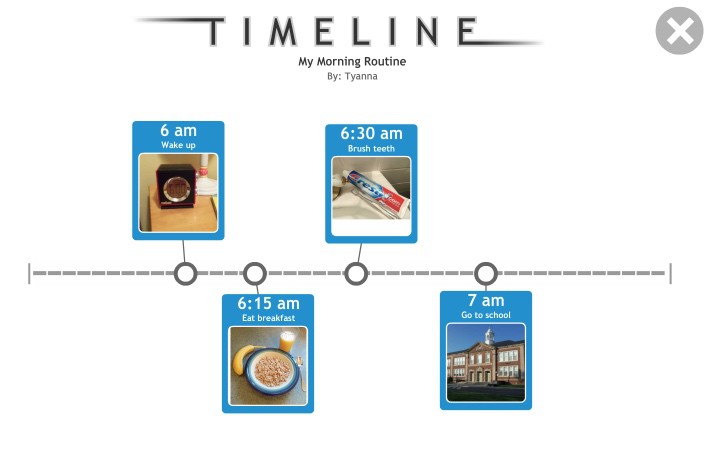
Timeline allows you to save your project if it is not completed and then resume it. To do this, you need to download a file to your computer. All you have to do is upload it again to Timeline to resume the creation of your file.
Once finished, you can download your chronological frieze or share it simply by email or on social networks. Timeline also allows a simple click to print it. Simple and effective.
Timeline is a tool to create timelines free of charge and without advertising. A nice surprise.
Link: Timeline
 English
Thank you for that info. I will also have to test it on tablet (class equipped with 2 ordis and 4 tablets)
I would like to take this opportunity to send you my best wishes for 2017: a lot of happiness, an iron health, and still a lot of little information to send us here!
THANK YOU for everything!
A very nice tool ! thank you for this discovery!