Last updated on 14 October 2022
Folge is an excellent application that allows you to create a tutorial very easily. It is particularly suitable for a software tutorial or to explain and illustrate all your processes or instructions.
Folge simplifies your task and will help you to produce a user manual in record time. Making a tutorial becomes simple and fast. I presented it to you a few months ago in a first version. The tool has continued to grow and added many new features in its mouth while improving the user experience thanks to feedback from its first fans. I am part of 😉

"Folge mir" means in German "follow me". This is the whole idea of this application to create a tutorial. It will capture all the steps of using a software by creating screenshots automatic. What previously could take a considerable amount of time with uneven quality results can be done with Folge in just a few minutes.
An application to make a user manual or create a tutorial easily
Folge surprises with its ease of use. This application that runs on Windows as on Mac can be taken in hand in a few minutes. It must be said that the creators of this software that allows to create a tutorial have done things well.
The principle is simple. Just launch the tool and then work on the application you want to create a user manual for. From there everything is captured automatically. Each time you click to complete an action, Folge takes a screenshot. You can also choose when the capture is done. In the same way you can take screenshots with mouse clicks, shortcut keys or key combinations. In use, it is really ultra-practical.
Work with your apps, websites, or any other program. Folge automatically captures your work and takes screenshots with every mouse click. You can capture a full screen or just a specific area.
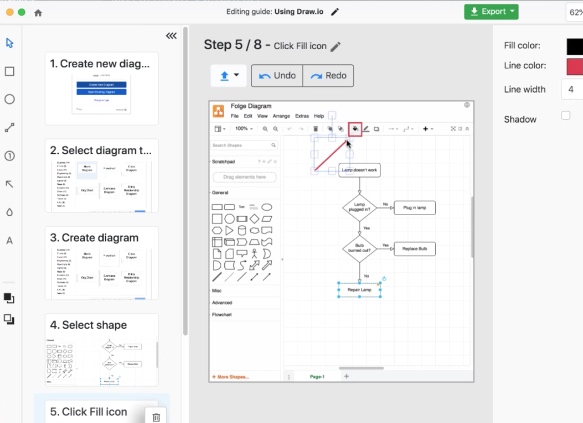
Once your captures are made, you will then be able to edit and customize them. In the editor you can go through the steps with the up and down arrow keys. You have the option to modify and customize each step.
You can rearrange them, delete them and add new ones. Add a title and description at each step and add additional information to each image with one of the annotation tools provided.
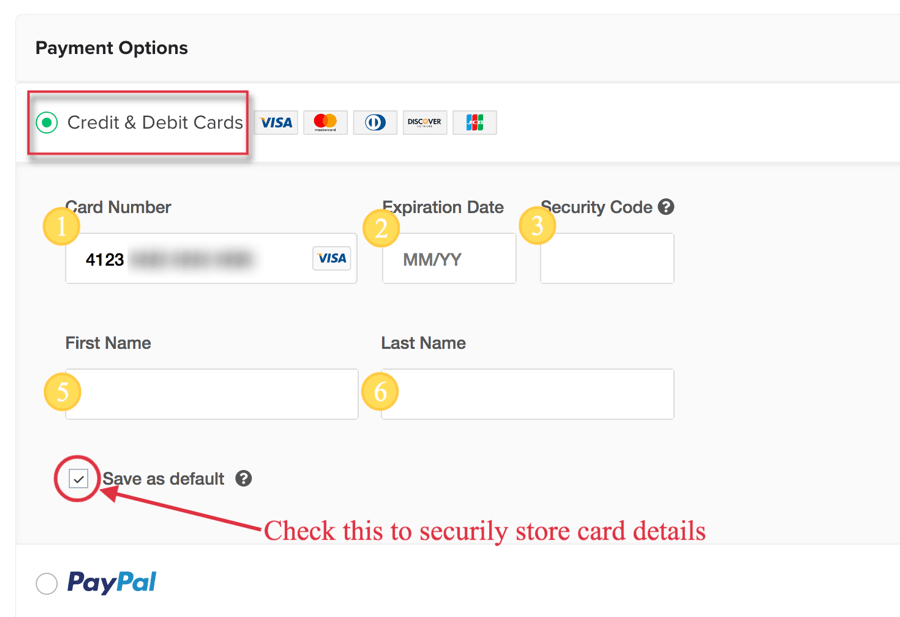
Folge offers rich customization possibilities: add shapes, arrows, lines and text. Hide sensitive information. Add step icons for multi-step instructions. The interface is clear, the quality integrated editor.
The publisher has gained new functionalities. Others are expected to follow soon. For example, you can now import slides from one guide to another and clone the features of the guide. A new highlighter has also appeared to highlight important parts of your screenshots as well as a new magnifying glass feature to highlight a detail.
Another highly anticipated novelty, steps can now have sub-steps to give more details about certain procedures or steps.
Create a tutorial in PDF or PowerPoint in a few clicks
Folge has another asset. It facilitates the publication of your tutorial by offering several generic export formats. No less than seven formats are offered by the platform. Once you have edited your screenshot sequences, you will be able to export your tutorial in PDF, but also in HTML, image format, Word or directly searchable in the clouds via a link.
Folge now also knows how to export your guide directly into a PowerPoint presentation. Ultra convenient to avoid juggling file formats.

The software continues to get richer month after month. The developer roadmap is loaded and other functions will complement the basic options already present in the software.
Folge is particularly useful in an educational setting to create tutorials for its students by getting rid of the technical aspects so they can focus on the content and message.
Folge offers a free version limited to three tutorials and braided for certain functions. For full and unlimited use, you will need to purchase the application. It is sold 60 EUR, but you will get 30 % Discount if you are a student or teacher.
Application runs on Mac and PC and that is not a detail, it is in French. The purchase of a licence is unique. No subscription and you will be entitled to all future updates.
An excellent application, probably one of the best, to create the instruction manual for a software in two steps, three movements.
Link: Folge
 English
This looks promising! How painful it is to have to take screenshots and create comments and instructions. Thank you for sharing!
Thank you indeed, I will test all this this this summer, with a lot of tutorials to think about for the back to school!
Tested and approved! Including hyper-fast, competent and listening chat support (in English).
What time saved!
Interesting. But nothing beats a small video tutorial, faster, more explicit in the end. In any case thank you for all these tools and this huge work of watch!!
Application discovered right here. Tested and approved to the point of purchasing the paid version to support its development. Total Satisfaction, Excellent 🙂 Tool
Want to learn quickly with videos