Last updated on 12 May 2026
ClassroomScreen is a service imagined and created by a teacher to be used as a wallpaper on your projector in the classroom. A wallpaper enriched with several modules or widgets that can be useful, if not very useful, for simple everyday needs.
The service has been around for several years. It has become much richer over time. The tool can now be used remotely, new modules have also appeared. New functions also to make it easier for you to manage your class. We come back to it in detail.

An interactive wallpaper for the class
ClassroomScreen does not bother with preambles or lengthy explanations. No need to create an account or sign in to be able to use this wallpaper for your class. Just go to the homepage, the service is up and running with one click. Every time you connect, you will discover a full-screen image of a beautiful natural landscape. Dozens of images are available and you can even add your own if you wish.
You will be able to accompany your classroom activities by encouraging your students to get to work and participate through the intuitive tools that you will be able to call on live. There is no need for a lot of preparation, you can get started immediately and you can use the various modules integrated over the course of the water.
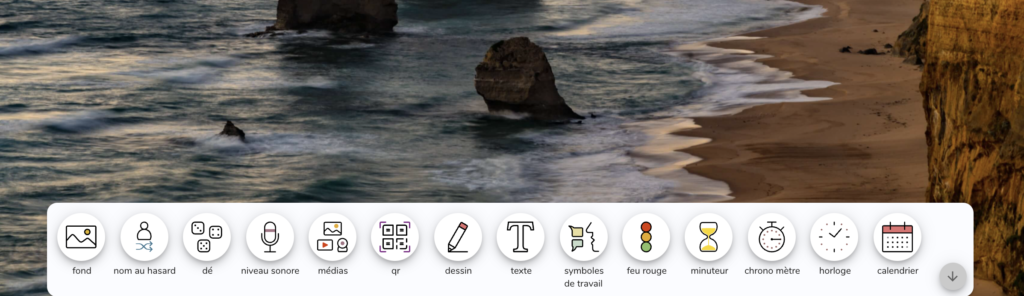
13 tools at your disposal to animate your courses
The ClassroomScreen wallpaper for your class has a series of widgets or functions if you prefer, which can be found in a horizontal menu bar at the bottom of the screen. Thirteen widgets are at your disposal to animate your courses.
Very simple to use and understand. Do not forget to first click on the toothed wheel to the left of the screen to change the default language to French. Each function is illustrated with an explicit picto. You can:
- Choosing a name randomly in the class
- Throwing virtual dice
- Measure the sound level in the class
- Create QRCodes
- Drawing
- Write
- Show working symbols
- Display a red light – green light
- Start a timer or stopwatch
- Show a clock
- Show a calendar
Most of these tools are configurable thanks to a small notched wheel that appears on the side. You can change their size on the screen and position them wherever you want on your wallpaper. Note also that you can view more than one at a time.

I'll let you find them out. There are many uses on a daily basis. From the possibility of displaying the time or a timer for a time-limited activity to the display of instructions to the whole class under the afiorm of a text or an explicit picto.
Not bad also the noise measurer. A bit like Zero Noise Classroom that I presented here some time ago. Ideal to make the class aware of the level of ambient noise and set limits for everyone.
In addition to these 13 utilities still available on your wallpaper, Classroom Screen also offers a voting tool for live exchanges in the teaching interface. Students see their vote displayed in a nice graphic. Another interesting function is the possibility of set up groups in class. You enter a list of names, the number of groups you want, the number of students per group and then Classroom screen displays the result.
An enriched pro version for distance learning or advanced functions
ClassroomScreen is completely free, you can use it without even having to register. The teacher who created the tool nevertheless offers a pro version that provides some additional options. It is also an opportunity to concretely support his formidable work and the necessary investments in day-to-day technical management.
You can use all the functions of ClassroomScreen for a remote class thanks to an integration with the main videoconferencing tools. You will also be able to cast votes or polls remotely. The Pro version also allows you to save your wallpapers with your custom images. You can even create wallpaper collections for different uses. Useful for example to prepare a sequence in advance. This pro plan costs around €30 per year.
ClassroomScreen is amazingly simple to use with a projector from your computer's browser. Your students will love it!
There are other tools that offer a wallpaper for the class, such as the module Digiscreen proposed by La Digitale. None, however, can quite match ClassroomScreen.

 English
Thank you for this discovery!
However, a disappointment, the impossibility of saving your screen means that you have to enter the names of the students every day to make the draw widget work.
Or I didn’t get it all, Possible!
I really like classroomscreen. I have the premium version and I prepare a screen for my activities by integrating the instructions, the timers for the different … stages
Yes, yes. You have to switch to the premium version to be able to save your table. Several can even be prepared in advance.
Hello Fidel,
Since the birth of digital technology, I have been presenting, in training, the equivalent called DigiScreen.
https://ladigitale.dev/digiscreen/
Thank you for your weekly letters of which I am an absolute fan 😉
Christophe