Last updated on 12 May 2026
La Quizinière, the online platform offered by Canopé, which allows the creation of exercises, quizzes and evaluations on the web, has been updated. A new version that enriches a tool that makes equal play, or even exceeds many Online test creation solutions present on the web.
The Quizinière platform is perfect for creating online evaluations easily and free of charge, with hole texts, MCQs, drawings or videos. Detailed review of the main novelties of this new version including an interesting "order" function.
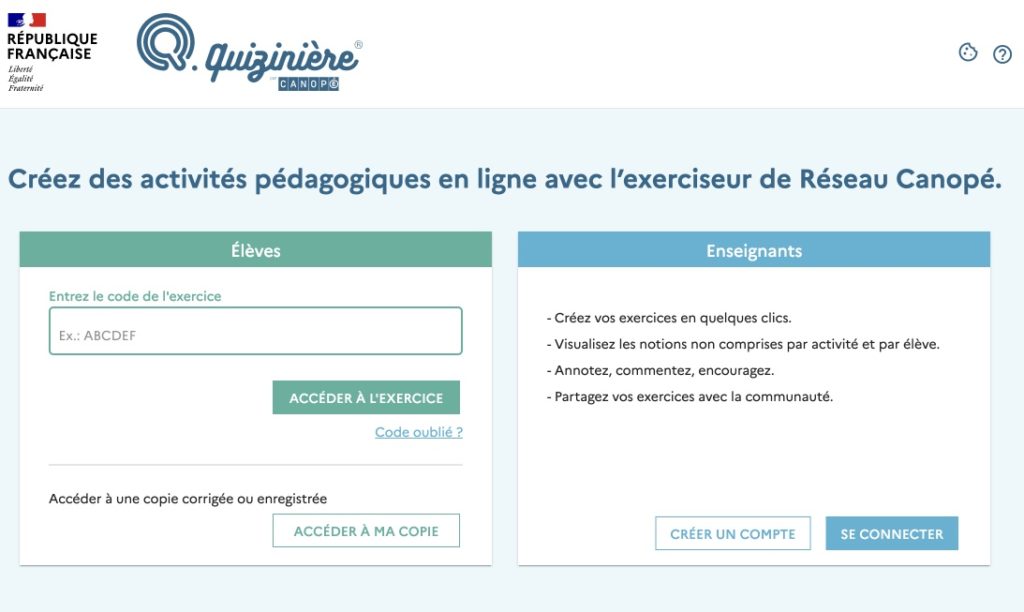
What is Quizinière?
It is an online tool that allows you to simply create tests and online questionnaires of any kind. Students can reply from any computer and have corrections and comments from the teacher.
The Quizinière was designed and designed for use by teachers in the classroom and it shows. Thus, only the teacher needs to create an account with an email address to use the platform. Students only need a code to enter and respond to an exercise.
The Quizinière is relatively simple to use. You just have to get used to the different menus and options, but this is done quickly and without real difficulty. Once registered on the platform, you will be able to create your first assessment from a blank sheet. All the commands are in the top menu bar divided into three main parts.

Please note:
Main features of the Quizinière:
The Quizinière is distinguished by its simplicity of use and its functional richness. Here are the main features that make it a great tool for the class:
- Creation of various exercises:
Create interactive exercises with hole texts, MCQs, drag-and-drop, or videos and audio files. Students can respond in text, drawing or even oral. - Customisation of instructions:
Change the size, color and style of the text to adapt your instructions to your needs. A practical novelty for students with special educational needs. - Simplified sharing:
Share your exercises via a code or QR code. Students do not need to create an account. - Instant assessment:
The results are automatically saved and analyzed. You can view aggregate or individual statistics, and provide personalized feedback. - Collaborative catalogue:
Access a library of more than 11,000 exercises created by other teachers to inspire you or save time.
A new version that facilitates the personalization of exercises
The Quizinière allows you to ask questions in different ways. You can use text, but also images, sound, video or mathematical expressions …
After defining the question, you have to define the answer. Again, several possible options, your students will be able to respond in text, with images or sound. So much for the basic functions, but if you want, you can also create MCQs, hole texts or exercises with drag-and-drop …
In this new version of Quizinière, the text editor is enriched with new functions. You can apply bold and color or change the size of the text in the instructions and corrections.
Very practical also in this new version, the possibility of inserting audio comments. Ideal for beginner readers or students with special educational needs.
Discover the Ordering activity: a 2025 novelty
Quizinière has just enriched its functions with the activity “Order”, ideal for creating interactive exercises where students have to put a variety of elements in order: words, images, sounds or mathematical formulas.

Simplified creation:
- Go to the ‘Order’ option in the exercise editor.
- Add items in the correct order (they will be mixed for students).
- Attach non-movable items with the pin icon.
Elements are randomly mixed for each student. The correction is then automatic, with the possibility to add comments.
A simple and effective tool that will save you time
You can add as many questionnaires or evaluations as you want. The platform will keep all your creations in memory so that you can reuse them later. In the new version, you will be able to classify the exercises into folders and subfolders This will allow you to sort them, and find them easily.

An improved general dashboard allows you to view at a glance all the sequences you have created and those you have distributed to your students.
Once you have created your exercises, all you have to do is share them. To do this, Quizinière provides you with a code and a QRCode with which your students will access the exercise on the site. Once logged in, they will complete the exercise, provide their first and last name and validate all responses with a click. The results are saved and you will be able to consult them in your teaching area. You will also have access to aggregate or individual statistics of the results. Practical.
Easy access for students
Quizinière allows students to easily access assessments without the need to create an account. All they have to do is use a link to access it. Corrections happen instantly, the platform corrects the quiz directly. She immediately analyzes the results to give a detailed feedback on the performance of the students.
These features improve the effectiveness of the tool for assessing students’ learning, providing a quick and accessible way to obtain relevant feedback.
Note that Quizinière also offers the possibility ofexport your exercises in PDF format so that they can be printed as needed.

Very useful, you will also find on the platform, a collaborative catalogue for teachers to share the exercises they have created. More than 11,000 exercises are available to date.
How to use the Quizinière on a daily basis
Here are some concrete examples of Quizinière’s use in different subjects and contexts:
- In mathematics:
Create interactive exercises with mathematical formulas. Perfect for quick reviews or revisions. - In modern languages:
Use audio files for oral comprehension exercises, or offer students to record their answers to work on oral expression. - History and geography:
Integrate images or interactive maps to ask students to annotate or locate items. - In reverse class:
Share questionnaires upstream of classes to assess students' prior knowledge.
An intuitive and very practical assessment tool
The Quiziniere tool is very intuitive for teachers. It is also very useful. It allows you to quickly distribute homework related to the content seen in class. You have the ability to share files, images and videos, create questionnaires and assessments, check students' achievements and monitor students' progress.
In the end, a practical and well thought out service to allow you to embark on exercises and online assessments without real risk.
The tool adapts to all levels:
- Basic education: from CP to CM2, designed for young children in their basic learning years.
- College: from the sixth to the third, preparing students for more advanced studies.
- High school: from the second to the final year, as well as specialized pathways such as the vocational baccalaureate or vocational training.
Try Quizinière today!
See you on the official website of Quizinière to create your first interactive exercise. Share your feedback with us in the comments or via our social networks!
Questions you may have about the free exerciser offered by Canopé
Operation and access
- How to access Quizinière? Users can access the platform by visiting the site https://www.quiziniere.com. To share exercises, a code and a QRCode are provided, allowing students to easily access the exercises online.
Creation and personalization of exercises
- How to create exercises on Quizinière? The platform allows you to ask questions in different forms: text, images, sound, video, or mathematical expressions. Answers can also be varied, including text, images, or sound.
- What's new in the latest version? The new version makes it easier to personalise exercises by adding the possibility to add MCQs, drawings, videos and the rich text editor with new features, such as applying bold, colour and changing the size of the text. It is also possible to insert audio comments.
Exercise management and sharing
- How can the exercises be shared and disseminated? Once the exercises are created, they can be shared with students through a code or QR code. The results are recorded and searchable in the teaching area.
- Can the exercises created be organised? In the new version, it is possible to classify the exercises in folders and subfolders to facilitate their sorting and recovery.
Evaluation and feedback
- How does the evaluation of responses work? Quizinière offers a system for evaluating percentage responses. Teachers can add general comments to the copy or to each question.
- Can students see the corrections? Yes, each student has a code that allows them to access the teacher’s answer after completing their copy. It is important to activate the dissemination of the correction.
Use tips to get started
- Start small:
Do not create exercises that are too long for your first uses. Test the platform with simple questionnaires to familiarize yourself with its features. - Use existing models:
Explore the collaborative catalogue to find out-of-the-box exercises and tailor them to your needs. - Activate automatic corrections:
This allows students to receive instant feedback on their performance, which is motivating and engaging. - Test with a small group:
Before using Quizinière with the whole class, test it with a small group to identify any necessary adjustments.
A good tool to enrich your courses with interactive online exercises. The variety of exercises it creates and its ease of use make it a valuable resource for distance or classroom teaching.

 English
Too good
I have been using the cooker for a few expensive years. I started during the lockdown it was a way to be able to give exercises to students in virtual form. And now it has become a habit for me and my students