Last updated on 12 May 2026
Access to online video content is frequently awfully complicated. Recover a video to be able to watch it offline is confronted with the harsh reality of the limits imposed by most streaming sites.
There are many sites that offer to help you upload videos to YouTube. Most often they are to flee. You can use real dedicated software such asSnapDownloader Multiplatform App which I have presented here.
Finally, there are the different browsers that offer plugins and add-ons to facilitate the operation of downloading a video easily. To this little game, Firefox is one of the best equipped browsers. It offers valuable add-ons that facilitate the download operation. Here are three of them worth mentioning.
Be careful no surprises to be able to Download a video on Firefox with the best quality, it will be necessary for each of them to opt for a paid version. Without it the free versions are mostly too limited to do the job properly
The Swiss Download Knife: Video Downloader Professional
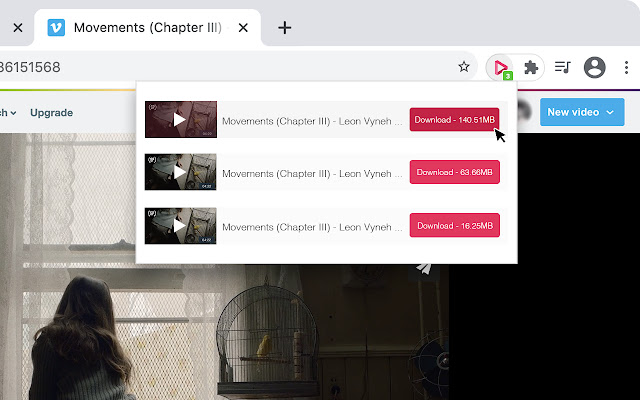
Among the wide range of tools available, Video Downloader Professional is a first-class choice. This extension, compatible with a multitude of sites, is distinguished by its ability to process up to 4,000 videos from popular platforms such as Vimeo or YouTube.
Many features are available. Create lists of favorite videos to download. Choice of playback resolution for a tailor-made experience and recommendations for downloadable videos directly from the extension.
One downside to note is the inability to download protected videos (RTMP protocol). To do this, you will need to upgrade to the paid version of Video Downloader.
Easy YouTube Video Downloader Express
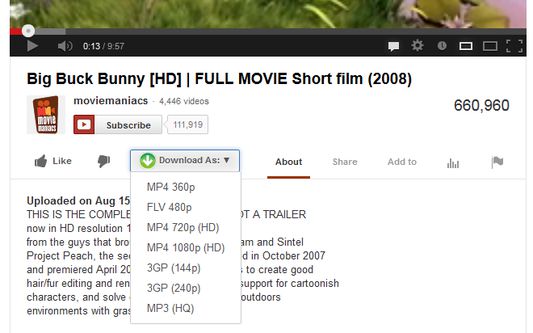
When we talk about uploading a video to YouTube, Easy YouTube Video Downloader Express appears as another good solution. Its credo: a disconcerting simplicity of use. One click, and the video is yours, in the format you prefer, from MP3 to MP4 via FLV and 3GP.
His recent facelift offered him the ability to manage the simultaneous downloading of several videos. A dedicated server even makes it possible to get rid of YouTube’s restrictions on 1080p downloads, provided, however, that you subscribe to a paid subscription.
Please note, however, that this module only works with YouTube. For other platforms, you will have to turn to another solution.
The Magician of Formats: Video DownloadHelper

Video DownloadHelper detects videos on any site and allows you to download video and audio files in various formats. It is a good extension for downloading videos, audios and images, while performing file conversions.
In addition, this add-on module of Firefox to download a video supports various streaming formats including HTTP, DASH, and HLS.
The module is compatible with popular websites such as Vimeo, DailyMotion, Facebook, Twitch, Metacafe, Vine, Bloomberg, RAI, France 2-3, and many others.
How to install a add-on in Firefox to download a video
Installing an add-on on Firefox is a quick and easy process. Start by opening your Firefox browser. At the top right of the browser window, you will find three horizontal lines that represent the menu. Click on it and a drop-down list will appear.
Choose the ‘Add-ons’ option, which will take you to a new page. Here you will see a search bar at the top of the page. Type the name of the add-on you want to install, such as "Video Downloader Professional," and then press Enter.
In the results that appear, find the extension you are looking for and click on the ‘Add to Firefox’ button. A dialog box will open to ask you for confirmation, click on ‘Add’.
Then, an icon will appear in the toolbar of your browser, indicating that the add-on has been installed. You can now use your new add-on to download a video with Firefox.
***
While downloading videos online can sometimes be a challenge, these add-ons for Firefox offer effective and diversified solutions.
Each of them has specific advantages: whether you are looking for versatility with Video Downloader Professional, ease of use with Easy YouTube Video Downloader Express, or support for multiple formats with Video DownloadHelper, you should find a solution that fits your needs.
However, some advanced features may require a paid version. It is therefore crucial to properly assess your needs before choosing the right extension.

 English
Hi the community,
Video DownloadHelper has the unfortunate idea of embedding a QRCode when uploading videos to YouTube.