Last updated on 24 May 2026
How many times have you opened fifteen tabs to prepare a sequence, accumulated screenshots, copied excerpts into a document, and finally no longer knew where that quote came from when writing? Scrible responds to this very concrete problem by transforming the browser into a real research workshop. Highlight, annotate, save, quote, share: everything is done directly on the web page consulted, without changing tools.
Launched more than a decade ago, Scrible has evolved a lot. It is no longer limited to a simple online highlighter. It is today a research and writing platform It is aimed at both students and teachers who want to give them a real method of documentary work.
Table of Contents
Annotate a web page as simply as a paper book
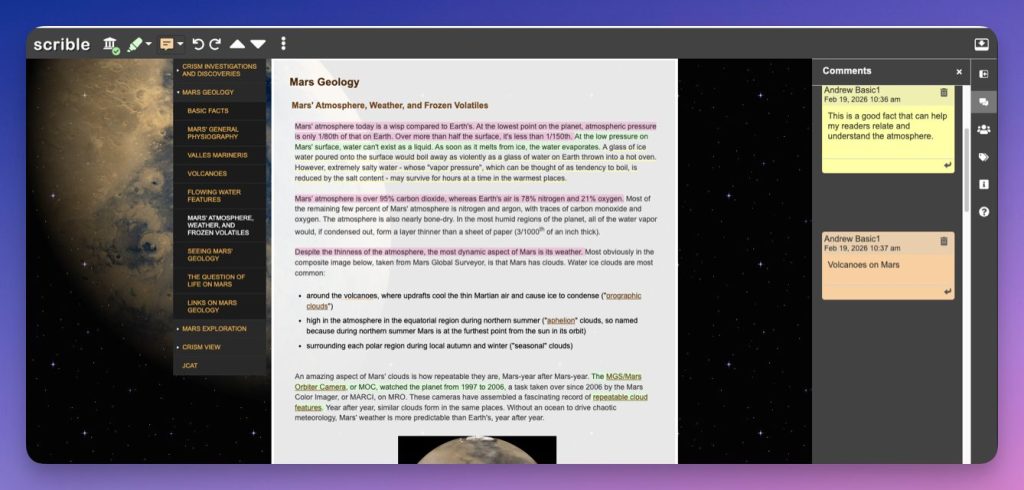
The basic use of Scrible remains childishly simple. Once the Chrome extension is installed and the account is created (login is done with a Google account), a discrete toolbar appears at the top of each web page. It makes it possible to highlight with different colors, to put in bold, in italics or to emphasize a passage, exactly as one would do on a Paper Book. Adhesive notes can also be placed directly on the page to add a comment, question or instruction.
Everything remains visible on the original page, and the whole is saved in a personal library accessible from any connected computer. With a tag system, you can easily find an article read three months earlier, which radically changes the comfort of working when you follow several projects in parallel.
From backing up web pages to the real search library
This is probably the point that has changed the most since the first articles on Scrible. The library is no longer just a repository of enriched favorites. It now behaves like a small source manager, with full-text search, multiple tag filters and the possibility of creating several separate libraries to separate its projects. A teacher can thus hold a "NDE" library, another "pedagogical readings", a third "major oral preparation", without mixing everything.
Libraries can also become collaborative. Several users then share the same corpus of sources, add their annotations, exchange around key passages. This is particularly useful for inter-disciplinary teamwork or to make a class work on a common documentary file.
Quoting its sources without pain, finally
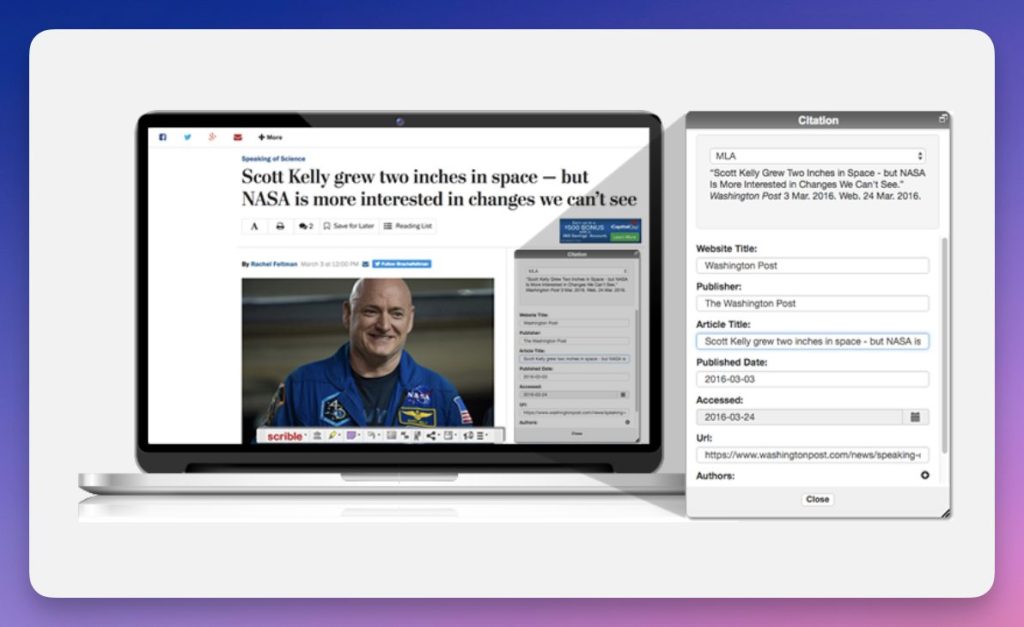
Teaching students to cite their sources remains one of the main areas of media and information literacy. On this point, Scrible brings a rather remarkable comfort. From the page consulted, a simple click is enough to generate a quote correctly formatted in MLA, APA or Chicago. The tool will search for the title, author, date and publisher on its own, and presents the reference ready to be copied.
From the sources retained in the library, it is just as simple to produce a complete bibliography, exportable, and whose style can be changed on the fly. The Edu Pro version goes much further, with more than 7,000 bibliographic styles available and support for various sources (review articles, books, offline documents, etc.). What to bring the rigor of the quote into classroom practices without turning the session into a typographic nightmare.
Seamless integration with Google Docs to move from reading to writing
Where Scrible takes on its full dimension is in its articulation with Google Docs. An add-on, Scrible Writer, allows you to search its Scrible library without leaving the document being written. In one click, we insert an annotation, its citation and the corresponding bibliographic reference. The final bibliography updates itself, and a drop-down menu is sufficient to change the citation style if the teacher requires another one.
For classrooms already equipped with Google Workspace, this is a real time saver and an excellent pretext to show students how to methodically link their sources to their written output.
When artificial intelligence assists desk research
Like most modern educational tools, Scrible has integrated AI functionalities. Concretely, AI can help to summarize a long article, to identify the main ideas of a saved page, to propose thematic groupings between several sources or to suggest ways of organising a dossier. The stated objective: save time on the documentary sorting phase, without replacing critical reading.
For a teacher, it is also an interesting place to work with his students on the posture in the face of AI: compare what the machine retains with what human reading puts forward, spot what the abstract hides, verify fidelity to sources. In short, make it a discussion tool rather than a black box.
How much does it cost? A generous free version and paid plans to go further
Scrible is based on a fairly clear freemium model. The free version gives access to the essentials: web page annotation, personal library, link sharing, basic quotes. It is more than enough to discover the tool with a class or for regular personal use.
For more intensive uses, the Edu Pro formula unlocks more storage, an enriched annotation palette, multiple collaborative libraries, exporting notes as a one-page summary, multi-tag filters and all bibliographic styles. An Edu Team formula goes even further, with centralized account management for an institution or an educational team. The tariffs are deliberately softer for the educational public, which makes the tool accessible to many structures.
Practical uses in the classroom, from college to university
For a teacher, Scrible can be used to prepare a file of annotated sources, shared with students as a starting point for a sequence in media education, science, history or languages. Highlighting and adhesive notes make it possible to direct the reading, to point out key passages, to ask questions in the margin. Modelling, projected onto the screen, also becomes an excellent way of making a critical reading approach visible: identify sources, identify arguments, uncover biases.
As for students, Scrible accompanies the entire research path, from the draft of reflection to the final document. For the great oral, a TPE, a dissertation or a simple presentation, they can gather their sources, annotate them, quote them and write them in the process without ever losing the thread of references. In a group project, the collaborative library becomes the place where we build documentation together, where we compare readings, where we learn, almost without realising it, to work as researchers.
I like, I like less
Scrible seduced me by the consistency of the course he proposed: read, annotate, organize, quote, write, all in a unique environment and well integrated with Google Workspace. The contributions of AI and citation tools make it a valuable companion for developing students’ information culture.
In terms of regrets, the interface exists only in English. The tool assumes a Google account and Chrome-centric use, thus a fairly strong dependency on this ecosystem. Finally, the most powerful functionalities are paid formulas, which deserves to be anticipated in the choice of the tool.
To conclude, a tool to test
Scrible is one of those discrete tools that, put in the right hands, permanently transforms the way people search, read and write. For a teacher who wants to bring his students to a real documentary work, go beyond the simple copy-paste and install quotation reflexes, he clearly deserves an essay.
You can discover Scrible and create a free account on the official website: https://www.scrible.com/

 English