Last updated on 12 May 2026
Are you looking for a practical and free tool to turn your texts into audio files? TTSMaker is a free web application that offers quality online speech synthesis software. A simple and instant solution to convert your texts into audio files in several languages, including French.
With this online text-to-speech tool, you can easily create audio files to create voice overs for your presentations, dictations or … audiobooks.
A free text-to-speech tool to make your texts speak, which deserves its place in your digital toolkit.

Free online voice synthesis
Table of Contents
What are text-to-speech solutions?
Text-to-speech solutions are tools for transforming text into speech. In education, these solutions are becoming increasingly popular. Among other things, they offer many benefits for students who prefer to listen rather than read, but also for those with learning disabilities. This type of solution is used by equipment such as Readerpen which uses optical character recognition software to read texts aloud.
With TTSMaker, convert any text into speech online, free of charge
How to move from a written text to a read text? With the TTSMaker voice generator, the operation is simple and does not require instructions.
There is no need to download or install software. There is no complicated connection procedure. You also do not need to register. Then just paste your text into the application window on the homepage.
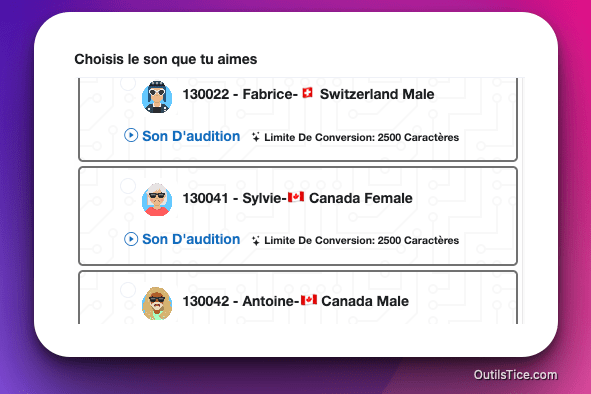
Voice Choice in TTSMaker
You then have to choose the language of the text and your favorite voice style, each language has several voice styles. You have a button that gives you access to the advanced settings that will allow you to refine the work of the TTSMaker synthesizer. You can adjust the speech rate, the pause time between each paragraph read, the sound volume. Note that you can also add breath breaks in the text reading by inserting markers through the drop-down menu that you find at the top right of the text input window.
All you have to do is click on “read”.
TTSMaker instantly reads out loud any text with a crisp, high-quality voice
Voice synthesis software works fast and pretty well. Depending on the voice you choose, you have a good dozen voices available for French, the text you can convert is limited in number of characters. The maximum limit for this free solution is 3,000 characters. But, nothing prevents you from making multiple recordings in a row.
Note that TTSMaker speaks several languages: English, French, German, Spanish, Arabic, Chinese, Japanese, Korean, Vietnamese … and for each of them offers a variety of vocal styles.
What are the uses for a text-to-speech tool like TTSMaker?
Online text-to-speech software such as TTSMaker can find many uses in education:
- Teachers can use speech synthesis solutions to help students improve their reading comprehension and pronunciation.
- This can promote better pronunciation among learners by allowing them to hear the words correctly spoken. This is particularly the case for pupils learning a foreign language.
- Text-to-speech solutions can be used to empower students with special educational needs, enabling them to work independently and adapt their work patterns.
But, we can also use them to propose dictated online, as a voice-over generator for your videos or to record clips in e-learning … sequences
On a personal basis, you can also use it to record and listen to interesting articles and books while working or driving. This is one of the strengths of this online voice synthesis. Not only does it allow any written text to be read by voice-over, but you can also record it.
Listen and download an audio file
Indeed, unlike many other online text-to-speech software and tools such as ttsreader or Natural Readers TTSMaker allows you to record the playback of your text as an audio file, which is limited to reading any text out loud.
Several audio file formats are available. You can make your choice in the advanced settings that manage the functionality of the software.

Choice of audio formats in TTSMaker
Simple and easy to use, TTSMaker has its place among your sound tools. it will make speak some of your texts.
Take a test. You do not risk much, even if you decide to keep it, the tool is completely free.

 English
Be careful, there is a limit of characters per week!
Limit 20,000 characters per week. The reset time is 5 days later.
I just tested: software that reads intelligently. What a change!!!!
Thank you and congratulations to their authors (and authors?)
Very useful, to test, thank you Fidel
After disappointing tests on other tools, I was finally able to convert my text into an audio file and transfer it. It is really free. Thank you Fidel!