Last updated on 12 May 2026
This is one of the good news of the beginning of the year, the company Canva who proposed the Best Online Graphic Design Studio is in the process of setting up the free of charge of its pro version for all … teachers and for their students. Canva Pro free for the world of education is great news.

For the past few days, teachers have been able to use Canva's premium tools and content for free without any restrictions. You will be able to equip yourself with a great tool for all your graphic needs in the classroom (posters, posters, infographics, presentations, or school time schedule for the class..). All this with a truly astonishing ease of use. Canva has managed to make graphic design a real breeze where everything is done by dragging and dropping. With this education version, you will also be able to make the tool available to your students.
Canva Pro free for the world of education
Canva is rolling out Canva for teaching, a specific version for classrooms and beyond in the world of education. Teachers will be able to benefit from all the tools available, but they will also be able to register their class(es). Teachers and students alike will therefore be able to benefit from all the premium features of the tool. It’s not nothing. Canva's premium subscribers have access to:
- More than 2 million free images, illustrations and icons.
- More than 20,000 models available free of charge.
- Access to the creator of GIFs and films to bring students' creations to life.
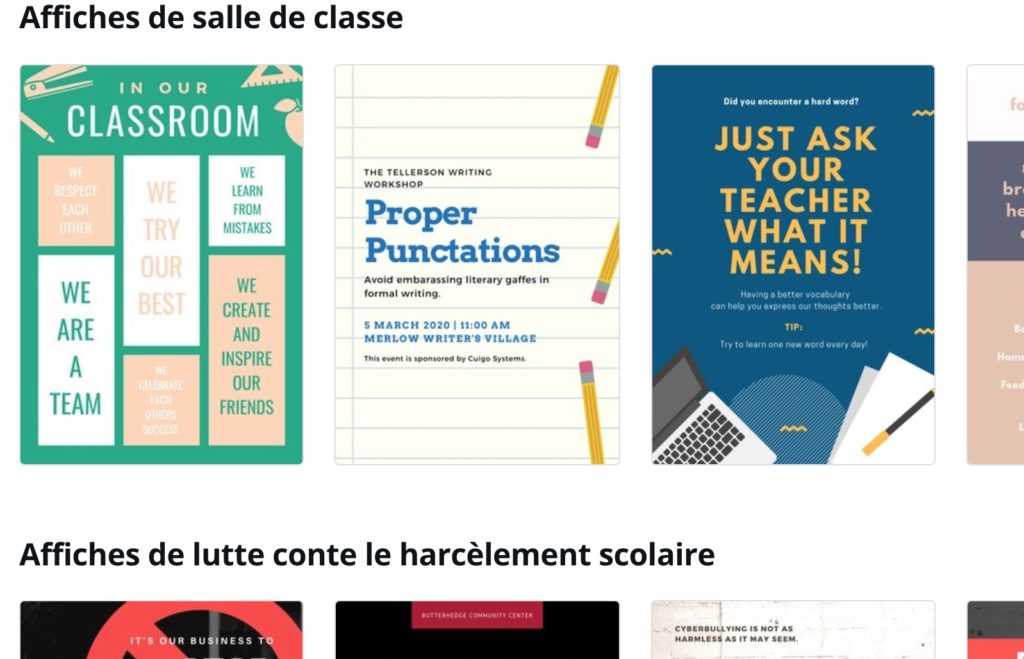
This version of Canva for education is also enriched with many graphic design models ready to be used for the world of education.
Canva for teaching, an ideal version for group work
This version of Canva also goes well and it is one of its great advantages to allow you to organise group work in the classroom. Each student will be able to access the tool for their own needs, but you will also be able to create class folders to properly organise all your projects. With Canva, group projects become very simple to set up and follow. You will be able to gather your class group and share your resources, designs and templates.
To benefit from this pro version offered by the Canva team, you must register on the site by filling out a form. (Note that this form is in English, but it should be translated into French very soon. The entire Canva interface has been available for some time now in French). Once your form has been sent, your application will be examined within approximately one week before being validated.

As soon as your request is validated, you will be able to benefit from Canva Pro free, all Canva Pro features available without limitation. You can also create one or more classes and enroll your students over the age of 13. The site indicates a maximum number of 30 students, but according to a Canva France official this limit has been lifted. You can also register colleagues for interclass work. Small downside however to register students or teachers it will be necessary to fill in their email address to send them an invitation.
I told you that this version is being rolled out and the Canva team is particularly responsive, do not hesitate to share your feedback with them.
Canva is available on the web and on dedicated mobile applications. The pro version, which has so far cost around €10 per month, is now free of charge. for all teachers.
Link: Canva for teachers

 English
Is this also valid for teachers of the superior?
Yes, this offer is valid until the university included.
Good news!! And if we already have a non-premium account, do we need to create a new account?
Hello,
While waiting for our online help to be translated into French, here is what is indicated on the form: "To apply for a Canva for Education account you need to have an existing Canva account using your school email address. You can set one up for free at http://www.canva.com. As soon as you are set up come back and fill out this app!
Translation: You must indicate in the form the email of an existing Canva account, but this email must be an academic email.
So, before applying, you either create a new account with an academic email or change the email from your personal account (free or pro) to your academic email.
Have a good day!
Hello,
I find this offer very interesting, just a small question, is it compatible with the restrictions on the use of websites linked to the GDPR (for use by students)?
Thank you very much and good day.
Which file to upload when requesting proof of our status? It is a pity that the email address is not enough.
Hello Janel,
I invite you to consult our privacy policy (https://about.canva.com/privacy-policy/) which contains all information about our compliance with the GDPR (GDPR) and how student data is processed as part of Canva Education (see Section 11).
It is important to note that teachers must obtain permission from the child's legal guardian before inviting them to use the platform.
Finally, if you would like more information in relation to the GDPR, you can use the following address: community@canva.com and our service dedicated to these questions will answer you.
I hope that these elements will answer this small question 🙂
Have a good day!
Hello and thank you for this information,. I have a small problem: I am a teacher of national education with a pro non-academic email because I teach in a French high school abroad. Is there a possible parade in your opinion?
Thank you
Hello,
I already use Canva with my students and I think I can meet the criteria, but my request has so far remained unanswered. However, I have provided a certificate of practice from my institution and I have an academic address.
Hello,
If you have a document from this school proving that you are a teacher + indicate on the form why you do not have an academic mail … I think it should pass.
Sincerely!
Hello,
If you made a request less than 15 days ago, I invite you to wait a little longer, as the number of requests has increased considerably in recent weeks.
We always send an email once requests have been accepted, refused or for requests for additional documents.
Otherwise, please contact our customer service https://support.canva.com/
Sincerely,
Hello,
I filled out the form and attached my tenure order as it is the only official proof I have (I have never received a school teacher’s degree) and I did create my account with my academic address but my application was refused. Which part do I need to provide?
Thank you.
I sent my application with a pay slip as proof. I received an email today informing me that my proof was not accepted. I do not see what more can be sent to justify my role as a teacher. We are not given a diploma when we have the … competition An idea of how to do Pierre Girardot? In advance thank you 🙂
Hello,
Indeed, the pay slip was probably not explicit enough for the (non-French-speaking) persons handling the applications. They look in particular for the terms "teacher" and "teacher" which are very explicit in relation to the function. For example, "contractor" is less obvious.
To inspire you, here are examples of application documents that have been validated:
– an individual extract from the collective electoral order (indicating the place of employment)
– a photo of an access card (academic) clearly indicating the person’s position as a teacher.
– a scan of a certificate from a head of establishment proving that the person was a teacher in his establishment
– a screenshot of an administrative site (iProf) showing the person’s surname, first name, ‘Your assignments’, ‘Your administrative situation’, ‘Body: certified teacher’
In short, the range is wide, but the common point remains that the words ‘teacher’, ‘professor’ always appear clearly.
Thank you!
Thank you for your answer. Let's wait then!
Hello, already having a canva account how can I do to have this offer? I can't find anything in my account.
Hello Bono,
The offer is not available from your account. You have to go through a form.
Here is an opportunity to recall that before applying, you must ABSOLUTELY have created a Canva account with the academic email address that you will then enter in the 🙂 form.
More than 50% Francophone applications are temporarily rejected for this simple reason.
Therefore, to apply:
1° Make sure that your Canva account has an "academic" email address. Change your personal email to the academic email in your profile or create a new dedicated account if necessary.
2° apply on this form (in English … Our apologies): https://support.canva.com/account-basics/canva-for-education/apply-canva-for-education/
3° provide proof that you are a teacher (appearing as official as possible + see my previous comment) … Applications from persons other than teachers
Such as documentalists will not be accepted.
4 ° wait ten days and you should be able to select a new team in your profile.
Sincerely.
Hello Thierry,
I am sorry to inform you that, at the moment, we are pausing the acceptance of applications for university teachers in order to focus on developing classroom-friendly functionalities from school to high school.
I will keep you informed if the situation changes.
Note that students can get Canva Pro for free for one year thanks to our partnership with GitHub: https://education.github.com/pack
Have a good day!
Hello,
I find it very damaging that documentary professors cannot obtain CanvaPro, even though we are at the forefront of information education (and its formatting!). My colleagues do pedagogical sessions with me so that I introduce and make use of Canva to the students.
I applied for Canva pro at the beginning of January (1st week), I was starting to wonder what answer to have. I just read the last comment you left (on 29 January 2020), with the answer that teachers docs are (ENCORE) set aside for access to information.
In short. Can you find a parade?
In addition, I will make a FIL in my establishment to present Canva … Too bad that I can not show with my account all the possibilities …
Disappointed.
Do you have any proposals for answers or solutions to propose to me?
Sincerely,
Hello,
Thank you very much for this comment, which allows us to better understand the role of everyone in an institution and thus to evolve our platform in order to be as useful as possible for the teaching community.
With this message, we understood that it was normal for documentalists to have access to the platform as well. I am therefore pleased to inform you that we are now accepting requests from documentalist teachers in secondary education.
We will review the applications received since the beginning of January and process them according to this new provision. They will have to meet the usual conditions to be accepted (open Canva account, academic email, official document) and you will be informed by email if any of these items are missing.
On a more practical note: for a teacher, documentalist or not, to be able to share with other teachers the work done in his or her class, he or she simply needs to add the persons concerned to his or her class (as if he or she were one more pupil).
Thank you again for your constructive remarks 🙂
Have a good day!
I take advantage of the forum in FR started here, thank you Fidel. Uploading the documents to be attached for justification does not seem to work: no download bar, no display of the file name. Pb format ? I tried in pdf, jpg png. Firefox or Chrome. There is no indication that a file was taken into account.
Have others encountered the same BP?
Hello Michel,
Even if the form does not seem to indicate anything, the files are generally well uploaded (we will send an email if the document is missing).
——-
For people wondering about the status of their requests (because we are sorry, but our deadlines have increased considerably in the face of thousands of requests from around the world):
If you have not received an email within the following week stating:
– There is no existing Canva account for the email address provided.
– That the document provided does not appear to us to be sufficient proof that you are a teacher or documentalist in a primary or secondary school. Then try to provide a screenshot of the iProf summary tab, which is a safe value.
So your application has been approved.
Once approved, we must activate your account for you to have access to the education platform. This is the last stage on which we currently have significant deadlines. You will receive an email once the activation has been completed.
We are working on a solution that should significantly speed up account activation.
Good day and thank you for your patience!
Thanks for the information. Unfortunately, it does not work for me: I put my academic address, I sent a screen coie from I-Prof… but nothing does, refusal. Any other advice?
Hello,
After verification, we did not find a Canva account opened with your academic address (the proof is ok). Please create a Canva account with this address or simply update your Canva account before reapplying.
Have a good day!
Many thanks for your work.
I discovered Canva free of charge via your website. Its use is disconcertingly easy for both students and teachers.
I do all my classes on this application and it was an indispensable tool during the confinement.
I just got Canva upbringing and it is the top.
Hello,
I just applied for a canva with a screenshot of iprof as a supporting document and received a message telling me that the documents provided do not meet the eligibility criteria.
What do I need to provide?
Hello,
@ Xavier Malbert I have the same problem as you … Are there any French teachers who have successfully validated their pro address with Canva?
Hello,
I just managed to get canva education for free after a lot of attempts. I used my email education address (I am in Luxembourg, as a teacher I have an education address linked to my Microsoft 365 account). I also had to fill in the information from my high school.
On the other hand, I was paying for a pro account and I don’t know if my education account gives me access to the same tools. Is canva pro still included in canva education as announced in 2020?
Thank you for your answers and hoping that you will also succeed in registering.